<feed xmlns="http://www.w3.org/2005/Atom">
    <generator>Hugo -- gohugo.io</generator>
    <title>
        
        Flavio Castelli</title>
        <link href="http://flavio.castelli.me/atom.xml" rel="self" type="application/atom" /><link href="http://flavio.castelli.me/"/>
    <updated>2024-06-25T11:23:10+02:00</updated>
    
    <id>http://flavio.castelli.me/</id>
        
        <entry>
            <title type="html"><![CDATA[KCD Italy - CEL, Kubernetes ValidatingAdmissionPolicy and Kubewarden]]></title>
            <link href="http://flavio.castelli.me/2024/06/25/kcd-italy---cel-kubernetes-validatingadmissionpolicy-and-kubewarden/"/>
            <id>http://flavio.castelli.me/2024/06/25/kcd-italy---cel-kubernetes-validatingadmissionpolicy-and-kubewarden/</id>
            
            <published>2024-06-25T11:00:00+02:00</published>
            <updated>2024-06-25T11:00:00+02:00</updated>
            
            
            <content type="html"><![CDATA[<p>Last week I had the opportunity to speak at <a href="https://community.cncf.io/events/details/cncf-kcd-italy-presents-kcd-italy-2024/">KCD Italy</a>, a Kubernetes Community Days event.
I delivered a talk titled &ldquo;How to leverage and extend CEL for your cluster security&rdquo;. The talk gives an overview about
the <a href="https://cel.dev/">Common Expression Language (CEL)</a>,
<a href="https://kubernetes.io/docs/reference/access-authn-authz/validating-admission-policy/">Kubernetes ValidatingAdmissionPolicy</a>,
and <a href="https://kubewarden.io">Kubewarden</a>.</p>

<p>While the talk has been delivered in Italian, the slides are in English and can be found <a href="/files/2024/kcd-italy-2024-kubernetes-and-cel.pdf">here</a>.</p>
]]></content>


                                <category scheme="http://flavio.castelli.me/categories/kubernetes" term="kubernetes" label="Kubernetes" />
                             
                                <category scheme="http://flavio.castelli.me/categories/cel" term="cel" label="CEL" />
                             
                                <category scheme="http://flavio.castelli.me/categories/common-expression-language" term="common-expression-language" label="Common Expression Language" />
                             
                                <category scheme="http://flavio.castelli.me/categories/kubewarden" term="kubewarden" label="Kubewarden" />
                             
                                <category scheme="http://flavio.castelli.me/categories/talk" term="talk" label="Talk" />


        </entry>
    
        
        <entry>
            <title type="html"><![CDATA[Building a unikernel that runs WebAssembly - part 1]]></title>
            <link href="http://flavio.castelli.me/2023/02/07/building-a-unikernel-that-runs-webassembly---part-1/"/>
            <id>http://flavio.castelli.me/2023/02/07/building-a-unikernel-that-runs-webassembly---part-1/</id>
            
            <published>2023-02-07T18:00:00+02:00</published>
            <updated>2023-02-07T18:00:00+02:00</updated>
            
            
            <content type="html"><![CDATA[

<p><a href="https://hackweek.opensuse.org/">Hackweek 22</a> took place last week. During
this week all the SUSE employees are free to hack on whatever they want. This one of
the perks of working at SUSE 😎.</p>

<p>This time my personal project has been about
<a href="https://hackweek.opensuse.org/22/projects/build-a-unikernel-that-runs-webassembly">building a unikernel that runs WebAssembly</a>.</p>

<blockquote>
<p>I wanted this blog post to contain all the details about this journey. However
I realized this would have been too much for a single post. I hence decided to
split everything into smaller chunks.
I&rsquo;ll update this section to keep track of all the posts.</p>

<p>In the meantime, you can find the code of the POC <a href="https://github.com/flavio/hermit-wasm">here</a>.</p>
</blockquote>

<h2 id="why">Why</h2>

<p>There are multiple reasons why I did that, but I don&rsquo;t want to repeat what I
wrote inside of the <a href="https://hackweek.opensuse.org/22/projects/build-a-unikernel-that-runs-webassembly">project description</a>.
Learning and fun goals aside, I think there&rsquo;s actually a good reason to mix
unikernels and WebAssembly.</p>

<p>From the application developer POV, porting/writing an application to the
unikernel is not an easy task. The application and all its dependencies
have to support the target unikernel. Some patching might be required inside
of the whole application stack to make it work.</p>

<p>From the unikernel maintainers POV, they have to invest quite some energies
to ensure any kind of application can run in a seamless way on top of their
platform. They don&rsquo;t know which kind of system primitives the user applications
will leverage, this makes everything harder.</p>

<p>On the other hand, when targeting a WebAssembly platform (think of
<a href="https://github.com/fermyon/spin">Spin</a>
or <a href="https://github.com/deislabs/spiderlightning">Spiderlightning</a>), the
application has a clear set of capabilities that have to be provided by
the WebAssembly runtime.</p>

<p>If you look at the Spiderlightning scenario, an application might be requiring
Key/Value store capabilities at runtime. However, how these capabilities are
implemented on the host side is not relevant to the application. That means
the same <code>.wasm</code> module can be run by a runtime that implements the K/V store
using Redis or using <a href="https://azure.microsoft.com/en-us/products/cosmos-db/">Azure Cosmos DB</a>.
That would be totally transparent to the end user application.</p>

<p>You might see where I&rsquo;m going with all that&hellip;</p>

<p>If we write a unikernel application that runs WebAssembly modules and supports a
set of Spiderlightning APIs, then the same Spiderlightning application could be
run both on top of the regular <code>slight</code> runtime and of this unikernel.</p>

<p>All of that without any additional work from the application developer. The Wasm
module wouldn&rsquo;t even realize that.
The complexity would fall only on the unikernel developer who, whoever, would
have a clear set of functionalities to implement (as opposed to &ldquo;let&rsquo;s try to
make any kind of application work&rdquo;).</p>

<h2 id="how">How</h2>

<p>Sometimes ago I stumbled over the <a href="https://github.com/hermitcore/rusty-hermit">RustyHermit</a>
project, this is a unikernel written in Rust.
I decided to use it as the foundation to write my unikernel application.</p>

<p>Building a RustyHermit application is pretty straightforward. Their documentation,
even though is a bit scattered, is good and their examples help a lot.</p>

<p>The cool thing is that RustyHermit is part of Rust nightly, which makes the whole
developer experience great. It feels like writing a regular Rust application.</p>

<p>Obviously you cannot expect all kind of Rust crates to just work with RustyHermit.
You will see how that influenced the development of the POC.</p>

<p>The next sections go over some of the major challenges I faced during the last week.
I&rsquo;ll share more details inside of the upcoming blog posts (see the disclaimer
section at the top of the page).</p>

<h3 id="the-webassembly-runtime">The WebAssembly runtime</h3>

<p>Unfortunately <a href="https://wasmtime.dev/">Wasmtime</a>, my favorite WebAssembly runtime,
does not build on top of RustyHermit. Many of its dependencies expect <code>libc</code>
or other low level libraries to be around.
The same applies to <a href="https://github.com/wasmerio/wasmer">wasmer</a>.</p>

<p>I thought about using something like <a href="https://github.com/bytecodealliance/wasm-micro-runtime">WebAssembly Micro Runtime (WAMR)</a>,
but I preferred to stick with something written in Rust and have the
&ldquo;full RustyHermit experience&rdquo;.</p>

<p>After some searching I found <a href="https://crates.io/crates/wasmi">wasmi</a> a pure Rust
WebAssembly runtime. This works fine on top of RustyHermit, plus its design
is inspired by the one of Wasmtime, which allowed me to reuse a lot of my previous
knowledge.</p>

<h3 id="webassembly-component-model">WebAssembly Component Model</h3>

<p>Spiderlightning leverages the <a href="https://github.com/webassembly/component-model">WebAssembly Component Model</a>
proposal to offer capabilities to the WebAssembly guests and
to allow the host to consume capabilities offered by the WebAssembly guest.</p>

<p>The communication between the host and the guest happens using types defined
with the <a href="https://github.com/WebAssembly/component-model/blob/main/design/mvp/WIT.md">Wasm Interface Type</a>.</p>

<p>To give some concrete examples, the demo I&rsquo;m going to run leverages the
WebAssembly Component Model in these ways:</p>

<ul>
<li>The guest asks the host to start a HTTP server. When doing that, the guest
informs the host about the HTTP routes that have to be registered, plus
the names of its internal handlers (the functions that have to be executed).
This is done by using the <a href="https://github.com/deislabs/spiderlightning/blob/main/wit/http-server.wit"><code>http-server</code></a>
types. In this case it&rsquo;s the guest that leverages capabilities offered by the
host.</li>
<li>The host handles the incoming HTTP requests using the routing
information provided by the guest. The http handlers mentioned before are
functions exposes by the WebAssembly guest. The server is now consuming
capabilities offered by the guest. The communication is done using the
<a href="https://github.com/deislabs/spiderlightning/blob/main/wit/http-handler.wit"><code>http-handler</code></a>
types.</li>
<li>Some of the http handlers defined by the guest are also interacting with
a Key/Value store. Also in this case the guest is leveraging a set of
capabilities offered by the host. These are defined using the
<a href="https://github.com/deislabs/spiderlightning/blob/main/wit/keyvalue.wit"><code>keyvalue</code></a>
types.</li>
</ul>

<p>As you can see there are many WIT types involved. For each one of them we
need code both inside of the guest (a SDK basically) and on the host (the
code that implements the guest SDK).
This code can be scaffolded by a cli tool called <a href="https://github.com/bytecodealliance/wit-bindgen"><code>wit-bindgen</code></a>,
which generates host/guest code starting from a <code>.wit</code> file.</p>

<p>In this case I only had to implement the host side of these interfaces inside
of the unikernel.</p>

<p>The code generated by <code>wit-bindgen</code> is doing low level operations using the
WebAssembly runtime. The code to be scaffolded depends on the programming language
and on the WebAssembly runtime used on the host side.</p>

<p>Obviously the <code>wasmi</code> WebAssembly runtime was not supported by <code>wit-bindgen</code>,
hence I had to extend <code>wit-bindgen</code> to handle it. The code can be found inside of
<a href="https://github.com/flavio/wit-bindgen/tree/wasmi">this fork</a>, under the <code>wasmi</code>
branch.</p>

<p>With all of that in place, I scaffolded the host side of the Key/Value capability
and I made a simple implementation of the host traits. The host code was just
emitting some debug information.
I was then able run the vanilla <a href="https://github.com/deislabs/spiderlightning/tree/main/examples/keyvalue-demo">keyvalue-demo</a>
from the Spiderlightning project. 🥳</p>

<h2 id="summary">Summary</h2>

<p>You made to the bottom of this long post, kudos! I think you deserve a prize for
that, so here we go&hellip;</p>

<p>This is a recording of the unikernel application running the Spiderlightning http-server
demo.</p>

<p><img src="/images/unikernel-webassembly/demo.gif" alt="A screencast of the unikernel application running the Spiderlightning http-server demo" title="It's alive!" /></p>

<p>I hope you enjoyed the reading.
Stay tuned for the next part of the journey. This will cover Rust async, Redis
and some weird errors.</p>
]]></content>


                                <category scheme="http://flavio.castelli.me/categories/unikernel" term="unikernel" label="Unikernel" />
                             
                                <category scheme="http://flavio.castelli.me/categories/webassembly" term="webassembly" label="WebAssembly" />
                             
                                <category scheme="http://flavio.castelli.me/categories/rust" term="rust" label="Rust" />


        </entry>
    
        
        <entry>
            <title type="html"><![CDATA[Playing with Common Expression Language]]></title>
            <link href="http://flavio.castelli.me/2022/07/21/playing-with-common-expression-language/"/>
            <id>http://flavio.castelli.me/2022/07/21/playing-with-common-expression-language/</id>
            
            <published>2022-07-21T19:00:00+02:00</published>
            <updated>2022-07-21T19:00:00+02:00</updated>
            
            
            <content type="html"><![CDATA[

<p><a href="https://github.com/google/cel-spec">Common Expression Language (CEL)</a> is
an expression language created by Google. It allows to define constraints
that can be used to validate input data.</p>

<p>This language is being used by some open source projects and products, like:</p>

<ul>
<li><a href="https://cloud.google.com/certificate-authority-service/docs/using-cel">Google Cloud Certificate Authority Service</a></li>
<li><a href="https://www.envoyproxy.io/docs/envoy/latest/xds/type/matcher/v3/cel.proto">Envoy</a></li>
<li>There&rsquo;s even a <a href="https://github.com/kubernetes/enhancements/blob/master/keps/sig-api-machinery/2876-crd-validation-expression-language/README.md">Kubernetes Enhancement Proposal</a>
that would use CEL to validate Kubernetes&rsquo; CRDs.</li>
</ul>

<p>I&rsquo;ve been looking at CEL since some time, wondering how hard it would be to
find a way to write
<a href="https://kubewarden.io">Kubewarden</a>
validation policies using this expression language.</p>

<p>Some weeks ago <a href="https://hackweek.opensuse.org/">SUSE Hackweek 21</a> took place,
which gave me some time to play with this idea.</p>

<p>This blog post describes the first step of this journey. Two other blog posts
will follow.</p>

<h2 id="picking-a-cel-runtime">Picking a CEL runtime</h2>

<p>Currently the only mature implementations of the CEL language are written in
<a href="https://github.com/google/cel-go">Go</a> and
<a href="https://github.com/google/cel-cpp">C++</a>.</p>

<p>Kubewarden policies are implemented using <a href="https://webassembly.org/">WebAssembly</a>
modules.</p>

<p>The official Go compiler isn&rsquo;t yet capable of producing WebAssembly modules that can
be run outside of the browser. <a href="https://tinygo.org/">TinyGo</a>, an alternative
implementation of the Go compiler,
can produce WebAssembly modules targeting the WASI interface. Unfortunately
TinyGo doesn&rsquo;t yet support the whole Go standard library. Hence it cannot be
used to compile <a href="https://github.com/google/cel-go">cel-go</a>.</p>

<p>Because of that, I was left with no other choice than to use the
<a href="https://github.com/google/cel-cpp">cel-cpp</a> runtime.</p>

<p>C and C++ can be compiled to WebAssembly, so I thought everything would have
been fine.</p>

<blockquote>
<p>Spoiler alert: this didn&rsquo;t turn out to be <em>&ldquo;fine&rdquo;</em>, but that&rsquo;s for another
blog post.</p>
</blockquote>

<h2 id="cel-and-protobuf">CEL and protobuf</h2>

<p>CEL is built on top of <a href="https://en.wikipedia.org/wiki/Protocol_Buffers">protocol buffer</a>
types.
That means CEL expects the input data (the one to be validated by the constraint)
to be described using a protocol buffer type. In the context of Kubewarden
this is a problem.</p>

<p>Some Kubewarden policies focus on a specific Kubernetes resource; for example,
all the ones implementing Pod Security Policies are inspecting only <code>Pod</code> resources.
Others, like the ones looking at <code>labels</code> or <code>annotations</code> attributes, are instead
evaluating any kind of Kubernetes resource.</p>

<p>Forcing a Kubewarden policy author to provide a protocol buffer definition of
the object to be evaluated would be painful.
Luckily, CEL evaluation libraries are also capable of working against free-form
JSON objects.</p>

<h2 id="the-grand-picture">The grand picture</h2>

<p>The long term goal is to have a CEL evaluator program compiled into a
WebAssembly module.</p>

<p>At runtime, the CEL evaluator WebAssembly module would be instantiated and would
receive as input three objects:</p>

<ul>
<li>The validation logic: a CEL constraint</li>
<li>Policy settings <em>(optional)</em>: these would provide a way to tune the
constraint. They would be delivered as a JSON object</li>
<li>The actual object to evaluate: this would be a JSON object</li>
</ul>

<p>Having set the goals, the first step is to write a C++ program that takes as
input a CEL constraint and applies that against a JSON object provided by the
user.</p>

<p>There&rsquo;s going to be no WebAssembly today.</p>

<h2 id="taking-a-look-at-the-code">Taking a look at the code</h2>

<p>In this section I&rsquo;ll go through the critical parts of the code. I&rsquo;ll do that
to help other people who might want to make a similar use of cel-cpp.</p>

<p>There&rsquo;s basically zero documentation about how to use the cel-cpp library. I had to learn how to
use it by looking at the excellent test suite. Moreover, the topic of validating
a JSON object (instead of a protocol buffer type) isn&rsquo;t covered by the tests.
I just found some tips inside of the GitHub issues and then I had to connect the
dots by looking at the protocol buffer documentation and other pieces of cel-cpp.</p>

<blockquote>
<p><strong>TL;DR</strong> The code of this POC can be found inside of
<a href="https://github.com/flavio/cel-evaluator-poc">this repository</a>.</p>
</blockquote>

<h3 id="parse-the-cel-constraint">Parse the CEL constraint</h3>

<p>The program receives a string containing the CEL constraint and has to
use it to create a <code>CelExpression</code> object.</p>

<p>This is pretty straightforward, and is done inside of <a href="https://github.com/flavio/cel-evaluator-poc/blob/0cb59fb7d1efd9ef67b2e943309a21c744bcd479/main/evaluate.cc#L55-L86">these lines</a>
of the <code>evaluate.cc</code> file.</p>

<p>As you will notice, cel-cpp makes use of the <a href="https://abseil.io/">Abseil</a>
library. A lot of cel-cpp APIs are returning <a href="https://abseil.io/docs/cpp/guides/status">absl::StatusOr<T></a>
objects. That leads to use a specific pattern, something like:</p>
<div class="highlight"><pre style="color:#f8f8f2;background-color:#272822;-moz-tab-size:4;-o-tab-size:4;tab-size:4"><code class="language-cpp" data-lang="cpp"><span style="color:#75715e">// invoke API
</span><span style="color:#75715e"></span><span style="color:#66d9ef">auto</span> parse_status <span style="color:#f92672">=</span> cel_parser<span style="color:#f92672">::</span>Parse(constraint);
<span style="color:#66d9ef">if</span> (<span style="color:#f92672">!</span>parse_status.ok())
{
  <span style="color:#75715e">// handle error
</span><span style="color:#75715e"></span>  std<span style="color:#f92672">::</span>string errorMsg <span style="color:#f92672">=</span> absl<span style="color:#f92672">::</span>StrFormat(
      <span style="color:#e6db74">&#34;Cannot parse CEL constraint: %s&#34;</span>,
      parse_status.status().ToString());
  <span style="color:#66d9ef">return</span> <span style="color:#a6e22e">EvaluationResult</span>(errorMsg);
}

<span style="color:#75715e">// Obtain the actual result
</span><span style="color:#75715e"></span><span style="color:#66d9ef">auto</span> parsed_expr <span style="color:#f92672">=</span> parse_status.value();
</code></pre></div>
<h3 id="handle-the-json-input">Handle the JSON input</h3>

<p>cel-cpp expects the data to be validated to be loaded into a <code>CelValue</code>
object.</p>

<p>As I said before, we want the final program to read a generic JSON object as
input data. Because of that, we need to perform a series of transformations.</p>

<p>First of all, we need to convert the JSON data into a <code>protobuf::Value</code> object.
This can be done using the <code>protobuf::util::JsonStringToMessage</code>
<a href="https://developers.google.com/protocol-buffers/docs/reference/cpp/google.protobuf.util.json_util#JsonStringToMessage.details">function</a>.
This is done by <a href="https://github.com/flavio/cel-evaluator-poc/blob/0cb59fb7d1efd9ef67b2e943309a21c744bcd479/main/evaluate.cc#L92-L101">these lines</a>
of code.</p>

<p>Next, we have to convert the <code>protobuf::Value</code> object into a <code>CelValue</code> one.
The cel-cpp library doesn&rsquo;t offer any helper. As a matter of fact, one of
the oldest <a href="https://github.com/google/cel-cpp/issues/24">open issue</a> of cel-cpp
is exactly about that.</p>

<p>This last conversion is done using a series of helper functions I wrote inside
of the <code>proto_to_cel.cc</code> <a href="https://github.com/flavio/cel-evaluator-poc/blob/0cb59fb7d1efd9ef67b2e943309a21c744bcd479/main/proto_to_cel.cc">file</a>.
The code relies on the introspection capabilities of <code>protobuf::Value</code> to
build the correct <code>CelValue</code>.</p>

<h3 id="evaluate-the-constraint">Evaluate the constraint</h3>

<p>Once the CEL expression object has been created, and the JSON data has been
converted into a `CelValue, there&rsquo;s only one last thing to do: evaluate
the constraint against the input.</p>

<p>First of all we have to create a CEL <code>Activation</code> object and insert the
<code>CelValue</code> holding the input data into it. This takes <a href="https://github.com/flavio/cel-evaluator-poc/blob/0cb59fb7d1efd9ef67b2e943309a21c744bcd479/main/evaluate.cc#L105-L117">just few lines of code</a>.</p>

<p>Finally, we can use the <code>Evaluate</code> method of the <code>CelExpression</code> instance
and look at its result. This is done by <a href="https://github.com/flavio/cel-evaluator-poc/blob/0cb59fb7d1efd9ef67b2e943309a21c744bcd479/main/evaluate.cc#L119-L142">these lines of code</a>,
which include the usual pattern that handles <code>absl::StatusOr&lt;T&gt;</code> objects.</p>

<p>The actual result of the evaluation is going to be a <code>CelValue</code> that holds
a boolean type inside of itself.</p>

<h2 id="building">Building</h2>

<p>This project uses the Bazel build system. I never used Bazel before, which
proved to be another interesting learning experience.</p>

<p>A recent C++ compiler is required by cel-cpp. You can use either gcc (version 9+) or
clang (version 10+).
Personally, I&rsquo;ve been using clag 13.</p>

<p>Building the code can be done in this way:</p>
<div class="highlight"><pre style="color:#f8f8f2;background-color:#272822;-moz-tab-size:4;-o-tab-size:4;tab-size:4"><code class="language-console" data-lang="console">CC=clang bazel build //main:evaluator</code></pre></div>
<p>The final binary can be found under <code>bazel-bin/main/evaluator</code>.</p>

<h2 id="usage">Usage</h2>

<p>The program loads a JSON object called <code>request</code> which is then embedded
into a bigger JSON object.</p>

<p>This is the input received by the CEL constraint:</p>
<div class="highlight"><pre style="color:#f8f8f2;background-color:#272822;-moz-tab-size:4;-o-tab-size:4;tab-size:4"><code class="language-json" data-lang="json">{
  <span style="color:#f92672">&#34;request&#34;</span>: <span style="color:#960050;background-color:#1e0010">&lt;</span> <span style="color:#960050;background-color:#1e0010">JSON_OBJECT_PROVIDED_BY_THE_USER</span> <span style="color:#960050;background-color:#1e0010">&gt;</span>
}</code></pre></div>
<blockquote>
<p>The idea is to later add another top level key called <code>settings</code>. This one would
be used by the user to tune the behavior of the constraint.</p>
</blockquote>

<p>Because of that, the CEL constraint must access the request values by
going through the <code>request.</code> key.</p>

<p>This is easier to explain by using a concrete example:</p>
<div class="highlight"><pre style="color:#f8f8f2;background-color:#272822;-moz-tab-size:4;-o-tab-size:4;tab-size:4"><code class="language-console" data-lang="console">./bazel-bin/main/evaluator \
  --constraint &#39;request.path == &#34;v1&#34;&#39; \
  --request &#39;{ &#34;path&#34;: &#34;v1&#34;, &#34;token&#34;: &#34;admin&#34; }&#39;</code></pre></div>
<p>The CEL constraint is satisfied because the <code>path</code> key of the request
is equal to <code>v1</code>.</p>

<p>On the other hand, this evaluation fails because the constraint is
not satisfied:</p>
<div class="highlight"><pre style="color:#f8f8f2;background-color:#272822;-moz-tab-size:4;-o-tab-size:4;tab-size:4"><code class="language-console" data-lang="console">$ ./bazel-bin/main/evaluator \
  --constraint &#39;request.path == &#34;v1&#34;&#39; \
  --request &#39;{ &#34;path&#34;: &#34;v2&#34;, &#34;token&#34;: &#34;admin&#34; }&#39;
The constraint has not been satisfied</code></pre></div>
<p>The constraint can be loaded from file. Create a file
named <code>constraint.cel</code> with the following contents:</p>
<div class="highlight"><pre style="color:#f8f8f2;background-color:#272822;-moz-tab-size:4;-o-tab-size:4;tab-size:4"><code class="language-cel" data-lang="cel">!(request.ip in [&#34;10.0.1.4&#34;, &#34;10.0.1.5&#34;, &#34;10.0.1.6&#34;]) &amp;&amp;
  ((request.path.startsWith(&#34;v1&#34;) &amp;&amp; request.token in [&#34;v1&#34;, &#34;v2&#34;, &#34;admin&#34;]) ||
  (request.path.startsWith(&#34;v2&#34;) &amp;&amp; request.token in [&#34;v2&#34;, &#34;admin&#34;]) ||
  (request.path.startsWith(&#34;/admin&#34;) &amp;&amp; request.token == &#34;admin&#34; &amp;&amp;
  request.ip in [&#34;10.0.1.1&#34;,  &#34;10.0.1.2&#34;, &#34;10.0.1.3&#34;]))</code></pre></div>
<p>Then create a file named <code>request.json</code> with the following contents:</p>
<div class="highlight"><pre style="color:#f8f8f2;background-color:#272822;-moz-tab-size:4;-o-tab-size:4;tab-size:4"><code class="language-json" data-lang="json">{
  <span style="color:#f92672">&#34;ip&#34;</span>: <span style="color:#e6db74">&#34;10.0.1.4&#34;</span>,
  <span style="color:#f92672">&#34;path&#34;</span>: <span style="color:#e6db74">&#34;v1&#34;</span>,
  <span style="color:#f92672">&#34;token&#34;</span>: <span style="color:#e6db74">&#34;admin&#34;</span>,
}</code></pre></div>
<p>Then run the following command:</p>
<div class="highlight"><pre style="color:#f8f8f2;background-color:#272822;-moz-tab-size:4;-o-tab-size:4;tab-size:4"><code class="language-console" data-lang="console">./bazel-bin/main/evaluator \
  --constraint_file constraint.cel \
  --request_file request.json</code></pre></div>
<p>This time the constraint will not be satisfied.</p>

<blockquote>
<p><strong>Note:</strong> I find the <code>_</code> symbols inside of the flags a bit weird. But this is
what is done by the <a href="https://abseil.io/docs/cpp/guides/flags">Abseil flags</a>
library that I experimented with. 🤷</p>
</blockquote>

<p>Let&rsquo;s evaluate a different kind of request:</p>
<div class="highlight"><pre style="color:#f8f8f2;background-color:#272822;-moz-tab-size:4;-o-tab-size:4;tab-size:4"><code class="language-console" data-lang="console">./bazel-bin/main/evaluator \
  --constraint_file constraint.cel \
  --request &#39;{&#34;ip&#34;: &#34;10.0.1.1&#34;, &#34;path&#34;: &#34;/admin&#34;, &#34;token&#34;: &#34;admin&#34;}&#39;</code></pre></div>
<p>This time the constraint will be satisfied.</p>

<h2 id="summary">Summary</h2>

<p>This has been a stimulating challenge.</p>

<h3 id="getting-back-to-c">Getting back to C++</h3>

<p>I didn&rsquo;t write big chunks of C++ code since a long time!
Actually, I never had a chance to look at the latest C++ standards. I
gotta say, lots of things changed for the better, but I still prefer to pick
other programming languages 😅</p>

<h3 id="building-the-universe-with-bazel">Building the universe with Bazel</h3>

<p>I had prior experience with <code>autoconf</code> &amp; friends, <code>qmake</code> and <code>cmake</code>, but I
never used Bazel before.
As a newcomer, I found the documentation of Bazel quite good. I appreciated
how easy it is to consume libraries that are using Bazel. I also like how
Bazel can solve the problem of downloading dependencies, something
you had to solve on your own with <code>cmake</code> and similar tools.</p>

<p>The concept of building inside of a sandbox, with all the dependencies vendored,
is interesting but can be kinda scary. Try building this
project and you will see that Bazel seems to be downloading the whole universe.
I&rsquo;m not kidding, I&rsquo;ve spotted a Java runtime, a Go compiler plus a lot of other
C++ libraries.</p>

<p>Bazel <code>build</code> command gives a nice progress bar. However, the number of tasks to
be done keeps growing during the build process. It kinda reminded me of the old
Windows progress bar!</p>

<p>I gotta say, I regularly have this feeling of &ldquo;building the universe&rdquo; with Rust, but
Bazel took that to the next level! 🤯</p>

<h3 id="code-spelunking">Code spelunking</h3>

<p>Finally, I had to do a lot of spelunking inside of different C++ code bases:
envoy, protobuf&rsquo;s c++ implementation, cel-cpp and Abseil to name a few.
This kind of activity can be a bit exhausting, but it&rsquo;s also a great way to
learn from the others.</p>

<h2 id="what-s-next">What&rsquo;s next?</h2>

<p>Well, in a couple of weeks I&rsquo;ll blog about my next step of this
journey: building C++ code to standalone WebAssembly!</p>

<p>Now I need to take some deserved vacation time 😊!</p>

<p>⛰️ 🚶👋</p>
]]></content>


                                <category scheme="http://flavio.castelli.me/categories/kubernetes" term="kubernetes" label="kubernetes" />
                             
                                <category scheme="http://flavio.castelli.me/categories/webassembly" term="webassembly" label="WebAssembly" />
                             
                                <category scheme="http://flavio.castelli.me/categories/cpp" term="cpp" label="CPP" />
                             
                                <category scheme="http://flavio.castelli.me/categories/common-expression-language" term="common-expression-language" label="Common expression language" />


        </entry>
    
        
        <entry>
            <title type="html"><![CDATA[Write kubectl plugins using WebAssembly and WASI]]></title>
            <link href="http://flavio.castelli.me/2022/04/26/write-kubectl-plugins-using-webassembly-and-wasi/"/>
            <id>http://flavio.castelli.me/2022/04/26/write-kubectl-plugins-using-webassembly-and-wasi/</id>
            
            <published>2022-04-26T21:00:00+02:00</published>
            <updated>2022-04-26T21:00:00+02:00</updated>
            
            
            <content type="html"><![CDATA[

<p>A long time passed since the last time I wrote something on this blog! 😅
I haven&rsquo;t been idle during this time, quite the opposite&hellip; I kept myself busy experimenting with <a href="https://webassembly.org/">WebAssembly</a>
and Kubernetes.</p>

<p>You probably have already heard about WebAssembly, but there are high chances
that happened in the context of Web application development. There&rsquo;s however
a new emerging trend that consists of using WebAssembly outside of the browser.</p>

<p>WebAssembly has many interesting properties that make it great for writing
plugin systems or even distributing small computational units (think of FaaS).</p>

<p>WebAssembly is what is being used to power <a href="https://kubewarden.io">Kubewarden</a>,
a project I created almost two years ago at SUSE Rancher, with the help of
<a href="https://github.com/ereslibre">Rafa</a> and other
<a href="https://github.com/orgs/kubewarden/people">awesome folks</a>.
This is where the majority of my &ldquo;blogging energies&rdquo; have been
<a href="https://www.kubewarden.io/blog/">focused</a>.</p>

<p>Now, let&rsquo;s go back to the main focus of today&rsquo;s blog entry: <strong>write kubectl
plugins using WebAssembly</strong>.</p>

<h2 id="the-current-state-of-things">The current state of things</h2>

<p>As you all know, kubectl can be easily extended by
<a href="https://kubernetes.io/docs/tasks/extend-kubectl/kubectl-plugins/">writing external plugins</a>.</p>

<p>These plugins are executables named <code>kubectl-&lt;name of the plugin&gt;</code> that, once
put in your <code>$PATH</code> can be invoked via <code>kubectl &lt;name of the plugin&gt;</code>. This
is the same mechanism used to write <code>git</code> plugins.</p>

<p>These plugins can be managed via a tool called <a href="https://krew.sigs.k8s.io/">Krew</a>.</p>

<p>The <code>kubectl</code> tool is available for multiple operating systems and architectures,
which means these plugins must be available for many platforms.</p>

<h2 id="can-webassembly-help-here">Can WebAssembly help here?</h2>

<p>I think writing kubectl plugins using WebAssembly has the following advantages:</p>

<ul>
<li>Portability: you don&rsquo;t have to build your WebAssembly-powered plugin for all the
possible operating systems and architectures the end users might want.</li>
<li>Security: each WebAssembly module is executed inside of a dedicated sandbox. They
cannot see other modules or processes running on the host. They also don&rsquo;t have access to the host resources (filesystem, devices, network).
Think of them as containers.</li>
<li>Size: the majority of kubectl plugins are written using Go, which produces big
binaries. The average size of a kubectl plugin is around 9 Mb. WebAssembly on
the other hand, can produce plugins that are half the size.</li>
</ul>

<p>Last but not least, this sounds like a fun experiment!</p>

<h2 id="introducing-krew-wasm">Introducing <code>krew-wasm</code></h2>

<p>The idea about writing kubectl plugins with WebAssembly originated during a
brainstorming session I was doing with Rafa about our upcoming talk for
<a href="https://sched.co/zgbM">WasmDay EU 2022</a>. The idea kinda &ldquo;infected&rdquo; me, I had to
hack on it ASAP!!! This is how the <a href="https://github.com/flavio/krew-wasm"><code>krew-wasm</code></a>
project was created.</p>

<p>krew-wasm takes inspiration from <a href="https://krew.sigs.k8s.io/">Krew</a>,
but it <strong>does not</strong> aim to replace it. That&rsquo;s quite the opposite, it&rsquo;s a
complementary tool that can be used alongside with Krew.</p>

<p>The sole purpose of krew-wasm is to manage and execute kubectl plugins written using
<a href="https://webassembly.org/">WebAssembly</a> and <a href="https://wasi.dev/">WASI</a>.</p>

<p>krew-wasm plugins are WebAssembly modules that are distributed using container
registries, the same infra used to host container images.</p>

<p>krew-wasm can download kubectl WebAssembly plugins from a container registry and
make them discoverable to kubectl.
This is achieved by creating a symbolic link for each managed plugin. This symbolic
link is named <code>kubectl-&lt;name of the plugin&gt;</code> but, instead of pointing to the
WebAssembly module, it points to the <code>krew-wasm</code> executable.</p>

<p>Once invoked, <code>krew-wasm</code> determines its usage mode which could either be a
&ldquo;direct invocation&rdquo; (when the user invokes the <code>krew-wasm</code> binary to manage plugins)
or it could be a &ldquo;wrapper invocation&rdquo; done via <code>kubectl</code>.</p>

<p>When invoked in &ldquo;wrapper mode&rdquo;, krew-wasm takes care of loading the WebAssembly
plugin and invoking it. krew-wasm works as a WebAssembly host, and takes care of
setting up the WASI environment used by the plugin.</p>

<p>I&rsquo;ll leave the technical details out of this post, but if you want you can
find more on the <a href="https://github.com/flavio/krew-wasm">GitHub project</a> page.</p>

<h2 id="some-examples">Some examples</h2>

<p>The POC would not be complete without some plugins to run. Guess what, you can find
a one right <a href="https://github.com/flavio/kubectl-decoder">here</a>!</p>

<p>The <code>kubectl decoder</code> plugin dumps Kubernetes Secret objects to the standard output,
decoding all the data that is base64-encoded. On top of that, when a x509 certificate
is found inside of the Secret, a detailed output is shown rather then the not so helpful
PEM encoded representation of the certificate.</p>

<p>If you want to experiment with this idea, you can write your plugins using Rust and <a href="https://github.com/flavio/krew-wasm-plugin-sdk-rust">this SDK</a>.</p>

<h2 id="summary">Summary</h2>

<p>This has been a nice experiment. It proves the combination of WebAssembly and WASI
can be used to produce working kubectl plugins.</p>

<p>What&rsquo;s more interesting is the fact these technologies could be used to extend other Cloud Native projects. Did
someone say <a href="https://helm.sh/docs/topics/plugins/">helm</a>? 😜</p>

<p>There are however some limitations, mostly caused by the freshness of WASI. These
are documented <a href="https://github.com/flavio/krew-wasm#limitations">here</a>. However, I&rsquo;m pretty sure things will definitely improve over the next months.
After all the WebAssembly ecosystem is moving at a fast pace!</p>
]]></content>


                                <category scheme="http://flavio.castelli.me/categories/kubernetes" term="kubernetes" label="kubernetes" />
                             
                                <category scheme="http://flavio.castelli.me/categories/webassembly" term="webassembly" label="WebAssembly" />
                             
                                <category scheme="http://flavio.castelli.me/categories/wasi" term="wasi" label="WASI" />


        </entry>
    
        
        <entry>
            <title type="html"><![CDATA[Build multi-architecture container images using argo workflow]]></title>
            <link href="http://flavio.castelli.me/2020/10/05/build-multi-architecture-container-images-using-argo-workflow/"/>
            <id>http://flavio.castelli.me/2020/10/05/build-multi-architecture-container-images-using-argo-workflow/</id>
            
            <published>2020-10-05T18:30:00+02:00</published>
            <updated>2020-10-05T18:30:00+02:00</updated>
            
            
            <content type="html"><![CDATA[

<blockquote>
<p><strong>Note well:</strong> this blog post is part of a series, checkout the previous episode about
<a href="/2020/09/16/build-multi-architecture-container-images-using-kubernetes/">running containerized buildah on top of Kubernetes</a>.</p>
</blockquote>

<h1 id="quick-recap">Quick recap</h1>

<p>I have a small Kubernetes cluster running at home that is made of ARM64 and x86_64
nodes. I want to build multi-architecture images so that I can run them
everywhere on the cluster, regardless of the node architecture.
My plan is to leverage the same cluster to build these container images. That
leads to a &ldquo;<a href="https://www.imdb.com/title/tt1375666/">Inception</a>-style&rdquo; scenario:
building container images from within a container itself.</p>

<p>To achieve that I decided to rely on <a href="https://github.com/containers/buildah/">buildah</a>
to build the container images. I&rsquo;ve shown how run buildah in a containerized
fashion <strong>without</strong> using a privileged container and with a tailor-made AppArmor
profile to secure it.</p>

<p>The previous blog post also showed the definition of Kubernetes PODs that would
build the actual images.</p>

<h1 id="today-s-goals">Today&rsquo;s goals</h1>

<p>What I&rsquo;m going to show today is how to automate the whole building process.</p>

<p>Given the references to the Git repository that provides a container image
definition, I want to automate these steps:</p>

<ol>
<li>Build the container image on a ARM64 node, push the image to a container
 registry.</li>
<li>Build the container image on a x86_64 node, push the image to a container
 registry.</li>
<li>Create a multi-architecture container image manifest, push it to a container
 registry.</li>
</ol>

<p>Steps #1 and #2 can be done in parallel, while step #3 needs to wait for the
previous ones to complete.</p>

<p>This kind of automation can be done using some pipeline solution.</p>

<h1 id="kubernetes-native-pipeline-solutions">Kubernetes native pipeline solutions</h1>

<p>There are many Continuous Integration and Continuous Delivery solutions that
are available for Kubernetes. If you love to seek enlightenment by staring in
front of beautiful logos, checkout <a href="https://landscape.cncf.io/category=continuous-integration-delivery&amp;format=card-mode&amp;grouping=category">this</a>
portion of the <a href="https://landscape.cncf.io/">CNCF landscape</a> dedicated to
CI and CD solutions. 🤯</p>

<p>After some research I came up with two potential candidates:
<a href="https://argoproj.github.io/">Argo</a> and <a href="https://argoproj.github.io/">Tekton</a>.</p>

<p>Both are valid projects with active communities. However I decided to settle
on Argo. The main reason that led to this decision was the lack of ARM64 support
from Tekton.</p>

<p>Interestingly enough, both Tekton and <a href="https://github.com/GoogleContainerTools/kaniko">kaniko</a>
(which I discussed in the previous blog post of this series) use the same
mechanism to build themselves, a mechanism that can produce
only x86_64 container images and is not so easy to extend.</p>

<p>Argo is an umbrella of different projects, each one of them tackling specific
problems like:</p>

<ul>
<li><a href="https://argoproj.github.io/projects/argo">Workflows and pipelines</a></li>
<li><a href="https://argoproj.github.io/projects/argo-cd">Continuous delivery</a></li>
<li><a href="https://argoproj.github.io/projects/argo-events">Event handling</a></li>
<li><a href="https://argoproj.github.io/argo-rollouts">Enriched Kubernetes Deployment resources</a></li>
</ul>

<p>The projects above are just the mature ones, many others can be found
under the <a href="https://github.com/argoproj-labs">Argo project labs</a> GitHub organization.
These projects are not yet considered production ready, but are super interesting.</p>

<p>My favourite ones are:</p>

<ul>
<li><a href="https://github.com/argoproj-labs/argocd-notifications">Notifications for Argo CD</a></li>
<li><a href="https://argocd-image-updater.readthedocs.io/en/stable/">Automatic updater of deployed images</a></li>
</ul>

<p>The majority of these projects don&rsquo;t have ARM64 container images yet, but work
is being done and this work is significantly simpler compared to the one of
porting Tekton. Most important of all: the core projects I need have already
been ported.</p>

<h1 id="creating-pipelines-using-argo-workflow">Creating pipelines using Argo Workflow</h1>

<p>A pipeline can be created inside Argo by defining a <a href="https://argoproj.github.io/argo/fields/#workflow">Workflow resource</a>.</p>

<p>Copying from the <a href="https://argoproj.github.io/argo/core-concepts/">core concepts</a>
documentation page of Argo Workflow, these are the elements I&rsquo;m going to use:</p>

<ul>
<li><em>Workflow</em>: a Kubernetes resource defining the execution of one or more <code>template</code>.</li>
<li><em>Template</em>: a <code>step</code>, <code>steps</code> or <code>dag</code>.</li>
<li><em>Step</em>: a single step of a workflow, typically runs a container based on inputs and capture the outputs.</li>
<li><em>Steps</em>: a list of steps.</li>
<li><em>Directed Acyclic Graph (DAG)</em>: a set of steps (nodes) and the dependencies (edges) between them.</li>
</ul>

<p>Spoiler alert, I&rsquo;m going to create multiple Argo Templates, each one of them focusing on
one specific part of the problem. Then I&rsquo;ll use a DAG to explicit the dependencies
between all these Templates. Finally, I&rsquo;ll define an Argo Workflow to &ldquo;wrap&rdquo;
all these objects.</p>

<p>I could show you the final result right away, but you would probably be
overwhelmed by it. I&rsquo;ll instead go step-by-step as I did. I&rsquo;ll start with
a small subset of the problem and then I&rsquo;ll keep building on top of it.</p>

<h2 id="porting-our-build-pod-to-an-argo-workflow">Porting our build POD to an Argo Workflow</h2>

<p>By the end of the previous blog post, I was able to build a container
image by using the following Kubernetes POD definition:</p>
<div class="highlight"><pre style="color:#f8f8f2;background-color:#272822;-moz-tab-size:4;-o-tab-size:4;tab-size:4"><code class="language-yaml" data-lang="yaml">apiVersion: v1
kind: Pod
metadata:
  name: builder
  annotations:
    container.apparmor.security.beta.kubernetes.io/main: localhost/containerized_buildah
spec:
  nodeSelector:
    kubernetes.io/arch: <span style="color:#e6db74">&#34;amd64&#34;</span>
  containers:
  - name: main
    image: registry.opensuse.org/home/flavio_castelli/containers/containers/buildahimage:latest
    command: [<span style="color:#e6db74">&#34;/bin/sh&#34;</span>]
    args: [<span style="color:#e6db74">&#34;-c&#34;</span>, <span style="color:#e6db74">&#34;cd code; cd $(readlink checkout); buildah bud -t guestbook .&#34;</span>]
    volumeMounts:
      - name: code
        mountPath: /code
    resources:
      limits:
        github.com/fuse: <span style="color:#ae81ff">1</span>
  initContainers:
  - name: git-sync
    image: k8s.gcr.io/git-sync/git-sync:v3.<span style="color:#ae81ff">1.7</span>
    args: [
      <span style="color:#e6db74">&#34;--one-time&#34;</span>,
      <span style="color:#e6db74">&#34;--depth&#34;</span>, <span style="color:#e6db74">&#34;1&#34;</span>,
      <span style="color:#e6db74">&#34;--dest&#34;</span>, <span style="color:#e6db74">&#34;checkout&#34;</span>,
      <span style="color:#e6db74">&#34;--repo&#34;</span>, <span style="color:#e6db74">&#34;https://github.com/flavio/guestbook-go.git&#34;</span>,
      <span style="color:#e6db74">&#34;--branch&#34;</span>, <span style="color:#e6db74">&#34;master&#34;</span>]
    volumeMounts:
      - name: code
        mountPath: /tmp/git
  volumes:
  - name: code
    emptyDir:
      medium: Memory</code></pre></div>
<p>These are the key points of this POD:</p>

<ul>
<li>It uses an <a href="https://kubernetes.io/docs/concepts/workloads/pods/init-containers/">Init Container</a>
to retrieve the source code of the container image from a Git repository.</li>
<li>A Kubernetes Volume is used to share the source code of the container image to be built
between the Init Container and the main one.</li>
<li>The Git repository details, the image name and other references are all hard-coded.</li>
<li>The POD just builds the container image, there&rsquo;s no push action at the end of it.</li>
<li>The POD is forcefully scheduled on a x86_64 node; hence this will produce
only x86_64 container images.</li>
<li>The POD requires a Fuse resource, this is required to allow buildah to use
the performant overlay graph driver.</li>
<li>The POD uses a specific AppArmor profile, not the default one provided by
the container engine.</li>
</ul>

<p>Starting from something like Argo&rsquo;s <a href="https://argoproj.github.io/argo/examples/#hello-world">&ldquo;Hello world Workflow&rdquo;</a>,
we can transpose the POD defined above to something like that:</p>
<div class="highlight"><pre style="color:#f8f8f2;background-color:#272822;-moz-tab-size:4;-o-tab-size:4;tab-size:4"><code class="language-yaml" data-lang="yaml">apiVersion: argoproj.io/v1alpha1
kind: Workflow
metadata:
  generateName: simple-build-
spec:
  entrypoint: buildah
  templates:
  - name: buildah
    metadata:
      annotations:
        container.apparmor.security.beta.kubernetes.io/main: localhost/containerized_buildah
    nodeSelector:
      kubernetes.io/arch: <span style="color:#e6db74">&#34;amd64&#34;</span>
    container:
      image: registry.opensuse.org/home/flavio_castelli/containers/containers/buildahimage:latest
      command: [<span style="color:#e6db74">&#34;/bin/sh&#34;</span>]
      args: [<span style="color:#e6db74">&#34;-c&#34;</span>, <span style="color:#e6db74">&#34;cd code; cd $(readlink checkout); buildah bud -t guestbook .&#34;</span>]
      volumeMounts:
        - name: code
          mountPath: /code
      resources:
        limits:
          github.com/fuse: <span style="color:#ae81ff">1</span>
    initContainers:
    - name: git-sync
      image: k8s.gcr.io/git-sync/git-sync:v3.<span style="color:#ae81ff">1.7</span>
      args: [
        <span style="color:#e6db74">&#34;--one-time&#34;</span>,
        <span style="color:#e6db74">&#34;--depth&#34;</span>, <span style="color:#e6db74">&#34;1&#34;</span>,
        <span style="color:#e6db74">&#34;--dest&#34;</span>, <span style="color:#e6db74">&#34;checkout&#34;</span>,
        <span style="color:#e6db74">&#34;--repo&#34;</span>, <span style="color:#e6db74">&#34;https://github.com/flavio/guestbook-go.git&#34;</span>,
        <span style="color:#e6db74">&#34;--branch&#34;</span>, <span style="color:#e6db74">&#34;master&#34;</span>]
      volumeMounts:
        - name: code
          mountPath: /tmp/git
    volumes:
    - name: code
      emptyDir:
        medium: Memory</code></pre></div>
<p>As you can see the POD definition has been transformed into a <a href="https://argoproj.github.io/argo/fields/#template">Template</a>
object. The contents of the POD <code>spec</code> section have been basically copied and pasted under the Template.
The POD annotations have been moved straight under the <code>template.metadata</code> section.</p>

<p>I have to admit this was pretty confusing to me in the beginning, but everything became clear once I
started to look at the <a href="https://argoproj.github.io/argo/fields/">field documentation</a> of the Argo resources.</p>

<p>The workflow can be submitted using the <code>argo</code> cli tool:</p>
<div class="highlight"><pre style="color:#f8f8f2;background-color:#272822;-moz-tab-size:4;-o-tab-size:4;tab-size:4"><code class="language-bash" data-lang="bash">$ argo submit workflow-simple-build.yaml
Name:                simple-build-qk4t4
Namespace:           argo
ServiceAccount:      default
Status:              Pending
Created:             Wed Sep <span style="color:#ae81ff">30</span> <span style="color:#ae81ff">15</span>:45:20 +0200 <span style="color:#f92672">(</span>now<span style="color:#f92672">)</span></code></pre></div>
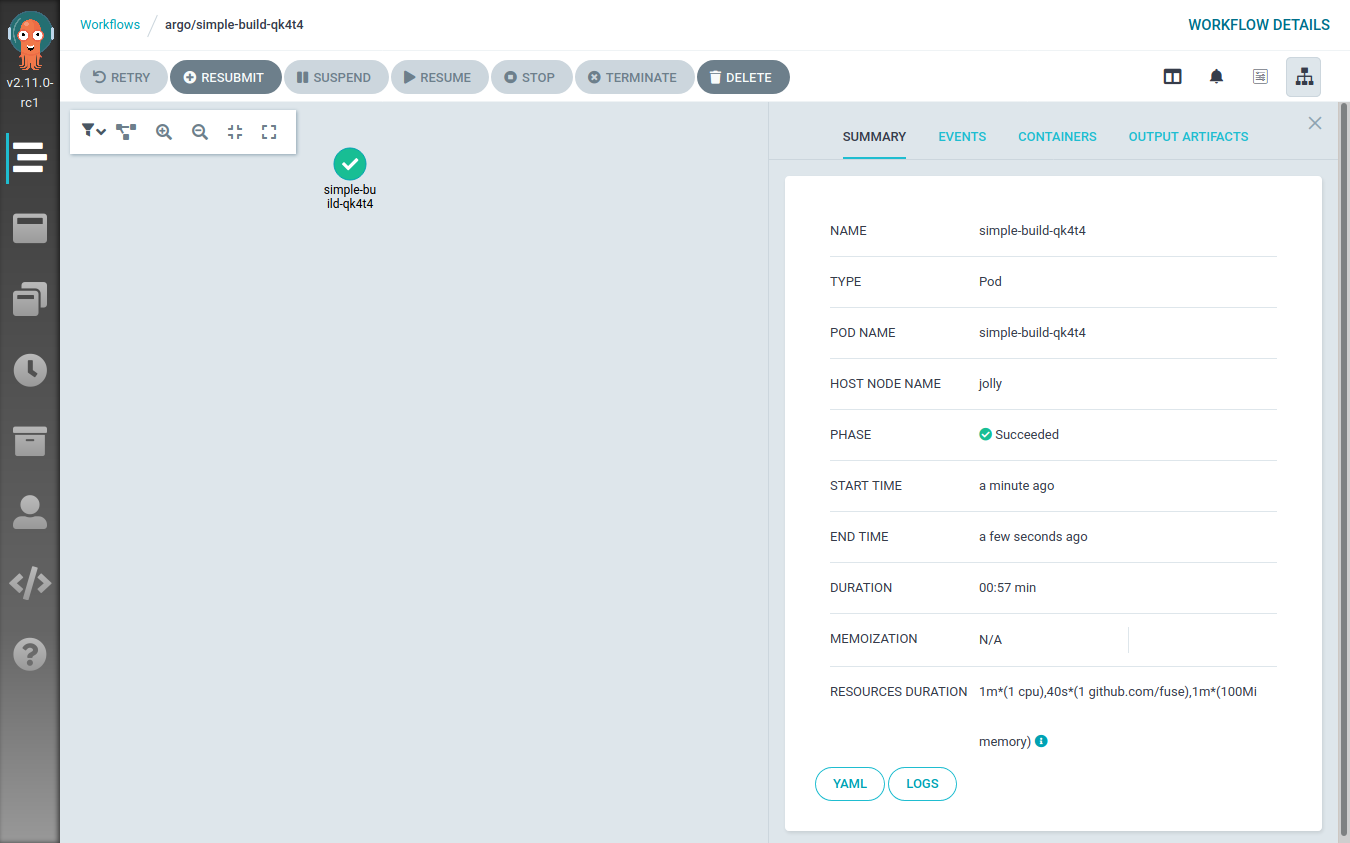
<p>This will be visible also from the Argo Workflow UI:</p>

<p><img src="/images/build-multi-arch-containers-post2/argo-workflow-build1.png" alt="Image of Argo Workflow UI" /></p>

<h2 id="refactoring-the-argo-workflow">Refactoring the Argo Workflow</h2>

<p>The previous Workflow definition can be cleaned up a bit, leading to
the following YAML file:</p>
<div class="highlight"><pre style="color:#f8f8f2;background-color:#272822;-moz-tab-size:4;-o-tab-size:4;tab-size:4"><code class="language-yaml" data-lang="yaml">apiVersion: argoproj.io/v1alpha1
kind: Workflow
metadata:
  generateName: simple-build-
spec:
  entrypoint: buildah
  templates:
  - name: buildah
    inputs:
      parameters:
      - name: arch
      - name: repository
      - name: branch
      - name: image_name
      - name: image_tag
    metadata:
      annotations:
        container.apparmor.security.beta.kubernetes.io/main: localhost/containerized_buildah
    nodeSelector:
      kubernetes.io/arch: <span style="color:#e6db74">&#34;amd64&#34;</span>
    script:
      image: registry.opensuse.org/home/flavio_castelli/containers/containers/buildahimage:latest
      command: [bash]
      source: <span style="color:#e6db74">|
</span><span style="color:#e6db74">        set -xe
</span><span style="color:#e6db74">        cd /code/
</span><span style="color:#e6db74">        # needed to workaround protected_symlink - we can&#39;t just cd into /code/checkout
</span><span style="color:#e6db74">        cd $(readlink checkout)
</span><span style="color:#e6db74">        buildah bud -t {{inputs.parameters.image_name}}:{{inputs.parameters.image_tag}}-{{inputs.parameters.arch}} .
</span><span style="color:#e6db74">        buildah push --cert-dir /certs {{inputs.parameters.image_name}}:{{inputs.parameters.image_tag}}-{{inputs.parameters.arch}}
</span><span style="color:#e6db74">        echo Image built and pushed to remote registry</span>
      volumeMounts:
        - name: code
          mountPath: /code
        - name: certs
          mountPath: /certs
          readOnly: <span style="color:#66d9ef">true</span>
      resources:
        limits:
          github.com/fuse: <span style="color:#ae81ff">1</span>
    initContainers:
    - name: git-sync
      image: k8s.gcr.io/git-sync/git-sync:v3.<span style="color:#ae81ff">1.7</span>
      args: [
        <span style="color:#e6db74">&#34;--one-time&#34;</span>,
        <span style="color:#e6db74">&#34;--depth&#34;</span>, <span style="color:#e6db74">&#34;1&#34;</span>,
        <span style="color:#e6db74">&#34;--dest&#34;</span>, <span style="color:#e6db74">&#34;checkout&#34;</span>,
        <span style="color:#e6db74">&#34;--repo&#34;</span>, <span style="color:#e6db74">&#34;{{inputs.parameters.repository}}&#34;</span>,
        <span style="color:#e6db74">&#34;--branch&#34;</span>, <span style="color:#e6db74">&#34;{{inputs.parameters.branch}}&#34;</span>]
      volumeMounts:
        - name: code
          mountPath: /tmp/git
    volumes:
    - name: code
      emptyDir:
        medium: Memory
    - name: certs
      secret:
        secretName: registry-cert</code></pre></div>
<p>Compared to the previous definition, this one doesn&rsquo;t have any hard-coded
value inside of it. The details of the Git repository, the image name, the container registry,&hellip; all
of that is now passed dynamically to the template by using the <code>input.parameters</code> map.</p>

<p>The <code>main</code> container has also been rewritten to use an Argo Workflow specific field: <code>script.source</code>. This
is really handy because it provides a nice way to write a bash script to be executed inside the
container.</p>

<p>The <code>source</code> script has been also extended to perform a <code>push</code> operation at the
end of the build process.
As you can see the architecture of the image is appended to the tag of the image.
This is a common pattern used when building multi-architecture container images.</p>

<p>One final note about the <code>push</code> operation. The destination registry is secured
using a self-signed certificate. Because of that either the CA that signed the
certificate or the registry&rsquo;s certificate have to be provided to buildah.
This can be done by using the <code>--cert-dir</code> flag and by placing the certificates
to be loaded under the specified path.
Note well, the certificate files must have the <code>.crt</code> file extension otherwise
they won&rsquo;t be handled.</p>

<p>I &ldquo;loaded&rdquo; the certificate into Kubernetes by using a Kubernetes secret
like this one:</p>
<div class="highlight"><pre style="color:#f8f8f2;background-color:#272822;-moz-tab-size:4;-o-tab-size:4;tab-size:4"><code class="language-yaml" data-lang="yaml">apiVersion: v1
kind: Secret
metadata:
  name: registry-cert
  namespace: argo
type: Opaque
data:
  ca.crt: `base64 -w <span style="color:#ae81ff">0</span> actualcert.crt`</code></pre></div>
<p>As you can see the <code>main</code> container is now mounting the contents of the <code>registry-cert</code>
Kubernetes Secret under <code>/certs</code>.</p>

<p>This time, when submitting the workflow, we must specify its parameters:</p>
<div class="highlight"><pre style="color:#f8f8f2;background-color:#272822;-moz-tab-size:4;-o-tab-size:4;tab-size:4"><code class="language-bash" data-lang="bash">$ argo submit workflow-simple-build-2.yaml <span style="color:#ae81ff">\
</span><span style="color:#ae81ff"></span>    -p arch<span style="color:#f92672">=</span>amd64 <span style="color:#ae81ff">\
</span><span style="color:#ae81ff"></span>    -p repository<span style="color:#f92672">=</span>https://github.com/flavio/guestbook-go.git <span style="color:#ae81ff">\
</span><span style="color:#ae81ff"></span>    -p branch<span style="color:#f92672">=</span>master <span style="color:#ae81ff">\
</span><span style="color:#ae81ff"></span>    -p image_name<span style="color:#f92672">=</span>registry-testing.svc.lan/guestbook-go <span style="color:#ae81ff">\
</span><span style="color:#ae81ff"></span>    -p image_tag<span style="color:#f92672">=</span><span style="color:#ae81ff">0</span>.0.1
Name:                simple-build-npqdw
Namespace:           argo
ServiceAccount:      default
Status:              Pending
Created:             Wed Sep <span style="color:#ae81ff">30</span> <span style="color:#ae81ff">15</span>:52:06 +0200 <span style="color:#f92672">(</span>now<span style="color:#f92672">)</span>
Parameters:
  arch:              <span style="color:#f92672">{</span><span style="color:#ae81ff">1</span> <span style="color:#ae81ff">0</span> amd64<span style="color:#f92672">}</span>
  repository:        <span style="color:#f92672">{</span><span style="color:#ae81ff">1</span> <span style="color:#ae81ff">0</span> https://github.com/flavio/guestbook-go.git<span style="color:#f92672">}</span>
  branch:            <span style="color:#f92672">{</span><span style="color:#ae81ff">1</span> <span style="color:#ae81ff">0</span> master<span style="color:#f92672">}</span>
  image_name:        <span style="color:#f92672">{</span><span style="color:#ae81ff">1</span> <span style="color:#ae81ff">0</span> registry-testing.svc.lan/guestbook-go<span style="color:#f92672">}</span>
  image_tag:         <span style="color:#f92672">{</span><span style="color:#ae81ff">1</span> <span style="color:#ae81ff">0</span> <span style="color:#ae81ff">0</span>.0.1<span style="color:#f92672">}</span></code></pre></div>
<h2 id="building-on-multiple-architectures">Building on multiple architectures</h2>

<p>The Workflow object defined so far is still hard-coded to be scheduled only
on x86_64 nodes (see the <code>nodeSelector</code> constraint).</p>

<p>I could create a new Workflow definition by copying one shown before and then
change the <code>nodeSelector</code> constraint to reference the
ARM64 architecture. However, this would violate the
<a href="https://en.wikipedia.org/wiki/Don%27t_repeat_yourself">DRY principle</a>.</p>

<p>Instead, I will abstract the Workflow definition by leveraging a feature of
Argo Workflow called
<a href="https://argoproj.github.io/argo/examples/#loops">loops</a>.
I will define a parameter for the target architecture and then I will iterate
over two possible values: <code>amd64</code> and <code>arm64</code>.</p>

<p>This is the resulting Workflow definition:</p>
<div class="highlight"><pre style="color:#f8f8f2;background-color:#272822;-moz-tab-size:4;-o-tab-size:4;tab-size:4"><code class="language-yaml" data-lang="yaml">apiVersion: argoproj.io/v1alpha1
kind: Workflow
metadata:
  generateName: simple-build-
spec:
  entrypoint: build-images-arch-loop
  templates:
  - name: build-images-arch-loop
    inputs:
      parameters:
      - name: repository
      - name: branch
      - name: image_name
      - name: image_tag
    steps:
    - - name: build-image
        template: buildah
        arguments:
          parameters:
          - name: arch
            value: <span style="color:#e6db74">&#34;{{item.arch}}&#34;</span>
          - name: repository
            value: <span style="color:#e6db74">&#34;{{inputs.parameters.repository}}&#34;</span>
          - name: branch
            value: <span style="color:#e6db74">&#34;{{inputs.parameters.branch}}&#34;</span>
          - name: image_name
            value: <span style="color:#e6db74">&#34;{{inputs.parameters.image_name}}&#34;</span>
          - name: image_tag
            value: <span style="color:#e6db74">&#34;{{inputs.parameters.image_tag}}&#34;</span>
        withItems:
          - { arch: <span style="color:#e6db74">&#39;amd64&#39;</span> }
          - { arch: <span style="color:#e6db74">&#39;arm64&#39;</span> }
  - name: buildah
    inputs:
      parameters:
      - name: arch
      - name: repository
      - name: branch
      - name: image_name
      - name: image_tag
    metadata:
      annotations:
        container.apparmor.security.beta.kubernetes.io/main: localhost/containerized_buildah
    nodeSelector:
      kubernetes.io/arch: <span style="color:#e6db74">&#34;{{inputs.parameters.arch}}&#34;</span>
    script:
      image: registry.opensuse.org/home/flavio_castelli/containers/containers/buildahimage:latest
      command: [bash]
      source: <span style="color:#e6db74">|
</span><span style="color:#e6db74">        set -xe
</span><span style="color:#e6db74">        cd /code/
</span><span style="color:#e6db74">        # needed to workaround protected_symlink - we can&#39;t just cd into /code/checkout
</span><span style="color:#e6db74">        cd $(readlink checkout)
</span><span style="color:#e6db74">        buildah bud -t {{inputs.parameters.image_name}}:{{inputs.parameters.image_tag}}-{{inputs.parameters.arch}} .
</span><span style="color:#e6db74">        buildah push --cert-dir /certs {{inputs.parameters.image_name}}:{{inputs.parameters.image_tag}}-{{inputs.parameters.arch}}
</span><span style="color:#e6db74">        echo Image built and pushed to remote registry</span>
      volumeMounts:
        - name: code
          mountPath: /code
        - name: certs
          mountPath: /certs
          readOnly: <span style="color:#66d9ef">true</span>
      resources:
        limits:
          github.com/fuse: <span style="color:#ae81ff">1</span>
    initContainers:
    - name: git-sync
      image: k8s.gcr.io/git-sync/git-sync:v3.<span style="color:#ae81ff">1.7</span>
      args: [
        <span style="color:#e6db74">&#34;--one-time&#34;</span>,
        <span style="color:#e6db74">&#34;--depth&#34;</span>, <span style="color:#e6db74">&#34;1&#34;</span>,
        <span style="color:#e6db74">&#34;--dest&#34;</span>, <span style="color:#e6db74">&#34;checkout&#34;</span>,
        <span style="color:#e6db74">&#34;--repo&#34;</span>, <span style="color:#e6db74">&#34;{{inputs.parameters.repository}}&#34;</span>,
        <span style="color:#e6db74">&#34;--branch&#34;</span>, <span style="color:#e6db74">&#34;{{inputs.parameters.branch}}&#34;</span>]
      volumeMounts:
        - name: code
          mountPath: /tmp/git
    volumes:
    - name: code
      emptyDir:
        medium: Memory
    - name: certs
      secret:
        secretName: registry-cert</code></pre></div>
<p>The workflow definition grew a bit. I&rsquo;ve added a new template called <code>build-images-arch-loop</code>, which is now
the entry point of the workflow. This template performs a loop over the
<code>[ { arch: 'amd64' }, { arch: 'arm64' } ]</code> array, each time invoking the <code>buildah</code>
template with slightly different input parameters. The only parameter that changes
across the invocations is the <code>arch</code> one, which is used to define the
<code>nodeSelector</code> constraint.</p>

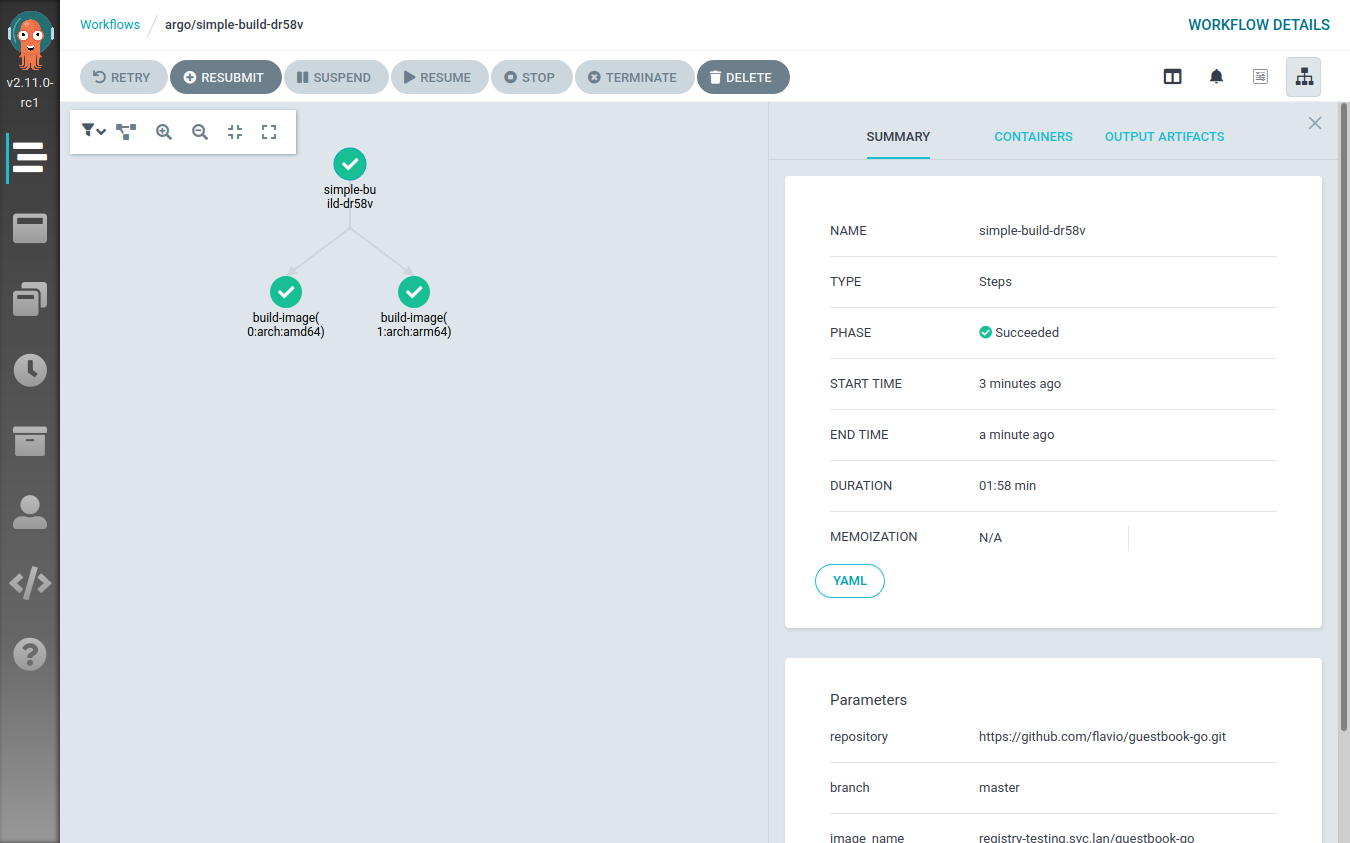
<p>Executing this workflow results in two steps being executed at the same time: one building the image on
a random x86_64 node, the other doing the same thing on a random ARM64 node.</p>

<p>This can be clearly seen from the Argo Workflow UI:</p>

<p><img src="/images/build-multi-arch-containers-post2/argo-workflow-build3.png" alt="Image of Argo Workflow UI" /></p>

<p>When the workflow execution is over, the registry will contain two different images:</p>

<ul>
<li><code>&lt;image-name&gt;:&lt;image-tag&gt;-amd64</code></li>
<li><code>&lt;image-name&gt;:&lt;image-tag&gt;-arm64</code></li>
</ul>

<p>Now there&rsquo;s just one last step to perform: create a multi-architecture container manifest referencing
these two images.</p>

<h2 id="creating-the-image-manifest">Creating the image manifest</h2>

<p>The <a href="https://github.com/docker/distribution/blob/master/docs/spec/manifest-v2-2.md">Image manifest Version 2, Schema 2</a>
specification defines a new type of image manifest called <em>&ldquo;Manifest list&rdquo;</em>
(<code>application/vnd.docker.distribution.manifest.list.v2+json</code>).</p>

<p>Quoting the official specification:</p>

<blockquote>
<p>The manifest list is the &ldquo;fat manifest&rdquo; which points to specific image manifests for one or more platforms. Its use is optional, and relatively few images will use one of these manifests. A client will distinguish a manifest list from an image manifest based on the Content-Type returned in the HTTP response.</p>
</blockquote>

<p>The creation of such a manifest is pretty easy and it can be done with docker, podman
and buildah in a similar way.</p>

<p>I will still use buildah to create the manifest and push it to the registry
where all the images are stored.</p>

<p>This is the Argo Template that takes care of that:</p>
<div class="highlight"><pre style="color:#f8f8f2;background-color:#272822;-moz-tab-size:4;-o-tab-size:4;tab-size:4"><code class="language-yaml" data-lang="yaml"> - name: create-manifest
    inputs:
      parameters:
      - name: image_name
      - name: image_tag
      - name: architectures
    metadata:
      annotations:
        container.apparmor.security.beta.kubernetes.io/main: localhost/containerized_buildah
    volumes:
    - name: certs
      secret:
        secretName: registry-cert
    script:
      image: registry.opensuse.org/home/flavio_castelli/containers/containers/buildahimage:latest
      command: [bash]
      source: <span style="color:#e6db74">|
</span><span style="color:#e6db74">        set -xe
</span><span style="color:#e6db74">        image_name=&#34;{{inputs.parameters.image_name}}&#34;
</span><span style="color:#e6db74">        image_tag=&#34;{{inputs.parameters.image_tag}}&#34;
</span><span style="color:#e6db74">        architectures=&#34;{{inputs.parameters.architectures}}&#34;
</span><span style="color:#e6db74">        target=&#34;${image_name}:${image_tag}&#34;
</span><span style="color:#e6db74">        architectures_list=($(echo $architectures | tr &#34;,&#34; &#34;\n&#34;))
</span><span style="color:#e6db74">        buildah manifest create ${target}
</span><span style="color:#e6db74">        #Print the split string
</span><span style="color:#e6db74">        for arch in &#34;${architectures_list[@]}&#34;
</span><span style="color:#e6db74">        do
</span><span style="color:#e6db74">          arch_image=&#34;${image_name}:${image_tag}-${arch}&#34;
</span><span style="color:#e6db74">          buildah pull --cert-dir /certs ${arch_image}
</span><span style="color:#e6db74">          buildah manifest add ${target} ${arch_image}
</span><span style="color:#e6db74">        done
</span><span style="color:#e6db74">        buildah manifest push --cert-dir /certs ${target} docker://${target}
</span><span style="color:#e6db74">        echo Manifest creation done</span>
      volumeMounts:
        - name: certs
          mountPath: /certs
          readOnly: <span style="color:#66d9ef">true</span>
      resources:
        limits:
          github.com/fuse: <span style="color:#ae81ff">1</span></code></pre></div>
<p>The template has an input parameter called <code>architectures</code>, this string is made
of the architectures names joined by a comma; e.g. <code>&quot;amd64,arm64&quot;</code>.</p>

<p>The <code>script</code> creates a manifest with the name of the image and then, iterating
over the architectures, it adds the architecture-specific images to it.
Once this is done the manifest is pushed to the container registry.</p>

<p>To make a simple example, assuming the following scenario:</p>

<ul>
<li>We are building the <code>guestbook-go</code> application with release <code>v0.1.0</code></li>
<li>We want to build the image for the x86_64 and the ARM64 architectures</li>
<li>We want to push the images to the <code>registry.svc.lan</code> registry</li>
</ul>

<p>The Argo Template that creates the manifest will pull the following
images:</p>

<ul>
<li><code>registry.svc.lan/guestbook-go:v0.1.0-amd64</code>: the x86_64 image</li>
<li><code>registry.svc.lan/guestbook-go:v0.1.0-arm64</code>: the ARM64 image</li>
</ul>

<p>Finally, the Template will create and push a manifest named <code>registry.svc.lan/guestbook-go:v0.1.0</code>.
This image reference will always return the right container image to the node
requesting it.</p>

<p>Adding the container image to the manifest is done with the
<code>buildah manifest add</code> command. This command doesn&rsquo;t actually need to have
the container image available locally, it would be enough to reach out to
the registry hosting it to obtain the manifest digest.</p>

<p>In our case the images are stored on a registry secured with
a custom certificate. Unfortunately, the <code>manifest add</code> command
was lacking some flags (like the <code>cert</code> one); because of that I had
to introduce the workaround  of pre-pulling all the images referenced
by the manifest. This has the side effect of wasting some time, bandwidth and
disk space.</p>

<p>I&rsquo;ve submitted patches both to <a href="https://github.com/containers/buildah/pull/2593">buildah</a>
and to <a href="https://github.com/containers/podman/pull/7576">podman</a> to enrich their
<code>manifest add</code> commands; both pull requests have been merged into the <code>master</code>
branches. The next release of buildah will ship with my patch and the
manifest creation Template  will be simpler and faster.</p>

<h2 id="explicating-dependencies-between-argo-templates">Explicating dependencies between Argo templates</h2>

<p>Argo allows to define a workflow sequence with clear dependencies
between each step. This is done by defining a <a href="https://argoproj.github.io/argo/examples/#dag">DAG</a>.</p>

<p>Our workflow will be made of one Argo Template of type DAG, that will have two tasks:</p>

<ol>
<li>Build the multi-architecture images. This is done with the Argo
 Workflow loop shown above.</li>
<li>Create the manifest. This task depends on the successful completion of
 the previous one.</li>
</ol>

<p>This is the Template definition:</p>
<div class="highlight"><pre style="color:#f8f8f2;background-color:#272822;-moz-tab-size:4;-o-tab-size:4;tab-size:4"><code class="language-yaml" data-lang="yaml">- name: full-process
  dag:
    tasks:
    - name: build-images
      template: build-images-arch-loop
      arguments:
        parameters:
        - name: repository
          value: <span style="color:#e6db74">&#34;{{workflow.parameters.repository}}&#34;</span>
        - name: branch
          value: <span style="color:#e6db74">&#34;{{workflow.parameters.branch}}&#34;</span>
        - name: image_name
          value: <span style="color:#e6db74">&#34;{{workflow.parameters.image_name}}&#34;</span>
        - name: image_tag
          value: <span style="color:#e6db74">&#34;{{workflow.parameters.image_tag}}&#34;</span>
    - name: create-multi-arch-manifest
      dependencies: [build-images]
      template: create-manifest
      arguments:
        parameters:
        - name: image_name
          value: <span style="color:#e6db74">&#34;{{workflow.parameters.image_name}}&#34;</span>
        - name: image_tag
          value: <span style="color:#e6db74">&#34;{{workflow.parameters.image_tag}}&#34;</span>
        - name: architectures
          value: <span style="color:#e6db74">&#34;{{workflow.parameters.architectures_string}}&#34;</span></code></pre></div>
<p>As you can see the Template takes the usual series of parameters we&rsquo;ve already defined,
and forwards them to the tasks.</p>

<p>This is the <strong>full</strong> definition of our Argo workflow, hold on&hellip; this is really long 🙀</p>
<div class="highlight"><pre style="color:#f8f8f2;background-color:#272822;-moz-tab-size:4;-o-tab-size:4;tab-size:4"><code class="language-yaml" data-lang="yaml">apiVersion: argoproj.io/v1alpha1
kind: Workflow
metadata:
  generateName: build-multi-arch-image-
spec:
  ttlStrategy:
    secondsAfterCompletion: <span style="color:#ae81ff">60</span>
  entrypoint: full-process
  arguments:
    parameters:
    - name: repository
      value: https://github.com/flavio/guestbook-go.git
    - name: branch
      value: master
    - name: image_name
      value: registry-testing.svc.lan/guestbook
    - name: image_tag
      value: <span style="color:#ae81ff">0.0</span>.<span style="color:#ae81ff">1</span>
    - name: architectures_string
      value: <span style="color:#e6db74">&#34;arm64,amd64&#34;</span>
  templates:
  - name: full-process
    dag:
      tasks:
      - name: build-images
        template: build-images-arch-loop
        arguments:
          parameters:
          - name: repository
            value: <span style="color:#e6db74">&#34;{{workflow.parameters.repository}}&#34;</span>
          - name: branch
            value: <span style="color:#e6db74">&#34;{{workflow.parameters.branch}}&#34;</span>
          - name: image_name
            value: <span style="color:#e6db74">&#34;{{workflow.parameters.image_name}}&#34;</span>
          - name: image_tag
            value: <span style="color:#e6db74">&#34;{{workflow.parameters.image_tag}}&#34;</span>
      - name: create-multi-arch-manifest
        dependencies: [build-images]
        template: create-manifest
        arguments:
          parameters:
          - name: image_name
            value: <span style="color:#e6db74">&#34;{{workflow.parameters.image_name}}&#34;</span>
          - name: image_tag
            value: <span style="color:#e6db74">&#34;{{workflow.parameters.image_tag}}&#34;</span>
          - name: architectures
            value: <span style="color:#e6db74">&#34;{{workflow.parameters.architectures_string}}&#34;</span>
  - name: build-images-arch-loop
    inputs:
      parameters:
      - name: repository
      - name: branch
      - name: image_name
      - name: image_tag
    steps:
    - - name: build-image
        template: buildah
        arguments:
          parameters:
          - name: arch
            value: <span style="color:#e6db74">&#34;{{item.arch}}&#34;</span>
          - name: repository
            value: <span style="color:#e6db74">&#34;{{inputs.parameters.repository}}&#34;</span>
          - name: branch
            value: <span style="color:#e6db74">&#34;{{inputs.parameters.branch}}&#34;</span>
          - name: image_name
            value: <span style="color:#e6db74">&#34;{{inputs.parameters.image_name}}&#34;</span>
          - name: image_tag
            value: <span style="color:#e6db74">&#34;{{inputs.parameters.image_tag}}&#34;</span>
        withItems:
          - { arch: <span style="color:#e6db74">&#39;amd64&#39;</span> }
          - { arch: <span style="color:#e6db74">&#39;arm64&#39;</span> }
  - name: buildah
    inputs:
      parameters:
      - name: arch
      - name: repository
      - name: branch
      - name: image_name
      - name: image_tag
    metadata:
      annotations:
        container.apparmor.security.beta.kubernetes.io/main: localhost/containerized_buildah
    nodeSelector:
      kubernetes.io/arch: <span style="color:#e6db74">&#34;{{inputs.parameters.arch}}&#34;</span>
    volumes:
    - name: code
      emptyDir:
        medium: Memory
    - name: certs
      secret:
        secretName: registry-cert
    script:
      image: registry.opensuse.org/home/flavio_castelli/containers/containers/buildahimage:latest
      command: [bash]
      source: <span style="color:#e6db74">|
</span><span style="color:#e6db74">        set -xe
</span><span style="color:#e6db74">        cd /code/
</span><span style="color:#e6db74">        # needed to workaround protected_symlink - we can&#39;t just cd into /code/checkout
</span><span style="color:#e6db74">        cd $(readlink checkout)
</span><span style="color:#e6db74">        buildah bud -t {{inputs.parameters.image_name}}:{{inputs.parameters.image_tag}}-{{inputs.parameters.arch}} .
</span><span style="color:#e6db74">        buildah push --cert-dir /certs {{inputs.parameters.image_name}}:{{inputs.parameters.image_tag}}-{{inputs.parameters.arch}}
</span><span style="color:#e6db74">        echo Image built and pushed to remote registry</span>
      volumeMounts:
        - name: code
          mountPath: /code
        - name: certs
          mountPath: /certs
          readOnly: <span style="color:#66d9ef">true</span>
      resources:
        limits:
          github.com/fuse: <span style="color:#ae81ff">1</span>
    initContainers:
    - name: git-sync
      image: k8s.gcr.io/git-sync/git-sync:v3.<span style="color:#ae81ff">1.7</span>
      args: [
        <span style="color:#e6db74">&#34;--one-time&#34;</span>,
        <span style="color:#e6db74">&#34;--depth&#34;</span>, <span style="color:#e6db74">&#34;1&#34;</span>,
        <span style="color:#e6db74">&#34;--dest&#34;</span>, <span style="color:#e6db74">&#34;checkout&#34;</span>,
        <span style="color:#e6db74">&#34;--repo&#34;</span>, <span style="color:#e6db74">&#34;{{inputs.parameters.repository}}&#34;</span>,
        <span style="color:#e6db74">&#34;--branch&#34;</span>, <span style="color:#e6db74">&#34;{{inputs.parameters.branch}}&#34;</span>]
      volumeMounts:
        - name: code
          mountPath: /tmp/git
  - name: create-manifest
    inputs:
      parameters:
      - name: image_name
      - name: image_tag
      - name: architectures
    metadata:
      annotations:
        container.apparmor.security.beta.kubernetes.io/main: localhost/containerized_buildah
    volumes:
    - name: certs
      secret:
        secretName: registry-cert
    script:
      image: registry.opensuse.org/home/flavio_castelli/containers/containers/buildahimage:latest
      command: [bash]
      source: <span style="color:#e6db74">|
</span><span style="color:#e6db74">        set -xe
</span><span style="color:#e6db74">        image_name=&#34;{{inputs.parameters.image_name}}&#34;
</span><span style="color:#e6db74">        image_tag=&#34;{{inputs.parameters.image_tag}}&#34;
</span><span style="color:#e6db74">        architectures=&#34;{{inputs.parameters.architectures}}&#34;
</span><span style="color:#e6db74">        target=&#34;${image_name}:${image_tag}&#34;
</span><span style="color:#e6db74">        architectures_list=($(echo $architectures | tr &#34;,&#34; &#34;\n&#34;))
</span><span style="color:#e6db74">        buildah manifest create ${target}
</span><span style="color:#e6db74">        #Print the split string
</span><span style="color:#e6db74">        for arch in &#34;${architectures_list[@]}&#34;
</span><span style="color:#e6db74">        do
</span><span style="color:#e6db74">          arch_image=&#34;${image_name}:${image_tag}-${arch}&#34;
</span><span style="color:#e6db74">          buildah pull --cert-dir /certs ${arch_image}
</span><span style="color:#e6db74">          buildah manifest add ${target} ${arch_image}
</span><span style="color:#e6db74">        done
</span><span style="color:#e6db74">        buildah manifest push --cert-dir /certs ${target} docker://${target}
</span><span style="color:#e6db74">        echo Manifest creation done</span>
      volumeMounts:
        - name: certs
          mountPath: /certs
          readOnly: <span style="color:#66d9ef">true</span>
      resources:
        limits:
          github.com/fuse: <span style="color:#ae81ff">1</span></code></pre></div>
<p>That&rsquo;s how life goes with Kubernetes, sometimes there&rsquo;s just a <strong>lot</strong> of YAML&hellip;</p>

<p><img src="/images/build-multi-arch-containers-post2/fortune-teller-yaml.jpg" alt="Fortune teller and Kubernetes" /></p>

<p>Now we can submit the workflow to Argo:</p>
<div class="highlight"><pre style="color:#f8f8f2;background-color:#272822;-moz-tab-size:4;-o-tab-size:4;tab-size:4"><code class="language-bash" data-lang="bash">$ argo submit build-pipeline-final.yml
Name:                build-multi-arch-image-wndlr
Namespace:           argo
ServiceAccount:      default
Status:              Pending
Created:             Thu Oct <span style="color:#ae81ff">01</span> <span style="color:#ae81ff">16</span>:22:46 +0200 <span style="color:#f92672">(</span>now<span style="color:#f92672">)</span>
Parameters:
  repository:        <span style="color:#f92672">{</span><span style="color:#ae81ff">1</span> <span style="color:#ae81ff">0</span> https://github.com/flavio/guestbook-go.git<span style="color:#f92672">}</span>
  branch:            <span style="color:#f92672">{</span><span style="color:#ae81ff">1</span> <span style="color:#ae81ff">0</span> master<span style="color:#f92672">}</span>
  image_name:        <span style="color:#f92672">{</span><span style="color:#ae81ff">1</span> <span style="color:#ae81ff">0</span> registry-testing.svc.lan/guestbook<span style="color:#f92672">}</span>
  image_tag:         <span style="color:#f92672">{</span><span style="color:#ae81ff">1</span> <span style="color:#ae81ff">0</span> <span style="color:#ae81ff">0</span>.0.1<span style="color:#f92672">}</span>
  architectures_string: <span style="color:#f92672">{</span><span style="color:#ae81ff">1</span> <span style="color:#ae81ff">0</span> arm64,amd64<span style="color:#f92672">}</span></code></pre></div>
<p>The visual representation of the workflow is pretty nice:</p>

<p><img src="/images/build-multi-arch-containers-post2/argo-workflow-build4.png" alt="Image of Argo Workflow UI" /></p>

<p>As you might have noticed, I didn&rsquo;t provide any parameter to <code>argo submit</code>; the
Argo Workflow now has default values for all the input parameters.</p>

<h2 id="garbage-collector">Garbage collector</h2>

<p>Something worth of note, Argo Workflow leaves behind all the containers it creates.
This is good to triage failures, but I don&rsquo;t want to clutter my cluster with all
these resources.</p>

<p>Argo provides <a href="https://argoproj.github.io/argo/cost-optimisation/#limit-the-total-number-of-workflows-and-pods">cost optimization</a>
parameters to implement cleanup strategies. The one I&rsquo;ve used above is the
<a href="https://argoproj.github.io/argo/fields/#ttlstrategy">Workflow TTL Strategy</a>.</p>

<p>You can see these lines at the top of the full Workflow definition:</p>
<div class="highlight"><pre style="color:#f8f8f2;background-color:#272822;-moz-tab-size:4;-o-tab-size:4;tab-size:4"><code class="language-yaml" data-lang="yaml">apiVersion: argoproj.io/v1alpha1
kind: Workflow
metadata:
  generateName: build-multi-arch-image-
spec:
  ttlStrategy:
    secondsAfterCompletion: <span style="color:#ae81ff">60</span></code></pre></div>
<p>This triggers an automatic cleanup of all the PODs spawned by the
Workflow 60 seconds after its completion, be it successful or not.</p>

<h1 id="summary">Summary</h1>

<p>Today we have seen how to create a pipeline that builds container images
for multiple architectures on top an existing Kubernetes cluster.</p>

<p>Argo Workflow proved to be a good solution for this kind of automation. There&rsquo;s
quite some YAML involved with that, but I highly doubt over projects
would have spared us from that.</p>

<p>What can we do next? Well, to me the answer is pretty clear. The definition of
the  container image is stored inside of a Git repository; hence I want to connect
my Argo Workflow to the events happening inside of the Git repository.</p>

<p>Stay tuned for more updates! In the meantime feedback is always welcome.</p>
]]></content>


                                <category scheme="http://flavio.castelli.me/categories/argo" term="argo" label="argo" />
                             
                                <category scheme="http://flavio.castelli.me/categories/argo-workflow" term="argo-workflow" label="argo workflow" />
                             
                                <category scheme="http://flavio.castelli.me/categories/arm" term="arm" label="ARM" />
                             
                                <category scheme="http://flavio.castelli.me/categories/buildah" term="buildah" label="buildah" />
                             
                                <category scheme="http://flavio.castelli.me/categories/containers" term="containers" label="containers" />
                             
                                <category scheme="http://flavio.castelli.me/categories/kubernetes" term="kubernetes" label="kubernetes" />
                             
                                <category scheme="http://flavio.castelli.me/categories/multi-architecture-container" term="multi-architecture-container" label="multi-architecture container" />


        </entry>
    
        
        <entry>
            <title type="html"><![CDATA[Build multi-architecture container images using Kubernetes]]></title>
            <link href="http://flavio.castelli.me/2020/09/16/build-multi-architecture-container-images-using-kubernetes/"/>
            <id>http://flavio.castelli.me/2020/09/16/build-multi-architecture-container-images-using-kubernetes/</id>
            
            <published>2020-09-16T10:00:00+02:00</published>
            <updated>2020-09-16T10:00:00+02:00</updated>
            
            
            <content type="html"><![CDATA[

<p>Recently I&rsquo;ve added some Raspberry Pi 4 nodes to the Kubernetes cluster I&rsquo;m
running at home.</p>

<p>The overall support of ARM inside of the container ecosystem improved a lot
over the last years with more container images made available for the
<code>armv7</code> and the <code>arm64</code> architectures.</p>

<p>But what about my own container images? I&rsquo;m running some homemade
containerized applications on top of this cluster and I would like to have them
scheduled both on the x64_64 nodes and on the ARM ones.</p>

<p>There are many ways to build ARM container images. You can go from something as
simple, and tedious, as performing manual builds on a real/emulated ARM machines
or you can do something more structured like using
<a href="https://github.com/marketplace/actions/docker-buildx">this GitHub Action</a>,
relying on something like the
<a href="https://openbuildservice.org/2018/05/09/container-building-and-distribution/">Open Build Service</a>,&hellip;</p>

<p>My personal desire was to leverage my mixed Kubernetes cluster and
perform the image building right on top of it.</p>

<p>Implementing this design has been a great learning experience, something IMHO
worth to be shared with others.
The journey has been too long to fit into a single blog post; I&rsquo;ll split my
story into multiple posts.</p>

<p>Our journey begins with the challenge of building a container image from
within a container.</p>

<h1 id="image-building">Image building</h1>

<p>The most known way to build a container image is by using <code>docker build</code>.
I didn&rsquo;t want to use docker to build my images because the build process
will take place right on top of Kubernetes, meaning the build will happen in a
containerized way.</p>

<p>Some people are using docker as the container runtime of their Kubernetes
clusters and are leveraging that to mount the docker socket inside of some
of their containers. Once the docker socket is mounted, the containerized
application has full access to the docker daemon that is running on the host.
From there <del>it&rsquo;s game over</del> the container can perform actions such as building
new images.</p>

<p>I&rsquo;m a strong opponent of this approach because it&rsquo;s highly insecure. Moreover
I&rsquo;m not using docker as container runtime and I guess many people will stop
doing that in the near future once <a href="https://github.com/kubernetes/kubernetes/pull/94624">dockershim gets deprecated</a>.
Translated: the majority of the future Kubernetes cluster will either have
containerd, CRI-O or something similar instead of docker - hence bye bye
to the docker socket hack.</p>

<p>There are however many other ways to build containers that are not based on
<code>docker build</code>.</p>

<p>If you do a quick internet search about containerized image building you will
definitely find <a href="https://github.com/GoogleContainerTools/kaniko">kaniko</a>.
kaniko does exactly what I want: it performs containerized builds without using
the docker daemon. There are also many examples covering image building on top
of Kubernetes with kaniko. Unfortunately, at the time of writing, kaniko
supports only the x86_64 architecture.</p>

<p>Our chances are not over yet because there&rsquo;s another container building tool
that can help us: <a href="https://github.com/containers/buildah/">buildah</a>.</p>

<p>Buildah is part of the &ldquo;libpod ecosystem&rdquo;, which includes projects such as
<a href="https://github.com/containers/podman/">podman</a>, <a href="https://github.com/containers/skopeo">skopeo</a>
and <a href="https://cri-o.io/">CRI-O</a>. All these tools are available for multiple
architectures: x86_64, aarch64 (aka ARM64), s390x and ppc64le.</p>

<h1 id="running-buildah-containerized">Running buildah containerized</h1>

<p>Buildah can build container images starting from a <code>Dockerfile</code> or in a
more interactive way. All of that without requiring any privileged daemon
running on your system.</p>

<p>During the last years the buildah developers spent quite some efforts to support the use
case of &ldquo;containerized buildah&rdquo;.
<a href="https://developers.redhat.com/blog/2019/08/14/best-practices-for-running-buildah-in-a-container/">This</a>
is just the most recent blog post that discusses this scenario in depth.</p>

<p>Upstream has even a <code>Dockerfile</code> that can be used to create a buildah container
image. This can be found <a href="https://github.com/containers/buildah/tree/master/contrib/buildahimage">here</a>.</p>

<p>I took this <code>Dockerfile</code>, made some minor adjustments and uploaded it
to <a href="https://build.opensuse.org/package/show/home:flavio_castelli:containers/buildahimage">this project</a>
on the Open Build Service. As a result I got a multi architecture container
image that can be pulled from <code>registry.opensuse.org/home/flavio_castelli/containers/containers/buildahimage:latest</code>.</p>

<h1 id="the-storage-driver">The storage driver</h1>

<p>As some container veterans probably know, there are several types of storage
drivers that can be used by container engines.</p>

<p>In case you&rsquo;re not familiar with this topic you can read these great
documentation pages from Docker:</p>

<ul>
<li><a href="https://docs.docker.com/storage/storagedriver/">Overview of storage drivers</a></li>
<li><a href="https://docs.docker.com/storage/storagedriver/select-storage-driver/">How to choose the right storage driver</a></li>
</ul>

<p>Note well: despite being written for the docker container engine, this applies
also to podman, buildah, CRI-O and containerd.</p>

<p>The most portable and performant storage driver is the <code>overlay</code> one.
This is the one we want to use when running buildah containerized.</p>

<p>The <code>overlay</code> driver can be used in safe way even inside of a container by
leveraging <a href="https://github.com/containers/fuse-overlayfs">fuse-overlay</a>; this
is described by the buildah blog post I linked above.</p>

<p>However, using the <code>overlay</code> storage driver inside of a container requires
Fuse to be enabled on the host and, most important of all, it requires the
<code>/dev/fuse</code> device to be accessible by the container.</p>

<p>The share operation cannot be done by simply mounting <code>/dev/fuse</code> as a volume
because there are some extra &ldquo;low level&rdquo; steps that must be done (like properly
instructing the cgroup device hierarchy).</p>

<p>These extra steps are automatically handled by docker and podman via the
<code>--device</code> flag of the <code>run</code> command:</p>
<div class="highlight"><pre style="color:#f8f8f2;background-color:#272822;-moz-tab-size:4;-o-tab-size:4;tab-size:4"><code class="language-bash" data-lang="bash">$ podman run --rm -ti --device /dev/fuse buildahimage bash</code></pre></div>
<p>This problem will need to be solved in a different way when buildah is run
on top of Kubernetes.</p>

<h1 id="kubernetes-device-plugin">Kubernetes device plugin</h1>

<p>Special host devices can be shared with containers running inside of a
Kubernetes POD by using a recent feature called
<a href="https://kubernetes.io/docs/concepts/extend-kubernetes/compute-storage-net/device-plugins/">Kubernetes device plugins</a>.</p>

<p>Quoting the upstream documentation:</p>

<blockquote>
<p>Kubernetes provides a device plugin framework that you can use to advertise system hardware resources to the Kubelet .</p>

<p>Instead of customizing the code for Kubernetes itself, vendors can implement a device plugin that you deploy either manually or as a DaemonSet . The targeted devices include GPUs, high-performance NICs, FPGAs, InfiniBand adapters, and other similar computing resources that may require vendor specific initialization and setup.</p>
</blockquote>

<p>This Kubernetes feature is commonly used to allow containerized machine learning
workloads to access the GPU cards available on the host.</p>

<p>Luckily someone wrote a Kubernetes device plugin that exposes <code>/dev/fuse</code> to
Kubernetes-managed containers:
<a href="https://github.com/kuberenetes-learning-group/fuse-device-plugin">fuse-device-plugin</a>.</p>

<p>I&rsquo;ve <a href="https://github.com/flavio/fuse-device-plugin">forked the project</a>, made
some minor fixes to its Dockerfile and created a GitHub action to build
the container image for <code>amd64</code>, <code>armv7</code> and <code>amd64</code> (a PR is coming soon).
The images are available on the Docker Hub as: <code>flavio/fuse-device-plugin</code>.</p>

<p>The fuse-device-plugin has to be deployed as a Kubernetes DaemonSet via this
yaml file:</p>
<div class="highlight"><pre style="color:#f8f8f2;background-color:#272822;-moz-tab-size:4;-o-tab-size:4;tab-size:4"><code class="language-yaml" data-lang="yaml">apiVersion: apps/v1
kind: DaemonSet
metadata:
  name: fuse-device-plugin-daemonset
  namespace: kube-system
spec:
  selector:
    matchLabels:
      name: fuse-device-plugin-ds
  template:
    metadata:
      labels:
        name: fuse-device-plugin-ds
    spec:
      hostNetwork: <span style="color:#66d9ef">true</span>
      containers:
      - image: flavio/fuse-device-plugin:latest
        name: fuse-device-plugin-ctr
        securityContext:
          allowPrivilegeEscalation: <span style="color:#66d9ef">false</span>
          capabilities:
            drop: [<span style="color:#e6db74">&#34;ALL&#34;</span>]
        volumeMounts:
          - name: device-plugin
            mountPath: /var/lib/kubelet/device-plugins
      volumes:
        - name: device-plugin
          hostPath:
            path: /var/lib/kubelet/device-plugins</code></pre></div>
<p>This is basically <a href="https://github.com/flavio/fuse-device-plugin/blob/master/fuse-device-plugin-k8s-1.16.yml">this</a> file,
with the <code>flavio/fuse-device-plugin</code> image being used instead of the
original one (which is built only for x86_64).</p>

<p>Once the DaemonSet PODs are running on all the nodes of the cluster, we can see
the Fuse device being exposed as an allocatable resource identified by the
<code>github.com/fuse</code> key:</p>
<div class="highlight"><pre style="color:#f8f8f2;background-color:#272822;-moz-tab-size:4;-o-tab-size:4;tab-size:4"><code class="language-bash" data-lang="bash">$ kubectl get nodes -o<span style="color:#f92672">=</span>jsonpath<span style="color:#f92672">=</span><span style="color:#e6db74">$&#39;{range .items[*]}{.metadata.name}: {.status.allocatable}\n{end}&#39;</span>
jam-2: map<span style="color:#f92672">[</span>cpu:4 ephemeral-storage:224277137028 github.com/fuse:5k memory:3883332Ki pods:110<span style="color:#f92672">]</span>
jam-1: map<span style="color:#f92672">[</span>cpu:4 ephemeral-storage:111984762997 github.com/fuse:5k memory:3883332Ki pods:110<span style="color:#f92672">]</span>
jolly: map<span style="color:#f92672">[</span>cpu:4 ephemeral-storage:170873316014 github.com/fuse:5k gpu.intel.com/i915:1 hugepages-1Gi:0 hugepages-2Mi:0 memory:16208280Ki pods:110<span style="color:#f92672">]</span></code></pre></div>
<p>The Fuse device can then be made available to a container by specifying a
resource limit:</p>
<div class="highlight"><pre style="color:#f8f8f2;background-color:#272822;-moz-tab-size:4;-o-tab-size:4;tab-size:4"><code class="language-yaml" data-lang="yaml">apiVersion: v1
kind: Pod
metadata:
  name: fuse-example
spec:
  containers:
  - name: main
    image: alpine
    command: [<span style="color:#e6db74">&#34;ls&#34;</span>, <span style="color:#e6db74">&#34;-l&#34;</span>, <span style="color:#e6db74">&#34;/dev&#34;</span>]
    resources:
      limits:
        github.com/fuse: <span style="color:#ae81ff">1</span></code></pre></div>
<p>If you look at the logs of this POD you will see something like that:</p>
<div class="highlight"><pre style="color:#f8f8f2;background-color:#272822;-moz-tab-size:4;-o-tab-size:4;tab-size:4"><code class="language-bash" data-lang="bash">$ kubectl logs fuse-example
total <span style="color:#ae81ff">0</span>
lrwxrwxrwx    <span style="color:#ae81ff">1</span> root     root            <span style="color:#ae81ff">11</span> Sep <span style="color:#ae81ff">15</span> <span style="color:#ae81ff">08</span>:31 core -&gt; /proc/kcore
lrwxrwxrwx    <span style="color:#ae81ff">1</span> root     root            <span style="color:#ae81ff">13</span> Sep <span style="color:#ae81ff">15</span> <span style="color:#ae81ff">08</span>:31 fd -&gt; /proc/self/fd
crw-rw-rw-    <span style="color:#ae81ff">1</span> root     root        <span style="color:#ae81ff">1</span>,   <span style="color:#ae81ff">7</span> Sep <span style="color:#ae81ff">15</span> <span style="color:#ae81ff">08</span>:31 full
crw-rw-rw-    <span style="color:#ae81ff">1</span> root     root       <span style="color:#ae81ff">10</span>, <span style="color:#ae81ff">229</span> Sep <span style="color:#ae81ff">15</span> <span style="color:#ae81ff">08</span>:31 fuse
drwxrwxrwt    <span style="color:#ae81ff">2</span> root     root            <span style="color:#ae81ff">40</span> Sep <span style="color:#ae81ff">15</span> <span style="color:#ae81ff">08</span>:31 mqueue
crw-rw-rw-    <span style="color:#ae81ff">1</span> root     root        <span style="color:#ae81ff">1</span>,   <span style="color:#ae81ff">3</span> Sep <span style="color:#ae81ff">15</span> <span style="color:#ae81ff">08</span>:31 null
lrwxrwxrwx    <span style="color:#ae81ff">1</span> root     root             <span style="color:#ae81ff">8</span> Sep <span style="color:#ae81ff">15</span> <span style="color:#ae81ff">08</span>:31 ptmx -&gt; pts/ptmx
drwxr-xr-x    <span style="color:#ae81ff">2</span> root     root             <span style="color:#ae81ff">0</span> Sep <span style="color:#ae81ff">15</span> <span style="color:#ae81ff">08</span>:31 pts
crw-rw-rw-    <span style="color:#ae81ff">1</span> root     root        <span style="color:#ae81ff">1</span>,   <span style="color:#ae81ff">8</span> Sep <span style="color:#ae81ff">15</span> <span style="color:#ae81ff">08</span>:31 random
drwxrwxrwt    <span style="color:#ae81ff">2</span> root     root            <span style="color:#ae81ff">40</span> Sep <span style="color:#ae81ff">15</span> <span style="color:#ae81ff">08</span>:31 shm
lrwxrwxrwx    <span style="color:#ae81ff">1</span> root     root            <span style="color:#ae81ff">15</span> Sep <span style="color:#ae81ff">15</span> <span style="color:#ae81ff">08</span>:31 stderr -&gt; /proc/self/fd/2
lrwxrwxrwx    <span style="color:#ae81ff">1</span> root     root            <span style="color:#ae81ff">15</span> Sep <span style="color:#ae81ff">15</span> <span style="color:#ae81ff">08</span>:31 stdin -&gt; /proc/self/fd/0
lrwxrwxrwx    <span style="color:#ae81ff">1</span> root     root            <span style="color:#ae81ff">15</span> Sep <span style="color:#ae81ff">15</span> <span style="color:#ae81ff">08</span>:31 stdout -&gt; /proc/self/fd/1
-rw-rw-rw-    <span style="color:#ae81ff">1</span> root     root             <span style="color:#ae81ff">0</span> Sep <span style="color:#ae81ff">15</span> <span style="color:#ae81ff">08</span>:31 termination-log
crw-rw-rw-    <span style="color:#ae81ff">1</span> root     root        <span style="color:#ae81ff">5</span>,   <span style="color:#ae81ff">0</span> Sep <span style="color:#ae81ff">15</span> <span style="color:#ae81ff">08</span>:31 tty
crw-rw-rw-    <span style="color:#ae81ff">1</span> root     root        <span style="color:#ae81ff">1</span>,   <span style="color:#ae81ff">9</span> Sep <span style="color:#ae81ff">15</span> <span style="color:#ae81ff">08</span>:31 urandom
crw-rw-rw-    <span style="color:#ae81ff">1</span> root     root        <span style="color:#ae81ff">1</span>,   <span style="color:#ae81ff">5</span> Sep <span style="color:#ae81ff">15</span> <span style="color:#ae81ff">08</span>:31 zero</code></pre></div>
<p>Now that this problem is solved we can move to the next one. 😉</p>

<h1 id="obtaining-the-source-code-of-our-image">Obtaining the source code of our image</h1>

<p>The source code of the &ldquo;container image to be built&rdquo; must be made available
to the containerized buildah.</p>

<p>As many people do, I keep all my container definitions versioned
inside of Git repositories. I had to find a way to clone the Git repository
holding the definition of the &ldquo;container image to be built&rdquo; inside of the
container running buildah.</p>

<p>I decided to settle for this POD layout:</p>

<ul>
<li>The main container of the POD is going to be the one running buildah.</li>
<li>The POD will have a <a href="https://kubernetes.io/docs/concepts/workloads/pods/init-containers/">Kubernetes init container</a>
that will <code>git clone</code> the source code of the &ldquo;container image to be built&rdquo;
before the main container is started.</li>
</ul>

<p>The contents produced by the <code>git clone</code> must be placed into a
directory that can be accessed later on by the main container.
I decided to use a Kubernetes volume of type <a href="https://kubernetes.io/docs/concepts/storage/volumes/#emptydir">emptyDir</a>
to create a shared storage between the init and the main containers.
The <code>emptyDir</code> volume is just perfect: it doesn&rsquo;t need any fancy Kubernetes
Storage Class and it will automatically vanish once the build is done.</p>

<p>To checkout the Git repository I decided to settle on the official
<a href="https://github.com/kubernetes/git-sync">Kubernetes git-sync</a> container.</p>

<p>Quoting its documentation:</p>

<blockquote>
<p>git-sync is a simple command that pulls a git repository into a local directory. It is a perfect &ldquo;sidecar&rdquo; container in Kubernetes - it can periodically pull files down from a repository so that an application can consume them.</p>

<p>git-sync can pull one time, or on a regular interval. It can pull from the HEAD of a branch, from a git tag, or from a specific git hash. It will only re-pull if the target of the run has changed in the upstream repository. When it re-pulls, it updates the destination directory atomically. In order to do this, it uses a git worktree in a subdirectory of the &ndash;root and flips a symlink.</p>

<p>git-sync can pull over HTTP(S) (with authentication or not) or SSH.</p>
</blockquote>

<p>This is just what I was looking for.</p>

<p>I will start <code>git-sync</code> with the following parameters:</p>

<ul>
<li><code>--one-time</code>: this is needed to make git-sync exit once the checkout is done;
otherwise it will keep running forever and it will periodically look for new
commits inside of the repository. I don&rsquo;t need that, plus this would cause
the main container to wait indefinitely for the init container to exit.</li>
<li><code>--depth 1</code>: this is done to limit the checkout to the latest commit. I&rsquo;m not
interested in the history of the repository. This will make the checkout faster
and use less bandwidth and disk space.</li>
<li><code>--repo &lt;my-repo</code>: the repo I want to checkout.</li>
<li><code>--branch &lt;my-branch&gt;</code>: the branch to checkout.</li>
</ul>

<p>The git-sync container image was already built for multiple architectures, but
unfortunately it <a href="https://github.com/kubernetes/git-sync/issues/222#issuecomment-685975894">turned out</a>
the non x86_64 images were broken.
The issue has been recently solved with the <a href="https://github.com/kubernetes/git-sync/releases/tag/v3.1.7">v3.1.7</a>.</p>

<p>While waiting for the issue to be fixed I just rebuilt the container image on
the Open Build Service. This is no longer needed, everybody can just use the
official image.</p>

<h1 id="trying-the-first-build">Trying the first build</h1>

<p>It&rsquo;s now time to perform a simple test run. We will define a simple
Kubernetes POD that will:</p>

<ol>
<li>Checkout the source code of a simple container image</li>
<li>Build the container iamge using <code>buildah</code></li>
</ol>

<p>This is the POD definition:</p>
<div class="highlight"><pre style="color:#f8f8f2;background-color:#272822;-moz-tab-size:4;-o-tab-size:4;tab-size:4"><code class="language-yaml" data-lang="yaml">apiVersion: v1
kind: Pod
metadata:
  name: builder-amd64
spec:
  nodeSelector:
    kubernetes.io/arch: <span style="color:#e6db74">&#34;amd64&#34;</span>
  initContainers:
  - name: git-sync
    image: k8s.gcr.io/git-sync/git-sync:v3.<span style="color:#ae81ff">1.7</span>
    args: [
      <span style="color:#e6db74">&#34;--one-time&#34;</span>,
      <span style="color:#e6db74">&#34;--depth&#34;</span>, <span style="color:#e6db74">&#34;1&#34;</span>,
      <span style="color:#e6db74">&#34;--dest&#34;</span>, <span style="color:#e6db74">&#34;checkout&#34;</span>,
      <span style="color:#e6db74">&#34;--repo&#34;</span>, <span style="color:#e6db74">&#34;https://github.com/flavio/guestbook-go.git&#34;</span>,
      <span style="color:#e6db74">&#34;--branch&#34;</span>, <span style="color:#e6db74">&#34;master&#34;</span>]
    volumeMounts:
      - name: code
        mountPath: /tmp/git
  volumes:
  - name: code
    emptyDir:
      medium: Memory
  containers:
  - name: main
    image: registry.opensuse.org/home/flavio_castelli/containers/containers/buildahimage:latest
    command: [<span style="color:#e6db74">&#34;/bin/sh&#34;</span>]
    args: [<span style="color:#e6db74">&#34;-c&#34;</span>, <span style="color:#e6db74">&#34;cd code; cd $(readlink checkout); buildah bud -t guestbook .&#34;</span>]
    volumeMounts:
      - name: code
        mountPath: /code
    resources:
      limits:
        github.com/fuse: <span style="color:#ae81ff">1</span></code></pre></div>
<p>Let&rsquo;s break it down into pieces.</p>

<h2 id="determine-image-architecture">Determine image architecture</h2>

<p>The POD uses a <a href="https://kubernetes.io/docs/concepts/scheduling-eviction/assign-pod-node/#nodeselector">Kubernetes node selector</a>
to ensure the build happens on a node with the x86_64 architecture. By doing
that we will know the architecture of the final image.</p>

<h2 id="checkout-the-source-code">Checkout the source code</h2>

<p>As said earlier, the Git repository is checked out using an init container:</p>
<div class="highlight"><pre style="color:#f8f8f2;background-color:#272822;-moz-tab-size:4;-o-tab-size:4;tab-size:4"><code class="language-yaml" data-lang="yaml">  initContainers:
  - name: git-sync
    image: k8s.gcr.io/git-sync/git-sync:v3.<span style="color:#ae81ff">1.7</span>
    args: [
      <span style="color:#e6db74">&#34;--one-time&#34;</span>,
      <span style="color:#e6db74">&#34;--depth&#34;</span>, <span style="color:#e6db74">&#34;1&#34;</span>,
      <span style="color:#e6db74">&#34;--dest&#34;</span>, <span style="color:#e6db74">&#34;checkout&#34;</span>,
      <span style="color:#e6db74">&#34;--repo&#34;</span>, <span style="color:#e6db74">&#34;https://github.com/flavio/guestbook-go.git&#34;</span>,
      <span style="color:#e6db74">&#34;--branch&#34;</span>, <span style="color:#e6db74">&#34;master&#34;</span>]
    volumeMounts:
      - name: code
        mountPath: /tmp/git</code></pre></div>
<p>The Git repository and the branch are currently hard-coded into the POD
definition, this is going to be fixed later on. Right now that&rsquo;s good
enough to see if things are working (spoiler alert: they won&rsquo;t 😅).</p>

<p>The git-sync container will run before the <code>main</code> container and it will write
the source code of the &ldquo;container image to be built&rdquo; inside of a Kubernetes
volume named <code>code</code>.</p>

<p>This is how the volume will look like after <code>git-sync</code> has ran:</p>
<div class="highlight"><pre style="color:#f8f8f2;background-color:#272822;-moz-tab-size:4;-o-tab-size:4;tab-size:4"><code class="language-bash" data-lang="bash">$ ls -lh &lt;root of the volume&gt;
drwxr-xr-x <span style="color:#ae81ff">9</span> <span style="color:#ae81ff">65533</span> <span style="color:#ae81ff">65533</span> <span style="color:#ae81ff">300</span> Sep <span style="color:#ae81ff">15</span> <span style="color:#ae81ff">09</span>:41 .git
lrwxrwxrwx <span style="color:#ae81ff">1</span> <span style="color:#ae81ff">65533</span> <span style="color:#ae81ff">65533</span>  <span style="color:#ae81ff">44</span> Sep <span style="color:#ae81ff">15</span> <span style="color:#ae81ff">09</span>:41 checkout -&gt; rev-155a69b7f81d5b010c5468a2edfbe9228b758d64
drwxr-xr-x <span style="color:#ae81ff">6</span> <span style="color:#ae81ff">65533</span> <span style="color:#ae81ff">65533</span> <span style="color:#ae81ff">280</span> Sep <span style="color:#ae81ff">15</span> <span style="color:#ae81ff">09</span>:41 rev-155a69b7f81d5b010c5468a2edfbe9228b758d64</code></pre></div>
<p>The source code is stored under the <code>rev-&lt;git commit ID&gt;</code> directory. There&rsquo;s
a symlink named <code>checkout</code> that points to it. As you will see later, this will
lead to a small twist.</p>

<h2 id="shared-volume">Shared volume</h2>

<p>The source code of our application is stored inside of a Kubernetes volume of
type <code>emptyDir</code>:</p>
<div class="highlight"><pre style="color:#f8f8f2;background-color:#272822;-moz-tab-size:4;-o-tab-size:4;tab-size:4"><code class="language-yaml" data-lang="yaml">  volumes:
  - name: code
    emptyDir:
      medium: Memory</code></pre></div>
<p>I&rsquo;ve also instructed Kubernetes to store the volume in memory. Behind the scene
Kubelet will use <a href="https://en.wikipedia.org/wiki/Tmpfs">tmpfs</a> to do that.</p>

<h2 id="the-buildah-container">The buildah container</h2>

<p>The POD will have just one container running inside of it. This is called <code>main</code>
and its only purpose is to run buildah.</p>

<p>This is the definition of the container:</p>
<div class="highlight"><pre style="color:#f8f8f2;background-color:#272822;-moz-tab-size:4;-o-tab-size:4;tab-size:4"><code class="language-yaml" data-lang="yaml">  containers:
  - name: main
    image: registry.opensuse.org/home/flavio_castelli/containers/containers/buildahimage:latest
    command: [<span style="color:#e6db74">&#34;/bin/sh&#34;</span>]
    args: [<span style="color:#e6db74">&#34;-c&#34;</span>, <span style="color:#e6db74">&#34;cd /code; cd $(readlink checkout); buildah bud -t guestbook .&#34;</span>]
    volumeMounts:
      - name: code
        mountPath: /code
    resources:
      limits:
        github.com/fuse: <span style="color:#ae81ff">1</span></code></pre></div>
<p>As expected the container is mounting the <code>code</code> Kubenetes volume too. Moreover,
the container is requesting one resource of type <code>github.com/fuse</code>; as explained
above this is needed to make <code>/dev/fuse</code> available inside of the container.</p>

<p>The container executes a simple bash script. The oneliner can be expanded
to that:</p>
<div class="highlight"><pre style="color:#f8f8f2;background-color:#272822;-moz-tab-size:4;-o-tab-size:4;tab-size:4"><code class="language-bash" data-lang="bash">cd /code
cd <span style="color:#66d9ef">$(</span>readlink checkout<span style="color:#66d9ef">)</span>
buildah bud -t guestbook .</code></pre></div>
<p>There&rsquo;s one interesting detail in there. As you can see I&rsquo;m not &ldquo;cd-ing&rdquo; straight
into <code>/code/checkout</code>, instead I&rsquo;m moving into <code>/code</code> and then resolving
the actual target of the <code>checkout</code> symlink.</p>

<p>We can&rsquo;t move straight into <code>/code/checkout</code> because that would give us an
error:</p>
<div class="highlight"><pre style="color:#f8f8f2;background-color:#272822;-moz-tab-size:4;-o-tab-size:4;tab-size:4"><code class="language-bash" data-lang="bash">builder:/ <span style="color:#75715e"># cd /code/checkout
</span><span style="color:#75715e"></span>bash: cd: /code/checkout: Permission denied</code></pre></div>
<p>This happens because <code>/proc/sys/fs/protected_symlinks</code> is turned on by default.
As you can read <a href="https://sysctl-explorer.net/fs/protected_symlinks/">here</a>, this
is a way to protect from specific type of exploits. Not even <code>root</code> inside of the
container can jump straight into <code>/code/checkout</code>, this is why I&rsquo;m doing this
workaround.</p>

<p>One last note, as you have probably noticed, buildah is just building the
container image, it&rsquo;s not pushing it to any registry. We don&rsquo;t care about
that right now.</p>

<h1 id="an-unexpected-problem">An unexpected problem</h1>

<p>Our journey is not over yet, there&rsquo;s one last challenge ahead of us.</p>

<p>Before digging into the issue, let me provide some background. My local cluster
was initially made by one x86_64 node running openSUSE Leap 15.2 and by two
ARM64 nodes running the <a href="https://downloads.raspberrypi.org/raspios_arm64/images/">beta ARM64 build</a>
of Rasperry Pi OS (formerly known as raspbian).</p>

<p>I used the POD definition shown above to define two PODs:</p>

<ul>
<li><code>builder-amd64</code>: the <code>nodeSelector</code> constraint targets the <code>amd64</code> architecture</li>
<li><code>builder-arm64</code>: the <code>nodeSelector</code> constraint targets the <code>arm64</code> architecture</li>
</ul>

<p>That lead to an interesting finding: the builds on ARM64 nodes worked fine, while
all the builds on the x86_64 node failed.</p>

<p>The failure was always the same and happened straight at the beginning of the
process:</p>
<div class="highlight"><pre style="color:#f8f8f2;background-color:#272822;-moz-tab-size:4;-o-tab-size:4;tab-size:4"><code class="language-bash" data-lang="bash">$ kubectl logs -f builder-amd64
mount /var/lib/containers/storage/overlay:/var/lib/containers/storage/overlay, flags: 0x1000: permission denied
level<span style="color:#f92672">=</span>error msg<span style="color:#f92672">=</span><span style="color:#e6db74">&#34;exit status 125&#34;</span></code></pre></div>
<p>To me, that immediately smelled like a security feature blocking buildah.</p>

<h2 id="finding-the-offending-security-check">Finding the offending security check</h2>

<p>I needed something faster then <code>kubectl</code> to iterate over this problem.
Luckily I was able to reproduce the same error while running buildah locally
using podman:</p>
<div class="highlight"><pre style="color:#f8f8f2;background-color:#272822;-moz-tab-size:4;-o-tab-size:4;tab-size:4"><code class="language-bash" data-lang="bash">$ sudo podman run <span style="color:#ae81ff">\
</span><span style="color:#ae81ff"></span>    --rm <span style="color:#ae81ff">\
</span><span style="color:#ae81ff"></span>    --device /dev/fuse <span style="color:#ae81ff">\
</span><span style="color:#ae81ff"></span>    -v &lt;path-to-container-image-sources&gt;:/code <span style="color:#ae81ff">\
</span><span style="color:#ae81ff"></span>    registry.opensuse.org/home/flavio_castelli/containers/containers/buildahimage:latest <span style="color:#ae81ff">\
</span><span style="color:#ae81ff"></span>    /bin/sh -c <span style="color:#e6db74">&#34;cd /code; buildah bud -t foo .&#34;</span></code></pre></div>
<p>I was pretty sure the failure happened due to some tight security check. To
prove my theory I ran the same container in
<a href="https://docs.docker.com/engine/reference/run/#runtime-privilege-and-linux-capabilities">privileged mode</a>:</p>
<div class="highlight"><pre style="color:#f8f8f2;background-color:#272822;-moz-tab-size:4;-o-tab-size:4;tab-size:4"><code class="language-bash" data-lang="bash">$ sudo podman run <span style="color:#ae81ff">\
</span><span style="color:#ae81ff"></span>    --rm <span style="color:#ae81ff">\
</span><span style="color:#ae81ff"></span>    --device /dev/fuse <span style="color:#ae81ff">\
</span><span style="color:#ae81ff"></span>    --privileged <span style="color:#ae81ff">\
</span><span style="color:#ae81ff"></span>    -v &lt;path-to-container-image-sources&gt;:/code <span style="color:#ae81ff">\
</span><span style="color:#ae81ff"></span>    registry.opensuse.org/home/flavio_castelli/containers/containers/buildahimage:latest <span style="color:#ae81ff">\
</span><span style="color:#ae81ff"></span>    /bin/sh -c <span style="color:#e6db74">&#34;cd /code; buildah bud -t foo .&#34;</span></code></pre></div>
<p>The build completed successfully. Running a container in privileged mode is bad
and makes me hurt, it&rsquo;s not a long term solution but at least that proved the
build failure was definitely caused by some security constraint.</p>

<p>The next step was to identify the security measure at the origin of the failure.
That could be either something related with seccomp or AppArmor. I immediately
ruled out SELinux as the root cause because it&rsquo;s not used on openSUSE by default.</p>

<p>I then ran the container again, but this time I instructed podman to not apply
any kind of seccomp profile; I basically disabled seccomp for my containerized
workload.</p>

<p>This can be done by using the <code>unconfined</code> mode for seccomp:</p>
<div class="highlight"><pre style="color:#f8f8f2;background-color:#272822;-moz-tab-size:4;-o-tab-size:4;tab-size:4"><code class="language-bash" data-lang="bash">$ sudo podman run <span style="color:#ae81ff">\
</span><span style="color:#ae81ff"></span>    --rm <span style="color:#ae81ff">\
</span><span style="color:#ae81ff"></span>    --device /dev/fuse <span style="color:#ae81ff">\
</span><span style="color:#ae81ff"></span>    -v &lt;path-to-container-image-sources&gt;:/code <span style="color:#ae81ff">\
</span><span style="color:#ae81ff"></span>    --security-opt<span style="color:#f92672">=</span>seccomp<span style="color:#f92672">=</span>unconfined <span style="color:#ae81ff">\
</span><span style="color:#ae81ff"></span>    registry.opensuse.org/home/flavio_castelli/containers/containers/buildahimage:latest <span style="color:#ae81ff">\
</span><span style="color:#ae81ff"></span>    /bin/sh -c <span style="color:#e6db74">&#34;cd /code; buildah bud -t foo .&#34;</span></code></pre></div>
<p>The build failed again with the same error. That meant seccomp was not causing
the failure. AppArmor was left as the main suspect.</p>

<p>Next, I just run the container but I instructed podman to not apply any kind
of AppArmor profile; again, I basically disabled AppArmor for my containerized
workload.</p>

<p>This can be done by using the <code>unconfined</code> mode for AppArmor:</p>
<div class="highlight"><pre style="color:#f8f8f2;background-color:#272822;-moz-tab-size:4;-o-tab-size:4;tab-size:4"><code class="language-bash" data-lang="bash">$ sudo podman run <span style="color:#ae81ff">\
</span><span style="color:#ae81ff"></span>    --rm <span style="color:#ae81ff">\
</span><span style="color:#ae81ff"></span>    --device /dev/fuse <span style="color:#ae81ff">\
</span><span style="color:#ae81ff"></span>    -v &lt;path-to-container-image-sources&gt;:/code <span style="color:#ae81ff">\
</span><span style="color:#ae81ff"></span>    --security-opt<span style="color:#f92672">=</span>apparmor<span style="color:#f92672">=</span>unconfined <span style="color:#ae81ff">\
</span><span style="color:#ae81ff"></span>    registry.opensuse.org/home/flavio_castelli/containers/containers/buildahimage:latest <span style="color:#ae81ff">\
</span><span style="color:#ae81ff"></span>    /bin/sh -c <span style="color:#e6db74">&#34;cd /code; buildah bud -t foo .&#34;</span></code></pre></div>
<p>This time the build completed successfully. Hence the issue was caused by the
default AppArmor profile.</p>

<h2 id="create-an-apparmor-profile-for-buildah">Create an AppArmor profile for buildah</h2>

<p>All the container engines (docker, podman, CRI-O, containerd) have an
AppArmor profile that is applied to all the containerized workloads by default.</p>

<p>The containerized Buildah is probably doing something that is not allowed by
this generic profile. I just had to identify the offending operation and create
a new tailor-made AppArmor profile for buildah.</p>

<p>As a first step I had to obtain the default AppArmor profile. This is not as easy
as it might seem. The profile is generated at runtime by all the container
engines and is loaded into the kernel. Unfortunately there&rsquo;s no way to dump
the information stored into the kernel and have a human-readable AppArmor profile.</p>

<p>After some digging into the source code of podman and some reading on docker&rsquo;s
GitHub issues, I produced a <a href="https://github.com/containers/podman/pull/7599">quick PR</a>
that allowed me to print the default AppArmor profile on to the stdout.</p>

<p>This is the default AppArmor profile used by podman:</p>

<pre><code>#include &lt;tunables/global&gt;


profile default flags=(attach_disconnected,mediate_deleted) {

  #include &lt;abstractions/base&gt;


  network,
  capability,
  file,
  umount,


  # Allow signals from privileged profiles and from within the same profile
  signal (receive) peer=unconfined,
  signal (send,receive) peer=default,


  deny @{PROC}/* w,   # deny write for all files directly in /proc (not in a subdir)
  # deny write to files not in /proc/&lt;number&gt;/** or /proc/sys/**
  deny @{PROC}/{[^1-9],[^1-9][^0-9],[^1-9s][^0-9y][^0-9s],[^1-9][^0-9][^0-9][^0-9]*}/** w,
  deny @{PROC}/sys/[^k]** w,  # deny /proc/sys except /proc/sys/k* (effectively /proc/sys/kernel)
  deny @{PROC}/sys/kernel/{?,??,[^s][^h][^m]**} w,  # deny everything except shm* in /proc/sys/kernel/
  deny @{PROC}/sysrq-trigger rwklx,
  deny @{PROC}/kcore rwklx,

  deny mount,

  deny /sys/[^f]*/** wklx,
  deny /sys/f[^s]*/** wklx,
  deny /sys/fs/[^c]*/** wklx,
  deny /sys/fs/c[^g]*/** wklx,
  deny /sys/fs/cg[^r]*/** wklx,
  deny /sys/firmware/** rwklx,
  deny /sys/kernel/security/** rwklx,


  # suppress ptrace denials when using using 'ps' inside a container
  ptrace (trace,read) peer=default,

}
</code></pre>

<p>A small parenthesis, this AppArmor profile is the same generated by all the other
container engines. Some poor folks keep this file in sync manually, but there&rsquo;s a
<a href="https://github.com/containerd/containerd/pull/4467">discussion upstream</a>
to better organize things.</p>

<p>Back to the build failure caused by AppArmor&hellip; I saved the default profile into
a text file named <code>containerized_buildah</code> and I changed this line</p>

<pre><code>profile default flags=(attach_disconnected,mediate_deleted) {
</code></pre>

<p>to look like that:</p>

<pre><code>profile containerized_buildah flags=(attach_disconnected,mediate_deleted,complain) {
</code></pre>

<p>This changes the name of the profile and, most important of all, changes the policy mode
to be of type <code>complain</code> instead of <code>enforcement</code>.</p>

<p>Quoting the AppArmor man page:</p>

<blockquote>
<ul>
<li>enforcement -  Profiles loaded in enforcement mode will result in enforcement of the policy defined in the profile as well as reporting policy violation attempts to syslogd.</li>
<li>complain - Profiles loaded in  &ldquo;complain&rdquo; mode will not enforce policy.  Instead, it will report policy violation attempts. This mode is convenient for developing profiles.</li>
</ul>
</blockquote>

<p>I then loaded the policy by doing:</p>
<div class="highlight"><pre style="color:#f8f8f2;background-color:#272822;-moz-tab-size:4;-o-tab-size:4;tab-size:4"><code class="language-bash" data-lang="bash">$ sudo apparmor_parser -r containerized_buildah</code></pre></div>
<p>Invoking the <code>aa-status</code> command reports a list of all the modules loaded,
their policy mode and all the processes confined by AppArmor.</p>
<div class="highlight"><pre style="color:#f8f8f2;background-color:#272822;-moz-tab-size:4;-o-tab-size:4;tab-size:4"><code class="language-bash" data-lang="bash">$ sudo aa-status
...
<span style="color:#ae81ff">2</span> profiles are in complain mode.
   containerized_buildah
...</code></pre></div>
<p>One last operation had to done before I could start to debug
the containerized buildah: turn off &ldquo;audit quieting&rdquo;. Again, straight
from AppArmor&rsquo;s man page:</p>

<blockquote>
<p><strong>Turn off deny audit quieting</strong></p>

<p>By default, operations that trigger &ldquo;deny&rdquo; rules are not logged.  This is called deny audit quieting.</p>

<p>To turn off deny audit quieting, run:</p>

<p><code>echo -n noquiet &gt;/sys/module/apparmor/parameters/audit</code></p>
</blockquote>

<p>Before starting the container, I opened a new terminal to execute this process:</p>
<div class="highlight"><pre style="color:#f8f8f2;background-color:#272822;-moz-tab-size:4;-o-tab-size:4;tab-size:4"><code class="language-bash" data-lang="bash"># tail -f /var/log/audit/audit.log | tee apparmor-build.log</code></pre></div>
<p>On systems where auditd is running (like mine), all the AppArmor logs are sent
to <code>/var/log/audit/audit.log</code>. This command allowed me to keep an eye open on
the live stream of audit logs and save them into a smaller file named
<code>apparmor-build.log</code>.</p>

<p>Finally, I started the container using the custom AppArmor profile shown above:</p>
<div class="highlight"><pre style="color:#f8f8f2;background-color:#272822;-moz-tab-size:4;-o-tab-size:4;tab-size:4"><code class="language-bash" data-lang="bash">$ sudo podman run <span style="color:#ae81ff">\
</span><span style="color:#ae81ff"></span>    --rm <span style="color:#ae81ff">\
</span><span style="color:#ae81ff"></span>    --device /dev/fuse <span style="color:#ae81ff">\
</span><span style="color:#ae81ff"></span>    -v &lt;path-to-container-image-sources&gt;:/code <span style="color:#ae81ff">\
</span><span style="color:#ae81ff"></span>    --security-opt<span style="color:#f92672">=</span>apparmor<span style="color:#f92672">=</span>containerized_buildah <span style="color:#ae81ff">\
</span><span style="color:#ae81ff"></span>    registry.opensuse.org/home/flavio_castelli/containers/containers/buildahimage:latest <span style="color:#ae81ff">\
</span><span style="color:#ae81ff"></span>    /bin/sh -c <span style="color:#e6db74">&#34;cd /code; buildah bud -t foo .&#34;</span></code></pre></div>
<p>The build completed successfully. Grepping for <code>ALLOWED</code> inside of the audit file
returned a stream of entries like the following ones:</p>

<pre><code>type=AVC msg=audit(1600172410.567:622): apparmor=&quot;ALLOWED&quot; operation=&quot;mount&quot; info=&quot;failed mntpnt match&quot; error=-13 profile=&quot;containerized_buildah&quot; name=&quot;/tmp/containers.o5iLtx&quot; pid=25607 comm=&quot;exe&quot; srcname=&quot;/usr/bin/buildah&quot; flags=&quot;rw, bind&quot;
type=AVC msg=audit(1600172410.567:623): apparmor=&quot;ALLOWED&quot; operation=&quot;mount&quot; info=&quot;failed mntpnt match&quot; error=-13 profile=&quot;containerized_buildah&quot; name=&quot;/tmp/containers.o5iLtx&quot; pid=25607 comm=&quot;exe&quot; flags=&quot;ro, remount, bind&quot;
type=AVC msg=audit(1600172423.511:624): apparmor=&quot;ALLOWED&quot; operation=&quot;mount&quot; info=&quot;failed mntpnt match&quot; error=-13 profile=&quot;containerized_buildah&quot; name=&quot;/&quot; pid=25629 comm=&quot;exe&quot; flags=&quot;rw, rprivate&quot;
...
</code></pre>

<p>As you can see all these entries are about <code>mount</code> operations, with <code>mount</code>
being invoked with quite an assortment of flags.</p>

<p>The default AppArmor profile explicitly denies <code>mount</code> operations:</p>

<pre><code>...
  deny mount,
...
</code></pre>

<p>All I had to do was to change the <code>containerized_buildah</code> AppArmor profile to
that:</p>

<pre><code>#include &lt;tunables/global&gt;


profile containerized_buildah flags=(attach_disconnected,mediate_deleted) {

  #include &lt;abstractions/base&gt;


  network,
  capability,
  file,
  umount,
  mount,

  # Allow signals from privileged profiles and from within the same profile
  signal (receive) peer=unconfined,
  signal (send,receive) peer=default,


  deny @{PROC}/* w,   # deny write for all files directly in /proc (not in a subdir)
  # deny write to files not in /proc/&lt;number&gt;/** or /proc/sys/**
  deny @{PROC}/{[^1-9],[^1-9][^0-9],[^1-9s][^0-9y][^0-9s],[^1-9][^0-9][^0-9][^0-9]*}/** w,
  deny @{PROC}/sys/[^k]** w,  # deny /proc/sys except /proc/sys/k* (effectively /proc/sys/kernel)
  deny @{PROC}/sys/kernel/{?,??,[^s][^h][^m]**} w,  # deny everything except shm* in /proc/sys/kernel/
  deny @{PROC}/sysrq-trigger rwklx,
  deny @{PROC}/kcore rwklx,

  deny /sys/[^f]*/** wklx,
  deny /sys/f[^s]*/** wklx,
  deny /sys/fs/[^c]*/** wklx,
  deny /sys/fs/c[^g]*/** wklx,
  deny /sys/fs/cg[^r]*/** wklx,
  deny /sys/firmware/** rwklx,
  deny /sys/kernel/security/** rwklx,


  # suppress ptrace denials when using using 'ps' inside a container
  ptrace (trace,read) peer=default,

}
</code></pre>

<p>The profile is now back to enforcement mode and, most important of all, it
allows any kind of <code>mount</code> invocation.</p>

<p>I tried to be more granular and allow only the <code>mount</code> flags
actually used by buildah, but the list was too long, there were too many
combinations and that seemed pretty fragile. The last thing I want to happen is
to have AppArmor break buildah in the future if a slightly different <code>mount</code>
operation is done.</p>

<p>Reloading the AppArmor profile via <code>sudo apparmor_parser -r containerized_buildah</code>
and restarting the build proved that the profile was doing its job also in
enforcement mode: the build successfully completed. 🎉🎉🎉</p>

<p>But the journey over yet, not quite&hellip;</p>

<h2 id="why-apparmor-is-blocking-only-x86-64-builds">Why AppArmor is blocking only x86_64 builds?</h2>

<p>Once I figured out the root cause of x86_64 builds there was one last mystery
to be solved: why the ARM64 builds worked just fine? Why didn&rsquo;t AppArmor cause
any issue over there?</p>

<p>The answer was quite simple (and a bit shocking to me): it turned out the
Raspberry Pi OS (formerly known as raspbian) ships a kernel that doesn&rsquo;t have
AppArmor enabled. I never realized that!</p>

<p>I didn&rsquo;t find the idea of running containers without any form of
<a href="https://en.wikipedia.org/wiki/Mandatory_access_control">Mandatory Access Control</a>
particularly thrilling. Hence I decided to change the operating system run on
my Raspberry Pi nodes.</p>

<p>I initially picked Raspberry Pi OS because I wanted to have my Raspberry Pi 4
boot straight from an external USB disk instead of the internal memory card.
At the time of writing, this feature requires a bleeding edge firmware and all
the documentation points at Raspberry Pi OS. I just wanted to stick with
what the community was using to reduce my chances of failure&hellip;</p>

<p>However, if you need AppArmor support, you&rsquo;re left with two options:
openSUSE and Ubuntu.</p>

<p>I installed openSUSE Leap 15.2 for aarch64 (aka ARM64) on one of my Raspberry
Pi 4. The process of getting it to boot from USB was pretty straightforward.
I added the node back into the Kubernetes cluster, forced
some workloads to move on top of it and monitored its behaviour.
Everything was great, I was ready to put openSUSE on my 2nd Raspberry Pi 4 when
I noticed something strange: my room was quieter than the usual&hellip;</p>

<p>My Raspberry Pis are powered using the official <a href="https://www.raspberrypi.org/products/poe-hat/">PoE HAT</a>.
I love this hat, but I hate its built-in fan because it&rsquo;s notoriously
loud (yes, you can tune its thresholds, but it&rsquo;s still damn noisy when it kicks
in).</p>

<p>Well, my room was suddenly quieter because the fan of the PoE HAT was
not spinning at all. That lead the CPU temperature to reach more than 85 °C 😱</p>

<p>It turns out the PoE HAT needs a driver which is not part of the mainstream
kernel and unfortunately nobody added it to the openSUSE kernel yet.
That means openSUSE doesn&rsquo;t see and doesn&rsquo;t even turn on the PoE HAT fan (not
even at full speed).</p>

<p>I filed a enhancement bug report against openSUSE Tumbleweed to get the PoE HAT
driver added to our kernel and moved over to Ubuntu. Unfortunately that was
a blocking issue for me. What a pity 😢</p>

<p>On the other hand, the kernel of Ubuntu Server supports both the PoE HAT fan and
AppArmor. After some testing I switched all my Raspberry Pi nodes to run
Ubuntu 20.04 Server.</p>

<p>To prove my mental sanity, I ran the <code>builder-arm64</code> POD against the Ubuntu
nodes using the default AppArmor profile. The build failed on ARM64 in the same
way as it did on x86_64. What a relief 😅.</p>

<h1 id="kubernetes-and-apparmor-profiles">Kubernetes and AppArmor profiles</h1>

<p>At this point I&rsquo;ve a tailor-made AppArmor profile for buildah, plus all the nodes
of my cluster have AppArmor support. It&rsquo;s time to put all the pieces together!</p>

<p>The previous POD definition has to be extended to ensure the main container
running buildah is using the tailor-made AppArmor profile instead of the
default one.</p>

<p><a href="https://kubernetes.io/docs/tutorials/clusters/apparmor/">Kubernetes&rsquo; AppArmor</a>
support is a bit primitive, but effective. The only requirement, when using
custom profiles, is to ensure the profile is already known by the AppArmor
system on each node of the cluster.</p>

<p>This can be done in an easy way: just copy the profile under
<code>/etc/apparmor.d</code> and perform a <code>systemct reload apparmor</code>. This has to be done
once, at the next boot the AppArmor service will automatically load all
the profiles found inside of <code>/etc/apparmor.d</code>.</p>

<p>This is how the final POD definition looks like:</p>
<div class="highlight"><pre style="color:#f8f8f2;background-color:#272822;-moz-tab-size:4;-o-tab-size:4;tab-size:4"><code class="language-yaml" data-lang="yaml">apiVersion: v1
kind: Pod
metadata:
  name: builder-amd64
  annotations:
    container.apparmor.security.beta.kubernetes.io/main: localhost/containerized_buildah
spec:
  nodeSelector:
    kubernetes.io/arch: <span style="color:#e6db74">&#34;amd64&#34;</span>
  containers:
  - name: main
    image: registry.opensuse.org/home/flavio_castelli/containers/containers/buildahimage:latest
    command: [<span style="color:#e6db74">&#34;/bin/sh&#34;</span>]
    args: [<span style="color:#e6db74">&#34;-c&#34;</span>, <span style="color:#e6db74">&#34;cd code; cd $(readlink checkout); buildah bud -t guestbook .&#34;</span>]
    volumeMounts:
      - name: code
        mountPath: /code
    resources:
      limits:
        github.com/fuse: <span style="color:#ae81ff">1</span>
  initContainers:
  - name: git-sync
    image: k8s.gcr.io/git-sync/git-sync:v3.<span style="color:#ae81ff">1.7</span>
    args: [
      <span style="color:#e6db74">&#34;--one-time&#34;</span>,
      <span style="color:#e6db74">&#34;--depth&#34;</span>, <span style="color:#e6db74">&#34;1&#34;</span>,
      <span style="color:#e6db74">&#34;--dest&#34;</span>, <span style="color:#e6db74">&#34;checkout&#34;</span>,
      <span style="color:#e6db74">&#34;--repo&#34;</span>, <span style="color:#e6db74">&#34;https://github.com/flavio/guestbook-go.git&#34;</span>,
      <span style="color:#e6db74">&#34;--branch&#34;</span>, <span style="color:#e6db74">&#34;master&#34;</span>]
    volumeMounts:
      - name: code
        mountPath: /tmp/git
  volumes:
  - name: code
    emptyDir:
      medium: Memory</code></pre></div>
<p>This time the build will work fine also inside of Kubernetes, regardless of the
node architecture! 🥳</p>

<h1 id="what-s-next">What&rsquo;s next?</h1>

<p>First of all, congratulations for having made up to this point. It has been quite
a long journey, I hope you enjoyed it.</p>

<p>The next step consists of taking this foundation (a Kubernetes POD that can
run buildah to build new container images) and find a way to orchestrate that.</p>

<p>What I&rsquo;ll show you in the next blog post is how to create a workflow that, given
a GitHub repository with a Dockerfile, builds two container images (amd64 and
arm64), pushes both of them to a container registry and then creates
a multi-architecture manifest referencing them.</p>

<p>As always feedback is welcome, see you soon!</p>
]]></content>


                                <category scheme="http://flavio.castelli.me/categories/apparmor" term="apparmor" label="AppArmor" />
                             
                                <category scheme="http://flavio.castelli.me/categories/arm" term="arm" label="ARM" />
                             
                                <category scheme="http://flavio.castelli.me/categories/buildah" term="buildah" label="buildah" />
                             
                                <category scheme="http://flavio.castelli.me/categories/containers" term="containers" label="containers" />
                             
                                <category scheme="http://flavio.castelli.me/categories/kubernetes" term="kubernetes" label="kubernetes" />
                             
                                <category scheme="http://flavio.castelli.me/categories/multi-architecture-container" term="multi-architecture-container" label="multi-architecture container" />
                             
                                <category scheme="http://flavio.castelli.me/categories/podman" term="podman" label="podman" />
                             
                                <category scheme="http://flavio.castelli.me/categories/seccomp" term="seccomp" label="seccomp" />


        </entry>
    
        
        <entry>
            <title type="html"><![CDATA[Semantic versioning and containers]]></title>
            <link href="http://flavio.castelli.me/2020/02/27/semantic-versioning-and-containers/"/>
            <id>http://flavio.castelli.me/2020/02/27/semantic-versioning-and-containers/</id>
            
            <published>2020-02-27T21:48:16+02:00</published>
            <updated>2020-02-27T21:48:16+02:00</updated>
            
            
            <content type="html"><![CDATA[

<p>Developers are used to express the dependencies of their programs using
<a href="https://semver.org/">semantic versioning</a> constraints.</p>

<p>For example a Node.js application relying on left-pad could force only certain
versions of this library to be used by specifying a constraint like
<code>&gt;= 1.1.0 &lt; 1.2.0</code>. This would force npm to install the latest version of the
library that satisfies the constraint.</p>

<p>How does that translates to containers?</p>

<p>Imagine the following scenario: a developer deploys a containerized application
that requires a Redi database. The developer deploys the latest version
of the redis container (eg: <code>redis:4.0.5</code>), ensures his application works fine
and then moves to do other things.</p>

<p>After some weeks a security issue/bug is found inside of Redis and a new patched
release takes place. Suddenly the deployed container is outdated. How can the
developer be aware a new v4 release of Redis is available? Wouldn&rsquo;t be even
better to have some automated tool taking care of this upgrade?</p>

<p>After some more weeks a new minor release of Redis is released (eg: <code>4.1.0</code>).
Is it safe to automatically update to a new minor release of Redis, is the
developer application going to work as expected?</p>

<p>Some container images have special tags like <code>v4</code> or <code>v4.1</code> and the developer
could just leverage them to kinda pinpoint the redis container to a more
delimited set of versions. However using these tags reduces reproducibility
and debuggability.</p>

<p>Let&rsquo;s imagine the redis image being deployed is <code>redis:v4.1</code> and everything is
working as expected. Assume after some time the developer (or some automated tool)
pulls a new version of the <code>redis:v4.1</code> image and suddenly the application
has some issues. How can the developer understand what really changed?
Wouldn&rsquo;t it be great to be able to say something like &ldquo;everything worked fine
with <code>redis:4.1.0</code> but it broke when I upgraded to <code>redis:4.1.9</code>&rdquo;?</p>

<p>There are some tools that can be used to find and automatically update old
container images: <a href="https://containrrr.github.io/watchtower/">Watchtower</a>
and <a href="https://github.com/pyouroboros/ouroboros">ouroboros</a>. However none of them
allows the flexibility I was looking for (in terms of checks), plus they are
both tailored to work only against docker.</p>

<p>Because of that, during the 2020 edition of
<a href="https://hackweek.suse.com/">SUSE Hackweek</a>, I spent some time working on
a different solution to this use case.</p>

<h2 id="introducing-fresh-container">Introducing fresh-container</h2>

<p><a href="https://github.com/flavio/fresh-container">fresh-container</a> is a tool that
can be used to see if a container can be updated to a more recent release.</p>

<p>fresh-container is different compared to Watchtower and ouroboros because it
relies on <a href="https://semver.org">semantic versioning</a> to process container
image tags.</p>

<p>Semantic versioning is used to express the version constraints a container
version must satisfy. This gives more flexibility, for example take a look
at the following scenarios:</p>

<ul>
<li>I&rsquo;m fine with any release of Redis that is part of the v4 code stream: <code>&gt;= 4.0.0 &lt; 5.0.0</code></li>
<li>I&rsquo;m fine only with patch releases of Redis that belong to the 4.1 code stream: <code>&gt;= 4.1.0 &lt; 4.2.0</code></li>
<li>I&rsquo;m don&rsquo;t want any release of Redis after v6: <code>&lt; 6.0.0</code></li>
</ul>

<h3 id="cli-mode">CLI mode</h3>

<p><code>fresh-container</code> can be run as a standalone program:</p>
<div class="highlight"><pre style="color:#f8f8f2;background-color:#272822;-moz-tab-size:4;-o-tab-size:4;tab-size:4"><code class="language-shell" data-lang="shell">$ fresh-container check --constraint <span style="color:#e6db74">&#34;&gt;= 1.9.0 &lt; 1.10.0&#34;</span> nginx:1.9.0

The <span style="color:#e6db74">&#39;docker.io/library/nginx&#39;</span> container image can be upgraded from the <span style="color:#e6db74">&#39;1.9.0&#39;</span> tag to the <span style="color:#e6db74">&#39;1.9.15&#39;</span> one and still satisfy the <span style="color:#e6db74">&#39;&gt;= 1.9.0 &lt; 1.10.0&#39;</span> constraint.</code></pre></div>
<p>Behind the scenes fresh-container will query the container registry hosting
the image to gather the list of all the available tags. The tags that do not
respect semantic versioning will be ignored and finally the tool will
evaluate the constraint provided by the user.</p>

<p>It can also generate computer parsable output by producing a JSON response:</p>
<div class="highlight"><pre style="color:#f8f8f2;background-color:#272822;-moz-tab-size:4;-o-tab-size:4;tab-size:4"><code class="language-shell" data-lang="shell">$ fresh-container check -o json --constraint <span style="color:#e6db74">&#34;&gt;= 1.9.0 &lt; 1.10.0&#34;</span> nginx:1.9.0

<span style="color:#f92672">{</span>
  <span style="color:#e6db74">&#34;image&#34;</span>: <span style="color:#e6db74">&#34;docker.io/library/nginx&#34;</span>,
  <span style="color:#e6db74">&#34;constraint&#34;</span>: <span style="color:#e6db74">&#34;&gt;= 1.9.0 &lt; 1.10.0&#34;</span>,
  <span style="color:#e6db74">&#34;current_version&#34;</span>: <span style="color:#e6db74">&#34;1.9.0&#34;</span>,
  <span style="color:#e6db74">&#34;next_version&#34;</span>: <span style="color:#e6db74">&#34;1.9.15&#34;</span>,
  <span style="color:#e6db74">&#34;stale&#34;</span>: true
<span style="color:#f92672">}</span></code></pre></div>
<h3 id="server-mode">Server mode</h3>

<p>Querying the remote container registries to fetch all the available tags of a
container image is an expensive operation. That gets even worse when multiple
containers have to be inspected on a regular basis.</p>

<p>The fresh-container binary can operate in a server mode to alleviate this issue:</p>
<div class="highlight"><pre style="color:#f8f8f2;background-color:#272822;-moz-tab-size:4;-o-tab-size:4;tab-size:4"><code class="language-shell" data-lang="shell">$ fresh-container server</code></pre></div>
<p>This will start a web server offering a simple REST API that can be used to
perform queries. The remote tags of the container images are cached inside of
an in-memory database to speed up constraint resolution.</p>

<p>It&rsquo;s possible to run <code>fresh-container check</code> against a <code>fresh-container</code> server
to perform faster queries by using the <code>--server &lt;http://fresh-container-server&gt;</code>
flag.</p>

<h2 id="kubernetes-integration">Kubernetes integration</h2>

<p>fresh-container is a tool built to serve one specific use case: your provide some
data as input and, as output, it will tell you if the container image can be
updated to a more recent version.</p>

<p>It&rsquo;s main goal is to be leveraged by other tools to build something bigger like
<a href="https://github.com/flavio/fresh-container-operator">fresh-container-operator</a>.</p>

<p>This is a kubernetes operator that, once deployed inside of a kubernetes cluster,
will look at all the kubernetes deployments running inside of it and finds the
ones having stale containers.</p>

<p>The operator can also automatically update these outdated deployments to use
the latest version of the container images that satisfy their requirements.</p>

<h3 id="usage">Usage</h3>

<p>How does it work? First of all you have to enrich your deployment definition
by adding some ad-hoc annotations.</p>

<p>For each container image used by the deployment you have to specify the semantic
versioning constraint that has to be used to evaluate their &ldquo;freshness&rdquo;.</p>

<p>Take a look at the following example:</p>
<div class="highlight"><pre style="color:#f8f8f2;background-color:#272822;-moz-tab-size:4;-o-tab-size:4;tab-size:4"><code class="language-yaml" data-lang="yaml">apiVersion: apps/v1
kind: Deployment
metadata:
  name: nginx-deployment
  annotations:
    fresh-container.autopilot: <span style="color:#e6db74">&#34;false&#34;</span>
spec:
  selector:
    matchLabels:
      app: nginx
  replicas: <span style="color:#ae81ff">1</span>
  template:
    metadata:
      labels:
        app: nginx
      annotations:
        fresh-container.constraint/nginx: <span style="color:#e6db74">&#34;&gt;= 1.9.0 &lt; 1.10.0&#34;</span>
    spec:
      containers:
      - name: nginx
        image: nginx:<span style="color:#ae81ff">1.9</span>.<span style="color:#ae81ff">0</span>
        ports:
        - containerPort: <span style="color:#ae81ff">80</span></code></pre></div>
<p>In this case the operator will look at the version of the nginx container
in use and evaluate it against the <code>&gt;= 1.9.0 &lt; 1.10.0</code> constraint.</p>

<p><strong>Note well:</strong> deployments that do not have any
<code>fresh-container.constraint/&lt;container name&gt;</code> will be ignored by the operator.</p>

<h3 id="find-stale-deployments">Find stale deployments</h3>

<p>The operator adds the special label <code>fresh-container.hasOutdatedContainers=true</code>
to all the deployments that have one or more stale containers inside of them.</p>

<p>This allows quick searches against all the deployments:</p>
<div class="highlight"><pre style="color:#f8f8f2;background-color:#272822;-moz-tab-size:4;-o-tab-size:4;tab-size:4"><code class="language-shell" data-lang="shell">$ kubectl get deployments --all-namespaces -l fresh-container.hasOutdatedContainers<span style="color:#f92672">=</span>true
NAMESPACE   NAME               READY   UP-TO-DATE   AVAILABLE   AGE
default     nginx-deployment   <span style="color:#ae81ff">1</span>/1     <span style="color:#ae81ff">1</span>            <span style="color:#ae81ff">1</span>           19m</code></pre></div>
<h3 id="why-is-a-deployment-stale">Why is a deployment stale?</h3>

<p>The details about the stale containers are added by the operator as annotations
of the deployment:</p>
<div class="highlight"><pre style="color:#f8f8f2;background-color:#272822;-moz-tab-size:4;-o-tab-size:4;tab-size:4"><code class="language-shell" data-lang="shell">kubectl describe deployments.apps nginx-deployment
Name:                   nginx-deployment
Namespace:              default
CreationTimestamp:      Thu, <span style="color:#ae81ff">27</span> Feb <span style="color:#ae81ff">2020</span> <span style="color:#ae81ff">10</span>:32:55 +0100
Labels:                 fresh-container.hasOutdatedContainers<span style="color:#f92672">=</span>true
Annotations:            deployment.kubernetes.io/revision: <span style="color:#ae81ff">1</span>
                        fresh-container.autopilot: false
                        fresh-container.lastChecked: <span style="color:#ae81ff">2020</span>-02-27T09:45:07Z
                        fresh-container.nextTag/nginx: <span style="color:#ae81ff">1</span>.9.15</code></pre></div>
<p>For each stale container the operator adds an annotation with
<code>fresh-container.nextTag/&lt;container name&gt;</code> as key and the tag of the most recent
container that satisfies the constraint as value.</p>

<p>In the example above you can see that the nginx container inside of the
deployment can be updated to the <code>1.9.15</code> tag while still satisfying the
<code>&gt;= 1.9.0 &lt; 1.10.0</code> constraint.</p>

<h2 id="automatic-upgrades">Automatic upgrades</h2>

<p>The next step is to allow fresh-container-operator to update all the
deployments that have stale containers.</p>

<p>This is not done by default, but can be enable on a per-deployment basis
by adding the <code>fresh-container.autopilot=true</code> annotation inside of the
deployment metadata.</p>

<h2 id="what-comes-next">What comes next</h2>

<p>As I stated in the beginning I created these projects during the 2020 edition of
<a href="https://hackweek.suse.com/">SUSE Hackweek</a>. They are early prototypes that
need more love.</p>

<p>I would be happy to hear what you think about them. Feel free to leave a comment
below or open an issue on their GitHub projects:</p>

<ul>
<li><a href="https://github.com/flavio/fresh-container">fresh-container</a></li>
<li><a href="https://github.com/flavio/fresh-containeri-operator">fresh-container-operator</a></li>
</ul>
]]></content>


                                <category scheme="http://flavio.castelli.me/categories/docker" term="docker" label="docker" />
                             
                                <category scheme="http://flavio.castelli.me/categories/containers" term="containers" label="containers" />
                             
                                <category scheme="http://flavio.castelli.me/categories/kubernetes" term="kubernetes" label="kubernetes" />


        </entry>
    
        
        <entry>
            <title type="html"><![CDATA[Hackweek Project Docker Registry Mirror]]></title>
            <link href="http://flavio.castelli.me/2018/07/18/hackweek-project-docker-registry-mirror/"/>
            <id>http://flavio.castelli.me/2018/07/18/hackweek-project-docker-registry-mirror/</id>
            
            <published>2018-07-18T15:48:16+02:00</published>
            <updated>2018-07-18T15:48:16+02:00</updated>
            
            
            <content type="html"><![CDATA[

<p>As part of <a href="https://hackweek.suse.com/">SUSE Hackweek 17</a> I decided to work on a
fully fledged docker registry mirror.</p>

<p>You might wonder why this is needed, after all it&rsquo;s already possible to run a
docker distribution (aka registry) instance as a
<a href="https://docs.docker.com/registry/recipes/mirror/">pull-through cache</a>. While
that&rsquo;s true, this solution doesn&rsquo;t address the needs of more &ldquo;sophisticated&rdquo;
users.</p>

<h2 id="the-problem">The problem</h2>

<p>Based on the feedback we got from a lot of SUSE customers it&rsquo;s clear that a simple
registry configured to act as a pull-through cache isn&rsquo;t enough.</p>

<p>Let&rsquo;s go step by step to understand the requirements we have.</p>

<h3 id="on-premise-cache-of-container-images">On-premise cache of container images</h3>

<p>First of all it should be possible to have a mirror of certain container images
locally. This is useful to save time and bandwidth. For example there&rsquo;s no
reason to download the same image over an over on each node of a Kubernetes
cluster.</p>

<p>A docker registry configured to act as a pull-through cache can help with that.
There&rsquo;s still need to warm the cache, this can be left to the organic pull
of images done by the cluster or could be done artificially by some script
run by an operator.</p>

<p>Unfortunately a pull-through cache is not going to solve this problem for
nodes running inside of an <em>air-gapped</em> environment. Nodes operated in such an
environment are located into a completely segregated network, that would make it
impossible for the pull-through registry to reach the external registry.</p>

<h3 id="retain-control-over-the-contents-of-the-mirror">Retain control over the contents of the mirror</h3>

<p>Cluster operators want to have control of the images available inside of the
local mirror.</p>

<p>For example, assuming we are mirroring the Docker Hub, an operator might be
fine with having the <code>library/mariadb</code> image but not the <code>library/redis</code> one.</p>

<p>When operating a registry configured as pull-through cache, all the images of
the <em>upstream registry</em> are at the reach of all the users of the cluster. It&rsquo;s
just a matter of doing a simple <code>docker pull</code> to get the image cached into
the local pull-through cache and sneak it into all the nodes.</p>

<p>Moreover some operators want to grant the privilege of adding images to the local
mirror only to trusted users.</p>

<h3 id="there-s-life-outside-of-the-docker-hub">There&rsquo;s life outside of the Docker Hub</h3>

<p>The Docker Hub is certainly the most known container registry. However there are
also other registries being used: SUSE operates its own registry, there&rsquo;s Quay.io,
Google Container Registry (aka <code>gcr</code>) and there are even user operated ones.</p>

<p>A docker registry configured to act as a pull-through cache can mirror only one
registry. Which means that, if you are interested in mirroring both the Docker
Hub and Quay.io, you will have to run two instances of docker registry
pull-through caches: one for the Docker Hub, the other for Quay.io.</p>

<p>This is just overhead for the final operator.</p>

<h2 id="a-better-solution">A better solution</h2>

<p>During the last week I worked to build a PoC to demonstrate we can create a docker
registry mirror solution that can satisfy all the requirements above.</p>

<p>I wanted to have a single box running the entire solution and I wanted all the
different pieces of it to be containerized. I hence resorted to use a
node powered by <a href="https://kubic.opensuse.org/">openSUSE Kubic</a>.</p>

<p>I didn&rsquo;t need all the different pieces of Kubernetes, I just needed <code>kubelet</code> so
that I could run it in <em>disconnected mode</em>. Disconnected means the <code>kubelet</code>
process is not connected to a Kubernetes API server, instead it reads PODs
manifest files straight from a local directory.</p>

<h3 id="the-all-in-one-box">The all-in-one box</h3>

<p>I created an openSUSE Kubic node and then I started by deploying a standard
docker registry.
This instance is <strong>not</strong> configured to act as a pull-through cache. However it
is configured to use an external authorization service. This is needed to allow
the operator to have full control of who can <em>push</em>/<em>pull</em>/<em>delete</em> images.</p>

<p>I configured the registry POD to store the registry data to a directory on the
machine by using a Kubernetes <a href="https://kubernetes.io/docs/concepts/storage/volumes/#hostpath">hostPath</a>
volume.</p>

<p>On the very same node I deployed the authorization service needed by the
docker registry. I choose <a href="https://port.us.org">Portus</a>, an open source solution
created at SUSE
<a href="http://flavio.castelli.me/2015/04/23/introducing-portus-an-authorization-service-and-front-end-for-docker-registry/">a long time ago</a>.</p>

<p>Portus needs a database, hence I deployed a containerized instance of MariaDB
on the same node. Again I used a Kubernetes <code>hostPath</code> to ensure the persistence
of the database contents. I placed both Portus and its MariaDB instance into the
same POD. I configured MariaDB to listen only to localhost, making it reachable
only by the Portus instance (that&rsquo;s because they are in the same
<a href="https://medium.com/google-cloud/understanding-kubernetes-networking-pods-7117dd28727">Kubernetes POD</a>).</p>

<p>I configured both the registry and Portus to bind to a local unix socket,
then I deployed a container running HAProxy to expose both of them to
the world.</p>

<p>The HAProxy is the only container that uses the host network. Meaning it&rsquo;s
actually listening on port 80 and port 443 of the openSUSE Kubic node.</p>

<p>I went ahead and created two new DNS entries inside of my local network:</p>

<ul>
<li><code>registry.kube.lan</code>: this is the FQDN of the registry</li>
<li><code>portus.kube.lan</code>: this is the FQDN of portus</li>
</ul>

<p>I configured both the names to be resolved with the IP address of my container
host.</p>

<p>I then used <a href="https://github.com/cloudflare/cfssl">cfssl</a> to generate a CA and
then a pair of certificates and keys for <code>registry.kube.lan</code> and <code>portus.kube.lan</code>.</p>

<p>Finally I configured HAProxy to:</p>

<ul>
<li>Listen on port 80 and 443.</li>
<li>Automatically redirect traffic from port 80 to port 443.</li>
<li>Perform TLS termination for registry and Portus.</li>
<li>Load balance requests against the right unix socket using
the <a href="https://www.haproxy.com/blog/enhanced-ssl-load-balancing-with-server-name-indication-sni-tls-extension/">Server Name Indication (SNI)</a>.</li>
</ul>

<p>By having dedicated FQDN for the registry and Portus and by using HAProxy&rsquo;s SNI
based load balancing, we can leave the registry listening on a standard port
(<code>443</code>) instead of using a different one (eg: <code>5000</code>). In my opinion that&rsquo;s a big
win, based on my personal experience having the registry listen on a non standard
port makes things more confusing both for the operators and the end users.</p>

<p>Once I was over with these steps I was able to log into <code>https://portus.kube.lan</code>
and perform the usual setup wizard of Portus.</p>

<h3 id="mirroring-images">Mirroring images</h3>

<p>We now have to mirror images from multiple registries into the local one, but
how can we do that?</p>

<p>Sometimes ago I stumbled over <a href="https://github.com/ivanilves/lstags">this tool</a>,
which can be used to copy images from multiple registries into a single one.
While doing that it can change the namespace of the image to put it all the
images coming from a certain registry into a specific namespace.</p>

<p>I wanted to use this tool, but I realized it relies on the docker open-source
engine to perform the pull and push operations. That&rsquo;s a blocking issue for me
because I wanted to run the mirroring tool into a container without doing nasty
tricks like mounting the docker socket of the host into a container.</p>

<p>Basically I wanted the mirroring tool to <strong>not</strong> rely on the docker open source
engine.</p>

<p>At SUSE we are already using and contributing to
<a href="https://github.com/projectatomic/skopeo">skopeo</a>, an amazing tool
that allows interactions with container images and container registries without
requiring any docker daemon.</p>

<p>The solution was clear: extend skopeo to provide mirroring capabilities.</p>

<p>I drafted a design proposal with my colleague <a href="https://github.com/marcov">Marco Vedovati</a>,
started coding and then ended up with <a href="https://github.com/projectatomic/skopeo/pull/524">this pull request</a>.</p>

<p>While working on that I also uncovered a <a href="https://github.com/containers/image/pull/480">small glitch</a>
inside of the <code>containers/image</code> library used by skopeo.</p>

<p>Using a patched skopeo binary (which include both the patches above) I then
mirrored a bunch of images into my local registry:</p>

<pre><code>$ skopeo sync --source docker://docker.io/busybox:musl --dest-creds=&quot;flavio:password&quot; docker://registry.kube.lan
$ skopeo sync --source docker://quay.io/coreos/etcd --dest-creds=&quot;flavio:password&quot; docker://registry.kube.lan
</code></pre>

<p>The first command mirrored only the <code>busybox:musl</code> container image from the
Docker Hub to my local registry, while the second command mirrored <strong>all</strong> the
<code>coreos/etcd</code> images from the quay.io registry to my local registry.</p>

<p>Since the local registry is protected by Portus I had to specify my credentials
while performing the sync operation.</p>

<p>Running multiple <code>sync</code> commands is not really practical, that&rsquo;s why we added
a <code>source-file</code> flag. That allows an operator to write a configuration file
indicating the images to mirror. More on that on a dedicated blog post.</p>

<p>At this point my local registry had the following images:</p>

<ul>
<li><code>docker.io/busybox:musl</code></li>
<li><code>quay.io/coreos/etcd:v3.1</code></li>
<li><code>quay.io/coreos/etcd:latest</code></li>
<li><code>quay.io/coreos/etcd:v3.3</code></li>
<li>&hellip; more <code>quay.io/coreos/etcd</code> images &hellip;</li>
</ul>

<p>As you can see the namespace of the mirrored images is changed to
include the FQDN of the registry from which they have been downloaded.
This avoids clashes between the images and makes easier to track their
origin.</p>

<h4 id="mirroring-on-air-gapped-environments">Mirroring on air-gapped environments</h4>

<p>As I mentioned above I wanted to provide a solution that could be used also
to run mirrors inside of air-gapped environments.</p>

<p>The only tricky part for such a scenario is how to get the images from the
<em>upstream registries</em> into the local one.</p>

<p>This can be done in two steps by using the <code>skopeo sync</code> command.</p>

<p>We start by downloading the images on a machine that is connected to the internet.
But instead of storing the images into a local registry we put them on a local
directory:</p>

<pre><code>$ skopeo sync --source docker://quay.io/coreos/etcd dir:/media/usb-disk/mirrored-images
</code></pre>

<p>This is going to copy all the versions of the <code>quay.io/coreos/etcd</code> image into
a local directory <code>/media/usb-disk/mirrored-images</code>.</p>

<p>Let&rsquo;s assume <code>/media/usb-disk</code> is the mount point of an external USB drive.
We can then unmount the USB drive, scan its contents with some tool, and
plug it into computer of the air-gapped network. From this computer we
can populate the local registry mirror by using the following command:</p>

<pre><code>$ skopeo sync --source dir:/media/usb-disk/mirrored-images --dest-creds=&quot;username:password&quot; docker://registry.secure.lan
</code></pre>

<p>This will automatically import all the images that have been previously downloaded
to the external USB drive.</p>

<h3 id="pulling-the-images">Pulling the images</h3>

<p>Now that we have all our images mirrored it&rsquo;s time to start consuming them.</p>

<p>It might be tempting to just update all our <code>Dockerfile</code>(s), Kubernetes
manifests, <a href="http://helm.sh/">Helm charts</a>, automation scripts, &hellip;
to reference the images from <code>registry.kube.lan/&lt;upstream registry FQDN&gt;/&lt;image&gt;:&lt;tag&gt;</code>.
This however would be tedious and unpractical.</p>

<p>As you might know the docker open source engine has a <code>--registry-mirror</code>.
Unfortunately the docker open source engine can only be configured to mirror the
Docker Hub, other external registries are not handled.</p>

<p>This annoying limitation lead me and <a href="https://github.com/vrothberg">Valentin Rothberg</a>
to create <a href="https://github.com/moby/moby/pull/34319">this pull request</a>
against the <a href="https://mobyproject.org/">Moby project</a>.</p>

<p>Valentin is also porting the patch against <a href="https://github.com/projectatomic/libpod">libpod</a>,
that will allow to have the same feature also inside of
<a href="http://cri-o.io/">CRI-O</a> and <code>podman</code>.</p>

<p>During my experiments I figured some
<a href="https://github.com/SUSE/docker-ce/commit/9129064d6d7e6647f27685f7f52d0645bdf2b4ca">little bits</a>
were missing from the original PR.</p>

<p>I built a docker engine with the <a href="https://github.com/SUSE/docker-ce/tree/suse-v17.09.x-private-registry-with-prefix-and-auth">full patch</a>
applied and I created this <code>/etc/docker/daemon.json</code> configuration file:</p>
<div class="highlight"><pre style="color:#f8f8f2;background-color:#272822;-moz-tab-size:4;-o-tab-size:4;tab-size:4"><code class="language-json" data-lang="json">{
  <span style="color:#f92672">&#34;registries&#34;</span>: [
    {
      <span style="color:#f92672">&#34;Prefix&#34;</span>: <span style="color:#e6db74">&#34;quay.io&#34;</span>,
      <span style="color:#f92672">&#34;Mirrors&#34;</span>: [
        {
          <span style="color:#f92672">&#34;URL&#34;</span>: <span style="color:#e6db74">&#34;https://registry.kube.lan/quay.io&#34;</span>
        }
      ]
    },
    {
      <span style="color:#f92672">&#34;Prefix&#34;</span>: <span style="color:#e6db74">&#34;docker.io&#34;</span>,
      <span style="color:#f92672">&#34;Mirrors&#34;</span>: [
        {
          <span style="color:#f92672">&#34;URL&#34;</span>: <span style="color:#e6db74">&#34;https://registry.kube.lan/docker.io&#34;</span>
        }
      ]
    }
  ]
}</code></pre></div>
<p>Then, on this node, I was able to issue commands like:</p>

<pre><code>$ docker pull quay.io/coreos/etcd:v3.1
</code></pre>

<p>That resulted in the image being downloaded from <code>registry.kube.lan/quay.io/coreos/etcd:v3.1</code>,
no communication was done against <code>quay.io</code>. Success!</p>

<h2 id="what-about-unpatched-docker-engines-other-container-engines">What about unpatched docker engines/other container engines?</h2>

<p>Everything is working fine on nodes that are running this not-yet merged patch,
but what about vanilla versions of docker or other container engines?</p>

<p>I think I have a solution for them as well, I&rsquo;m going to experiment a bit
with that during the next week and then provide an update.</p>

<h2 id="show-me-the-code">Show me the code!</h2>

<p>This is a really long blog post. I&rsquo;ll create a new one with all the configuration
files and instructions of the steps I performed. Stay tuned!</p>

<p>In the meantime I would like to thank
<a href="https://github.com/marcov">Marco Vedovati</a>,
<a href="https://github.com/vrothberg">Valentin Rothberg</a> for their help with skopeo and
the docker mirroring patch, plus <a href="https://github.com/mssola/">Miquel Sabaté Solà</a>
for his help with Portus.</p>
]]></content>


                                <category scheme="http://flavio.castelli.me/categories/docker" term="docker" label="docker" />
                             
                                <category scheme="http://flavio.castelli.me/categories/portus" term="portus" label="portus" />
                             
                                <category scheme="http://flavio.castelli.me/categories/containers" term="containers" label="containers" />
                             
                                <category scheme="http://flavio.castelli.me/categories/opensuse" term="opensuse" label="openSUSE" />


        </entry>
    
        
        <entry>
            <title type="html"><![CDATA[Putting openSUSE Docker images on a diet]]></title>
            <link href="http://flavio.castelli.me/2015/07/24/putting-opensuse-docker-images-on-a-diet/"/>
            <id>http://flavio.castelli.me/2015/07/24/putting-opensuse-docker-images-on-a-diet/</id>
            
            <published>2015-07-24T14:21:34+02:00</published>
            <updated>2015-07-24T14:21:34+02:00</updated>
            
            
            <content type="html"><![CDATA[<p>In case you missed the openSUSE images for Docker got suddenly smaller.</p>

<p>During the last week I worked together with <a href="https://plus.google.com/118327827420943568236/about">Marcus Schäfer</a>
(the author of KIWI) to reduce their size.</p>

<p>We fixed some obvious mistakes (like avoiding to install man pages and
documentation), but we also removed some useless packages.</p>

<p>These are the results of our work:</p>

<ul>
<li>openSUSE 13.2 image: from 254M down to 82M</li>
<li>openSUSE Tumbleweed image: from 267M down to 87M</li>
</ul>

<p>Just to make some comparisons, the Ubuntu image is around 188M while the
Fedora one is about 186M. We cannot obviously compete with images like busybox or
Alpine, but the situation definitely improved!</p>

<p>Needless to say, the new images are already on the DockerHub.</p>

<p>Have fun!</p>
]]></content>


                                <category scheme="http://flavio.castelli.me/categories/docker" term="docker" label="docker" />
                             
                                <category scheme="http://flavio.castelli.me/categories/opensuse" term="opensuse" label="opensuse" />


        </entry>
    
        
        <entry>
            <title type="html"><![CDATA[Introducing Portus: an authorization service and front-end for Docker registry]]></title>
            <link href="http://flavio.castelli.me/2015/04/23/introducing-portus-an-authorization-service-and-front-end-for-docker-registry/"/>
            <id>http://flavio.castelli.me/2015/04/23/introducing-portus-an-authorization-service-and-front-end-for-docker-registry/</id>
            
            <published>2015-04-23T21:43:09+02:00</published>
            <updated>2015-04-23T21:43:09+02:00</updated>
            
            
            <content type="html"><![CDATA[

<p>One of the perks of working at SUSE is hackweek, an entire week you can dedicate
working on whatever project you want. Last week the 12th edition of hackweek
took place. So I decided to spend it working on solving one of the problems many
users have when running an on-premise instance of a Docker registry.</p>

<p>The Docker registry works like a charm, but it&rsquo;s hard to have full
control over the images you push to it. Also there&rsquo;s no web interface
that can provide a quick overview of registry&rsquo;s contents.</p>

<p>So <a href="https://twitter.com/skullzeek">Artem</a>, <a href="https://twitter.com/eotchi">Federica</a>
and I created the <a href="https://github.com/SUSE/Portus">Portus project</a> (BTW
<em>&ldquo;portus&rdquo;</em> is the Latin name for harbour).</p>

<h2 id="portus-as-an-authorization-service">Portus as an authorization service</h2>

<p>The first goal of Portus is to allow users to have a better control over the
contents of their private registries. It makes possible to write policies
like:</p>

<ul>
<li>everybody can push and pull images to a certain namespace,</li>
<li>everybody can pull images from a certain namespace but only certain users can
push images to it,</li>
<li>only certain users can pull and push to a certain namespace; making all the
images inside of it invisible to unauthorzied users.</li>
</ul>

<p>This is done implementing the
<a href="https://github.com/docker/distribution/blob/master/docs/spec/auth/token.md">token based authentication system</a>
supported by the <a href="https://github.com/docker/distribution">latest version</a> of the
Docker registry.</p>

<h3 id="docker-login-and-portus-authentication-in-action">Docker login and Portus authentication in action</h3>

<script type="text/javascript" src="https://asciinema.org/a/19171.js" id="asciicast-19171" async></script>

<h2 id="portus-as-a-front-end-for-docker-registry">Portus as a front-end for Docker registry</h2>

<p>Portus listens to the <a href="https://github.com/docker/distribution/blob/master/docs/notifications.md">notifications</a>
sent by the Docker registry and uses them to populate its own database.</p>

<p>Using this data Portus can be used to navigate through all the namespaces and
the repositories that have been pushed to the registry.</p>

<p><a href="/images/portus/repositories.png"><img src="/images/portus/repositories.png" alt="repositories view" /></a></p>

<p>We also worked on a client library that can be used to fetch extra
information from the registry (i.e. repositories&rsquo; manifests) to extend Portus&rsquo;
knowledge.</p>

<h2 id="the-current-status-of-development">The current status of development</h2>

<p>Right now Portus has just the concept of users. When you sign up into Portus a
private namespace with your username will be created. You are the only one with
push and pull rights over it; nobody else will be able to mess with it.
Also pushing and pulling to the &ldquo;global&rdquo; namespace is currently not allowed.</p>

<p>The user interface is still a work in progress. Right now you can browse all
the namespaces and the repositories available on your registry. However user&rsquo;s
permissions are not taken into account while doing that.</p>

<p>If you want to play with Portus you can use the development environment managed
by Vagrant. In the near future we are going to publish a Portus appliance and
obviously a Docker image.</p>

<p>Please keep in mind that Portus is just the result of one week of work. A lot of
things are missing but the foundations are solid.</p>

<p>Portus can be found on <a href="https://github.com/SUSE/Portus">this repository</a> on
GitHub. Contributions (not only code, also proposals, bugs,&hellip;) are welcome!</p>
]]></content>


                                <category scheme="http://flavio.castelli.me/categories/docker" term="docker" label="docker" />
                             
                                <category scheme="http://flavio.castelli.me/categories/portus" term="portus" label="portus" />
                             
                                <category scheme="http://flavio.castelli.me/categories/opensuse" term="opensuse" label="opensuse" />
                             
                                <category scheme="http://flavio.castelli.me/categories/suse" term="suse" label="suse" />
                             
                                <category scheme="http://flavio.castelli.me/categories/hackweek" term="hackweek" label="hackweek" />


        </entry>
    
        
        <entry>
            <title type="html"><![CDATA[Orchestrating Docker containers on openSUSE]]></title>
            <link href="http://flavio.castelli.me/2014/11/03/orchestrating-docker-containers-on-opensuse/"/>
            <id>http://flavio.castelli.me/2014/11/03/orchestrating-docker-containers-on-opensuse/</id>
            
            <published>2014-11-03T14:51:42+01:00</published>
            <updated>2014-11-03T14:51:42+01:00</updated>
            
            
            <content type="html"><![CDATA[<p>A couple of weeks ago the 11th edition of SUSE&rsquo;s <a href="https://hackweek.suse.com/">hackweek</a>
took place. This year I decided to spend this time to look into the different
orchestration and service discovery tools build around Docker.</p>

<p>In the beginning I looked into the <a href="https://github.com/GoogleCloudPlatform/kubernetes">kubernetes</a>
project. I found it really promising but AFAIK not yet ready to be used. It&rsquo;s
still in its early days and it&rsquo;s in constant evolution. I will surely keep
looking into it.</p>

<p>I also looked into other projects like <a href="https://consul.io/">consul</a> and
<a href="http://openshift.github.io/geard/">geard</a> but then I focused on using
<a href="https://github.com/coreos/etcd">etcd</a> and
<a href="https://github.com/coreos/fleet">fleet</a>, two of the tools part of
<a href="https://coreos.com/">CoreOS</a>.</p>

<p>I ended up creating a small testing environment that is capable of running a
simple guestbook web application talking with a MongoDB database. Both the web
application and the database are shipped as Docker images running on a small
cluster.</p>

<p>The whole environment is created by <a href="https://www.vagrantup.com/">Vagrant</a>. That
project proved to be also a nice excuse to play with this tool. I found Vagrant
to be really useful.</p>

<p>You can find all the files and instructions required to reproduce my experiments
inside of <a href="https://github.com/flavio/docker-orchestration-demo">this</a> repository
on GitHub.</p>

<p>Happy hacking!</p>
]]></content>


                                <category scheme="http://flavio.castelli.me/categories/docker" term="docker" label="docker" />
                             
                                <category scheme="http://flavio.castelli.me/categories/opensuse" term="opensuse" label="openSUSE" />
                             
                                <category scheme="http://flavio.castelli.me/categories/orchestration" term="orchestration" label="orchestration" />


        </entry>
    
        
        <entry>
            <title type="html"><![CDATA[Building docker images with KIWI]]></title>
            <link href="http://flavio.castelli.me/2014/05/06/building-docker-images-with-kiwi/"/>
            <id>http://flavio.castelli.me/2014/05/06/building-docker-images-with-kiwi/</id>
            
            <published>2014-05-06T00:00:00+00:00</published>
            <updated>2014-05-06T00:00:00+00:00</updated>
            
            
            <content type="html"><![CDATA[

<p>I&rsquo;m pleased to announce <a href="https://github.com/schaefi">Marcus Schäfer</a> has
just made possible to build docker images with <a href="http://opensuse.github.io/kiwi/">KIWI</a>.</p>

<p>For those who never heard about it, KIWI is a tool which creates Linux systems
for both physical and virtual machines. It can create openSUSE, SUSE and other types of
Linux distributions.</p>

<p><strong>Update:</strong> I changed the required version of kiwi and the openSUSE 13.1 template.
Kiwi just received some improvements which do no longer force the image
to include the <em>lxc</em> package.</p>

<h2 id="why-is-this-important">Why is this important?</h2>

<p>As you might know Docker has already its <a href="http://docs.docker.io/reference/builder/">build system</a>
which provides a really easy way to create new images. However these images
must be based on existing ones, which leads to the problem of creating the 1st
parent image. That&rsquo;s where KIWI comes to the rescue.</p>

<p>Indeed Kiwi can be used to build the openSUSE/SUSE/whatever docker images that are
going to act as the foundation blocks of other ones.</p>

<h2 id="requirements">Requirements</h2>

<p>Docker support has been added to KIWI 5.06.87. You can find this package inside
of the <a href="https://build.opensuse.org/project/show?project=Virtualization%3AAppliances">Virtualization:Appliances</a>
project on OBS.</p>

<p>Install the <code>kiwi</code> and the <code>kiwi-doc</code> packages on your system. Then go to the
<code>/usr/share/doc/packages/kiwi/examples/</code> directory where you will find a simple
openSUSE 13.1 template.</p>

<h2 id="building-the-system">Building the system</h2>

<p>Just copy the whole <code>/usr/share/doc/packages/kiwi/examples/suse-13.1/suse-docker-container</code>
directory to another location and make your changes.</p>

<p>The heart of the whole image is the <code>config.xml</code> file:</p>
<div class="highlight"><pre style="color:#f8f8f2;background-color:#272822;-moz-tab-size:4;-o-tab-size:4;tab-size:4"><code class="language-xml" data-lang="xml"><span style="color:#75715e">&lt;?xml version=&#34;1.0&#34; encoding=&#34;utf-8&#34;?&gt;</span>

<span style="color:#f92672">&lt;image</span> <span style="color:#a6e22e">schemaversion=</span><span style="color:#e6db74">&#34;6.1&#34;</span> <span style="color:#a6e22e">name=</span><span style="color:#e6db74">&#34;suse-13.1-docker-guest&#34;</span><span style="color:#f92672">&gt;</span>
  <span style="color:#f92672">&lt;description</span> <span style="color:#a6e22e">type=</span><span style="color:#e6db74">&#34;system&#34;</span><span style="color:#f92672">&gt;</span>
    <span style="color:#f92672">&lt;author&gt;</span>Flavio Castelli<span style="color:#f92672">&lt;/author&gt;</span>
    <span style="color:#f92672">&lt;contact&gt;</span>fcastelli@suse.com<span style="color:#f92672">&lt;/contact&gt;</span>
    <span style="color:#f92672">&lt;specification&gt;</span>openSUSE 13.1 docker image<span style="color:#f92672">&lt;/specification&gt;</span>
  <span style="color:#f92672">&lt;/description&gt;</span>
  <span style="color:#f92672">&lt;preferences&gt;</span>
    <span style="color:#f92672">&lt;type</span> <span style="color:#a6e22e">image=</span><span style="color:#e6db74">&#34;docker&#34;</span> <span style="color:#a6e22e">container=</span><span style="color:#e6db74">&#34;os131&#34;</span><span style="color:#f92672">&gt;</span>
      <span style="color:#f92672">&lt;machine&gt;</span>
        <span style="color:#f92672">&lt;vmdisk/&gt;</span>
        <span style="color:#f92672">&lt;vmnic</span> <span style="color:#a6e22e">interface=</span><span style="color:#e6db74">&#34;eth0&#34;</span> <span style="color:#a6e22e">mode=</span><span style="color:#e6db74">&#34;veth&#34;</span><span style="color:#f92672">/&gt;</span>
      <span style="color:#f92672">&lt;/machine&gt;</span>
    <span style="color:#f92672">&lt;/type&gt;</span>
    <span style="color:#f92672">&lt;version&gt;</span>1.0.0<span style="color:#f92672">&lt;/version&gt;</span>
    <span style="color:#f92672">&lt;packagemanager&gt;</span>zypper<span style="color:#f92672">&lt;/packagemanager&gt;</span>
    <span style="color:#f92672">&lt;rpm-check-signatures&gt;</span>false<span style="color:#f92672">&lt;/rpm-check-signatures&gt;</span>
    <span style="color:#f92672">&lt;rpm-force&gt;</span>true<span style="color:#f92672">&lt;/rpm-force&gt;</span>
    <span style="color:#f92672">&lt;locale&gt;</span>en_US<span style="color:#f92672">&lt;/locale&gt;</span>
    <span style="color:#f92672">&lt;keytable&gt;</span>us.map.gz<span style="color:#f92672">&lt;/keytable&gt;</span>
    <span style="color:#f92672">&lt;hwclock&gt;</span>utc<span style="color:#f92672">&lt;/hwclock&gt;</span>
    <span style="color:#f92672">&lt;timezone&gt;</span>US/Eastern<span style="color:#f92672">&lt;/timezone&gt;</span>
  <span style="color:#f92672">&lt;/preferences&gt;</span>
  <span style="color:#f92672">&lt;users</span> <span style="color:#a6e22e">group=</span><span style="color:#e6db74">&#34;root&#34;</span><span style="color:#f92672">&gt;</span>
    <span style="color:#f92672">&lt;user</span> <span style="color:#a6e22e">password=</span><span style="color:#e6db74">&#34;$1$wYJUgpM5$RXMMeASDc035eX.NbYWFl0&#34;</span> <span style="color:#a6e22e">home=</span><span style="color:#e6db74">&#34;/root&#34;</span> <span style="color:#a6e22e">name=</span><span style="color:#e6db74">&#34;root&#34;</span><span style="color:#f92672">/&gt;</span>
  <span style="color:#f92672">&lt;/users&gt;</span>
  <span style="color:#f92672">&lt;repository</span> <span style="color:#a6e22e">type=</span><span style="color:#e6db74">&#34;yast2&#34;</span><span style="color:#f92672">&gt;</span>
    <span style="color:#f92672">&lt;source</span> <span style="color:#a6e22e">path=</span><span style="color:#e6db74">&#34;opensuse://13.1/repo/oss/&#34;</span><span style="color:#f92672">/&gt;</span>
  <span style="color:#f92672">&lt;/repository&gt;</span>
  <span style="color:#f92672">&lt;packages</span> <span style="color:#a6e22e">type=</span><span style="color:#e6db74">&#34;image&#34;</span><span style="color:#f92672">&gt;</span>
    <span style="color:#f92672">&lt;package</span> <span style="color:#a6e22e">name=</span><span style="color:#e6db74">&#34;coreutils&#34;</span><span style="color:#f92672">/&gt;</span>
    <span style="color:#f92672">&lt;package</span> <span style="color:#a6e22e">name=</span><span style="color:#e6db74">&#34;iputils&#34;</span><span style="color:#f92672">/&gt;</span>
  <span style="color:#f92672">&lt;/packages&gt;</span>
  <span style="color:#f92672">&lt;packages</span> <span style="color:#a6e22e">type=</span><span style="color:#e6db74">&#34;bootstrap&#34;</span><span style="color:#f92672">&gt;</span>
    <span style="color:#f92672">&lt;package</span> <span style="color:#a6e22e">name=</span><span style="color:#e6db74">&#34;filesystem&#34;</span><span style="color:#f92672">/&gt;</span>
    <span style="color:#f92672">&lt;package</span> <span style="color:#a6e22e">name=</span><span style="color:#e6db74">&#34;glibc-locale&#34;</span><span style="color:#f92672">/&gt;</span>
    <span style="color:#f92672">&lt;package</span> <span style="color:#a6e22e">name=</span><span style="color:#e6db74">&#34;module-init-tools&#34;</span><span style="color:#f92672">/&gt;</span>
  <span style="color:#f92672">&lt;/packages&gt;</span>
<span style="color:#f92672">&lt;/image&gt;</span></code></pre></div>
<p>This is a really minimal image which contains just a bunch of packages.</p>

<p>The first step is the creation of the image&rsquo;s root system:</p>

<pre><code>kiwi -p /usr/share/doc/packages/kiwi/examples/suse-13.1/suse-docker-container \
     --root /tmp/myimage
</code></pre>

<p>The next step compresses the file system of the image into a single tarball:</p>

<pre><code>    kiwi --create /tmp/myimage --type docker -d /tmp/myimage-result
</code></pre>

<p>The tarball can be found under <code>/tmp/myimage-result</code>. This can be imported
into docker using the following command:</p>

<pre><code>docker import - myImage &lt; /path/to/myimage.tbz
</code></pre>

<p>The image named <code>myImage</code> is now ready to be used.</p>

<h2 id="what-s-next">What&rsquo;s next</h2>

<p>In the next days I&rsquo;ll make another blog post explaining how to build docker
images using KIWI and the <a href="http://openbuildservice.org/">Open Build Service</a>.
This is a powerful combination which allows to achieve continuous delivery.</p>

<p>Stay tuned and have fun!</p>
]]></content>


                                <category scheme="http://flavio.castelli.me/categories/cloud" term="cloud" label="cloud" />
                             
                                <category scheme="http://flavio.castelli.me/categories/opensuse" term="opensuse" label="openSUSE" />
                             
                                <category scheme="http://flavio.castelli.me/categories/suse" term="suse" label="SUSE" />
                             
                                <category scheme="http://flavio.castelli.me/categories/docker" term="docker" label="docker" />
                             
                                <category scheme="http://flavio.castelli.me/categories/kiwi" term="kiwi" label="KIWI" />


        </entry>
    
        
        <entry>
            <title type="html"><![CDATA[Docker and openSUSE getting closer]]></title>
            <link href="http://flavio.castelli.me/2014/02/13/docker-and-opensuse-getting-closer/"/>
            <id>http://flavio.castelli.me/2014/02/13/docker-and-opensuse-getting-closer/</id>
            
            <published>2014-02-13T00:00:00+00:00</published>
            <updated>2014-02-13T00:00:00+00:00</updated>
            
            
            <content type="html"><![CDATA[<p>I have some good news about Docker and openSUSE.</p>

<p>First of all the Docker package has been moved from my personal OBS project
to the more official <a href="https://build.opensuse.org/package/show?project=Virtualization&amp;package=docker">Virtualization</a>
one. The next step is to get the Docker package into Factory :)</p>

<p>I&rsquo;m going to drop the <code>docker</code> package from <code>home:flavio_castelli:docker</code>,
so make sure to subscribe to the <code>Virtualization</code> repository to get latest versions of
Docker.</p>

<p>I have also submitted some openSUSE related documentation to the official Docker
project. If you visit the <a href="https://www.docker.io/gettingstarted/#h_installation">&ldquo;Getting started&rdquo;</a>
page you will notice the familiar geeko logo. Click it to be redirected to the
openSUSE&rsquo;s installation instructions.</p>
]]></content>


                                <category scheme="http://flavio.castelli.me/categories/cloud" term="cloud" label="cloud" />
                             
                                <category scheme="http://flavio.castelli.me/categories/opensuse" term="opensuse" label="openSUSE" />
                             
                                <category scheme="http://flavio.castelli.me/categories/paas" term="paas" label="paas" />


        </entry>
    
        
        <entry>
            <title type="html"><![CDATA[Better Docker experience on openSUSE]]></title>
            <link href="http://flavio.castelli.me/2013/11/28/better-docker-experience-on-opensuse/"/>
            <id>http://flavio.castelli.me/2013/11/28/better-docker-experience-on-opensuse/</id>
            
            <published>2013-11-28T00:00:00+00:00</published>
            <updated>2013-11-28T00:00:00+00:00</updated>
            
            
            <content type="html"><![CDATA[

<p>I don&rsquo;t know if you are aware of that, but Docker 0.7.0 has been released a
couple of days ago.</p>

<p>You can read the full announcement <a href="http://blog.docker.io/2013/11/docker-0-7-docker-now-runs-on-any-linux-distribution/">here</a>,
but let me talk about the biggest change introduced by this release: storage drivers!</p>

<p>Docker has always used <a href="http://aufs.sourceforge.net/">AUFS</a>,
a &ldquo;<a href="https://en.wikipedia.org/wiki/UnionFS">unionfs-like</a>&rdquo; file system, to power
its containers. Unfortunately AUFS is neither part of the official kernel nor
of the openSUSE/SLE one.</p>

<p><a href="http://flavio.castelli.name/2013/04/12/docker-and-opensuse/">In the past</a> I had
to build a custom patched kernel to run Docker on openSUSE. That proved to be
a real pain both for me and for the end users.</p>

<p>Now with storage drivers Docker can still use AUFS, but can also opt for something
different. In our case Docker is going to use <a href="https://lwn.net/Articles/465740/">thin provisioning</a>,
a consolidated technology which is part of the mainstream kernel since quite some time.</p>

<p>Moreover Docker&rsquo;s community is working on experimental drivers for BTRFS, ZFS,
Gluster and Ceph.</p>

<h2 id="what-changes-now-for-opensuse">What changes now for openSUSE?</h2>

<p>Running Docker is incredibly simple now: just use the <a href="http://software.opensuse.org/package/docker">1 click install</a>
and download it from the <em>&lsquo;home:flavio_castelli:docker&rsquo;</em> project.</p>

<p>As I said earlier: <strong>no custom kernel is required</strong>. You are going to keep the
one shipped by the official openSUSE repositories.</p>

<p>Just keep in mind that Docker does some initialization tasks on its very first
execution (it configures thin provisioning). So just wait a little before hitting its
API with the Docker cli tool (you will just get an error because <code>docker.socket</code>
is not found).</p>

<h2 id="the-road-ahead">The road ahead</h2>

<h3 id="support-sle">Support SLE</h3>

<p>Right now Docker works fine on openSUSE 12.3 and 13.1 but not on SLE 11 SP3. During
the next days I&rsquo;m going to look into this issue. I want to have a stable and working
package for SLE.</p>

<h3 id="make-it-more-official">Make it more official</h3>

<p>Once the package is proved to be stable enough I&rsquo;ll submit it for inclusion inside
of the <a href="https://build.opensuse.org/project/show/Virtualization">Virtualization</a>
project on OBS.</p>

<p>So please, checkout Docker package  and provide me your feedback!</p>
]]></content>


                                <category scheme="http://flavio.castelli.me/categories/cloud" term="cloud" label="cloud" />
                             
                                <category scheme="http://flavio.castelli.me/categories/opensuse" term="opensuse" label="openSUSE" />
                             
                                <category scheme="http://flavio.castelli.me/categories/paas" term="paas" label="paas" />


        </entry>
    
        
        <entry>
            <title type="html"><![CDATA[Docker and openSUSE: a container full of Geekos]]></title>
            <link href="http://flavio.castelli.me/2013/04/12/docker-and-opensuse-a-container-full-of-geekos/"/>
            <id>http://flavio.castelli.me/2013/04/12/docker-and-opensuse-a-container-full-of-geekos/</id>
            
            <published>2013-04-12T00:00:00+00:00</published>
            <updated>2013-04-12T00:00:00+00:00</updated>
            
            
            <content type="html"><![CDATA[

<p><a href="http://hackweek.suse.com/">SUSE&rsquo;s Hackweek #9</a> is over. It has
been an awesome week during which I worked hard to make <a href="http://www.docker.io">docker</a>
a first class citizen on <a href="http://www.opensuse.org/">openSUSE</a>. I also spent
some time working on an openSUSE container that could be used by docker&rsquo;s users.</p>

<p>The project has been tracked on <a href="https://github.com/SUSE/hackweek/wiki/docker.io-and-openSUSE">this</a>
page of hackweek&rsquo;s wiki, this is a detailed report of what I achieved.</p>

<h2 id="installing-docker-on-opensuse-12-3">Installing docker on openSUSE 12.3</h2>

<p>Docker has been packaged inside of <a href="https://build.opensuse.org/project/show?project=home%3Aflavio_castelli%3Adocker">this</a>
OBS project.</p>

<p>So installing it requires just two commands:</p>

<pre><code>sudo zypper ar http://download.opensuse.org/repositories/home:/flavio_castelli:/docker/openSUSE_12.3 docker
sudo zypper in docker
</code></pre>

<p>There&rsquo;s also a <a href="http://software.opensuse.org/ymp/home:flavio_castelli:docker/openSUSE_12.3/docker.ymp?base=openSUSE%3A12.3&amp;query=docker">1 Click Install</a>
for the lazy ones :)</p>

<p>Zypper will install docker and its dependencies which are:</p>

<ul>
<li><code>lxc</code>: docker&rsquo;s &ldquo;magic&rdquo; is built on top of <a href="http://lxc.sourceforge.net/">LXC</a>.</li>
<li><code>bridge-utils</code>: is used to setup the bridge interface used by docker&rsquo;s
containers.</li>
<li><code>dnsmasq</code>: is used to start the dhcp server used by the containers.</li>
<li><code>iptables</code>: is used to get containers&rsquo; networking work.</li>
<li><code>bsdtar</code>: is used by docker to compress/extract the containers.</li>
<li><a href="http://aufs.sourceforge.net/">aufs3</a> kernel module: is used by docker to
track the changes made to the containers.</li>
</ul>

<p>The <code>aufs3</code> kernel module is <strong>not</strong> part of the official kernel and is <strong>not</strong>
available on the official repositories. Hence adding docker will trigger the
<strong>installation of a new kernel package</strong> on your machine.</p>

<p>Both the kernel and the aufs3 packages are going to be installed from the
<em>home:flavio_castelli:docker</em> repository but they
are in fact links to the packages created by <a href="https://build.opensuse.org/home?user=-miska-">Michal Hrusecky</a>
inside of his <a href="https://build.opensuse.org/package/show?package=aufs3&amp;project=home%3A-miska-%3Aaufs">aufs project</a>
on OBS.</p>

<p><strong>Note well:</strong> docker works only on 64bit hosts. That&rsquo;s why there are no 32bit
packages.</p>

<h2 id="docker-appliance">Docker appliance</h2>

<p>If you don&rsquo;t want to install docker on your system or you are just curious and
want to jump straight into action there&rsquo;s a <a href="http://susestudio.com">SUSE Studio</a>
appliance ready for you. You can find it <a href="http://susestudio.com/a/CZ0T0D/docker">here</a>.</p>

<p>If you are not familiar with SUSE Gallery let me tell you two things about it:</p>

<ul>
<li>you can download the appliance on your computer and play with it or&hellip;</li>
<li>you can clone the appliance on SUSE Studio and customize it even further or&hellip;</li>
<li>you can test the appliance from your browser using SUSE Studio&rsquo;s Testdrive
feature (no SUSE Studio account required!).</li>
</ul>

<p>The latter option is really cool, because it will allow you to play with docker
immediately. There&rsquo;s just one thing to keep in mind about Testdrive: outgoing
connections are disabled, so you won&rsquo;t be able to install new stuff (or download
new docker images). Fortunately this appliance comes with the busybox container
bundled, so you will be able to play a bit with docker.</p>

<h2 id="running-docker">Running docker</h2>

<p>The docker daemon must be running in order to use your containers. The openSUSE
package comes with a init script which can be used to manage it.</p>

<p>The script is <code>/etc/init.d/docker</code>, but there&rsquo;s also the usual symbolic link
called <code>/usr/sbin/rcdocker</code>.</p>

<p>To start the docker daemon just type:</p>

<pre><code>sudo /usr/sbin/rcdocker start
</code></pre>

<p>This will trigger the following actions:</p>

<ol>
<li>The <code>docker0</code> bridge interface is created. This interface is bridged
 with <code>eth0</code>.</li>
<li>A <code>dnsmasq</code> instance listening on the <code>docker0</code> interface is started.</li>
<li>IP forwarding and IP masquerading are enabled.</li>
<li>Docker daemon is started.</li>
</ol>

<p>All the containers will get an IP on the <code>10.0.3.0/24</code> network.</p>

<h2 id="playing-with-docker">Playing with docker</h2>

<p>Now is time to play with docker.</p>

<p>First of all you need to download an image: <code>docker pull base</code></p>

<p>This will fetch the official Ubuntu-based image created by the
<a href="http://www.dotcloud.com/">dotCloud</a> guys.</p>

<p>You will be able to run the Ubuntu container on your openSUSE host without any
problem, that&rsquo;s LXC&rsquo;s &ldquo;magic&rdquo; ;)</p>

<p>If you want to use only &ldquo;green&rdquo; products just pull the openSUSE 12.3 container
I created for you:</p>

<pre><code>docker pull flavio/opensuse-12-3
</code></pre>

<p>Please <strong>experiment a lot with this image</strong> and <strong>give me your feedback</strong>.
The dotCloud guys proposed me to promote it to top-level base image, but I want
to be sure everything works fine before doing that.</p>

<p>Now you can go through the <a href="http://docs.docker.io/en/latest/examples/running_examples/">examples</a>
reported on the official
<a href="http://docs.docker.io/en/latest/concepts/containers/">docker&rsquo;s documentation</a>.</p>

<h2 id="create-your-own-opensuse-images-with-suse-studio">Create your own openSUSE images with SUSE Studio</h2>

<p>I think it would be extremely cool to create docker&rsquo;s images using
<a href="http://susestudio.com">SUSE Studio</a>.
As you might know I&rsquo;m part of the SUSE Studio team, so I looked a bit into how
to add support to this new format.</p>

<p><strong>&ndash; personal opinion &ndash;</strong></p>

<p>There are some technical challenges to solve, but I don&rsquo;t think it would be hard
to address them.</p>

<p><strong>&ndash; personal opinion &ndash;</strong></p>

<p>If you are interested in adding the docker format to SUSE Studio please create
a new feature request on <a href="https://features.opensuse.org/">openFATE</a> and vote it!</p>

<p>In the meantime there&rsquo;s another way to create your custom docker images, just
keep reading.</p>

<h2 id="create-your-own-opensuse-images-with-kiwi">Create your own openSUSE images with KIWI</h2>

<p><a href="http://opensuse.github.io/kiwi">KIWI</a> is the amazing tool at the heart of
SUSE Studio and can be used to create LXC containers.</p>

<p>As said earlier docker runs LXC containers, so we are going to follow
<a href="http://doc.opensuse.org/projects/kiwi/doc/#sec.lxc.building">these</a> instructions.</p>

<p>First of all install KIWI from the <a href="https://build.opensuse.org/project/show?project=Virtualization%3AAppliances">Virtualization:Appliances</a> project on OBS:</p>

<pre><code>sudo zypper ar http://download.opensuse.org/repositories/Virtualization:/Appliances/openSUSE_12.3 virtualization:appliances
sudo zypper in kiwi kiwi-doc
</code></pre>

<p>We are going to use the configuration files of a simple LXC container shipped
the <code>kiwi-doc</code> package:</p>

<pre><code>cp -r /usr/share/doc/packages/kiwi/examples/suse-11.3/suse-lxc-guest ~/openSUSE_12_3_docker
</code></pre>

<p>The <code>openSUSE_12_3_docker</code> directory contains two configuration files used by
KIWI (<code>config.sh</code> and <code>config.xml</code>) plus the <code>root</code> directory.</p>

<p>The contents of this directory are going to be added to the resulting container.
It&rsquo;s really important to create the <code>/etc/resolv.conf</code> file inside of the
final image since docker is going to mount the <code>resol.conf</code> file of the host
system inside of the running guest. If the file is not found docker won&rsquo;t be able
to start our container.</p>

<p>An empty file is enough:</p>

<pre><code>touch ~/openSUSE_12_3_docker/root/etc/resolv.conf
</code></pre>

<p>Now we can create the rootfs of the container using KIWI:</p>

<pre><code>sudo /usr/sbin/kiwi --prepare ~/openSUSE_12_3_docker --root /tmp/openSUSE_12_3_docker_rootfs
</code></pre>

<p>We can skip the next step reported on KIWI&rsquo;s documentation, that&rsquo;s not needed
with docker because it will produce an invalid container. Just execute the
following command:</p>

<pre><code>sudo tar cvjpf openSUSE_12_3_docker.tar.bz2 -C /tmp/openSUSE_12_3_docker_rootfs/ .
</code></pre>

<p>This will produce a tarball containing the rootfs of your container.</p>

<p>Now you can import it inside of docker, there are two ways to achieve that:</p>

<ul>
<li>from a web server.</li>
<li>from a local file.</li>
</ul>

<p>Importing the image from a web server is really convenient if you ran KIWI
on a different machine.</p>

<p>Just move the tarball to a directory which is exposed by the web server. If you don&rsquo;t
have one installed just move to the directory containing the tarball and type the following
command:</p>

<pre><code>python -m SimpleHTTPServer 8080
</code></pre>

<p>This will start a simple http server listening on port 8080 of your machine.</p>

<p>On the machine running docker just type:</p>

<pre><code>docker import http://mywebserver/openSUSE_12_3_docker.tar.bz2 my_openSUSE_image latest
</code></pre>

<p>If the tarball is already on the machine running docker you just need to type:</p>

<pre><code>cat ~/openSUSE_12_3_docker.tar.bz2 | docker import - my_openSUSE_image latest
</code></pre>

<p>Docker will download (just in the 1st case) and import the tarball. The resulting
image will be named <em>&lsquo;my_openSUSE_image&rsquo;</em> and it will have a tag named <em>&lsquo;latest&rsquo;</em>.</p>

<p>The name of the tag is really important since docker tries to run the
image with the <em>&lsquo;latest&rsquo;</em> tag unless you explicitly specify a different value.</p>

<h2 id="conclusion">Conclusion</h2>

<p>Hackweek #9 has been both productive and fun for me. I hope you will have fun
too using docker on openSUSE.</p>

<p>As usual, feedback is welcome.</p>
]]></content>


                                <category scheme="http://flavio.castelli.me/categories/cloud" term="cloud" label="cloud" />
                             
                                <category scheme="http://flavio.castelli.me/categories/opensuse" term="opensuse" label="openSUSE" />
                             
                                <category scheme="http://flavio.castelli.me/categories/paas" term="paas" label="paas" />
                             
                                <category scheme="http://flavio.castelli.me/categories/hackweek" term="hackweek" label="hackweek" />


        </entry>
    
        
        <entry>
            <title type="html"><![CDATA[qjson 0.8.1 released]]></title>
            <link href="http://flavio.castelli.me/2012/11/27/qjson-0.8.1-released/"/>
            <id>http://flavio.castelli.me/2012/11/27/qjson-0.8.1-released/</id>
            
            <published>2012-11-27T00:00:00+00:00</published>
            <updated>2012-11-27T00:00:00+00:00</updated>
            
            
            <content type="html"><![CDATA[

<p>Just a quick information, QJson 0.8.1 has been released. This release ensure API and ABI compatibility with version 0.7.1.</p>

<p>The previous 0.8.0 release broke ABI compatibility without changing the <code>SOVERSION</code>.</p>

<h2 id="toward-qjson-1-0-0">Toward QJson 1.0.0</h2>

<p>I&rsquo;m not entirely happy with some parts of QJson&rsquo;s API. I addressed these issues inside of the <a href="https://github.com/flavio/qjson/tree/1_0_0">1_0_0</a> branch.</p>

<p>I would appreciate to hear your opinion before merging this branch into master and releasing QJson 1.0.0.</p>
]]></content>


                                <category scheme="http://flavio.castelli.me/categories/qt" term="qt" label="qt" />
                             
                                <category scheme="http://flavio.castelli.me/categories/kde" term="kde" label="kde" />
                             
                                <category scheme="http://flavio.castelli.me/categories/qjson" term="qjson" label="qjson" />


        </entry>
    
        
        <entry>
            <title type="html"><![CDATA[QJson 0.8.0 released]]></title>
            <link href="http://flavio.castelli.me/2012/11/21/qjson-0.8.0-released/"/>
            <id>http://flavio.castelli.me/2012/11/21/qjson-0.8.0-released/</id>
            
                    <author>
                        <name>Flavio</name>
                    </author>
            <published>2012-11-21T00:00:00+00:00</published>
            <updated>2012-11-21T00:00:00+00:00</updated>
            
            
            <content type="html"><![CDATA[

<p>Almost three years passed since latest release of QJson.
A lot of stuff happened in my life and QJson definitely paid for that.
I have to admit I&rsquo;m a bit ashamed.</p>

<p>So here we go, QJson 0.8.0 is out!</p>

<h2 id="what-changed">What changed</h2>

<p>A lot of bugs has been smashed during this time, this new release will fix
issues like <a href="https://bugs.gentoo.org/show_bug.cgi?id=428256">this</a> one and
<a href="http://bugs.debian.org/cgi-bin/bugreport.cgi?bug=687537">this</a> in a nicer way.</p>

<p>QJson&rsquo;s API is still backward compatible, while the ABI changed.</p>

<h2 id="symbian-support">Symbian support</h2>

<p>Some work has also been done to get QJson work on the Symbian platform. The
development happened a long time before <a href="http://www.wired.com/business/2011/02/nokia-burning-platform/all/">Symbian was declared dead</a>.</p>

<p>Currently I do not offer any kind of support for the Symbian platform because
IMHO Symbian development is a mess and given the current situation in the mobile
world I don&rsquo;t see any point in investing more efforts on that.</p>

<p>Obviously Symbian patches and documentation are still accepted, as long as they
don&rsquo;t cause issues to the other target platforms.</p>

<h2 id="qmake-support">QMake support</h2>

<p>QJson always used cmake as build system but since some Windows developers
had problems with it I decided to add some <code>.pro</code> files. That proved to be a
bad choice for me since I had to support two build systems. I prefer to invest
my time fixing bugs in the code and adding interesting features rather then
triaging qmake issues on Windows. Hence I decided to remove them from git.</p>

<p>If you are a nostalgic you can still grab these files from git. They
have been removed with commit <a href="https://github.com/flavio/qjson/commit/66d10c44dd3b21d693933f320c32b3c9a175a693">66d10c44dd3b21</a>.</p>

<h2 id="relocating-to-github">Relocating to Github</h2>

<p>I decided to move QJson&rsquo;s code from Gitorious to <a href="https://github.com/flavio/qjson">Github</a>.
<a href="https://github.com/flavio/qjson/issues">Github&rsquo;s issue sysyem</a> is going to replace Sourceforge&rsquo;s bug tracking system.</p>

<p>I currently use Github a lot, both for personal projects and for work, and I simply love it.
I think it offers the best tools in the market and that&rsquo;s really important to me.</p>

<p><a href="http://qjson.sourceforge.net">QJson&rsquo;s website</a> and mailing lists are still going to be hosted on Sourceforge.</p>

<hr>

<p><br>
I think that&rsquo;s all from now. If you want more details about the changes introduced
take a look at the <a href="https://github.com/flavio/qjson/blob/master/ChangeLog">changelog</a>
or checkout <a href="http://qjson.sourceforge.net">QJson&rsquo;s website</a>.</p>
]]></content>


                                <category scheme="http://flavio.castelli.me/categories/qjson" term="qjson" label="qjson" />
                             
                                <category scheme="http://flavio.castelli.me/categories/qt" term="qt" label="qt" />
                             
                                <category scheme="http://flavio.castelli.me/categories/kde" term="kde" label="kde" />


        </entry>
    
        
        <entry>
            <title type="html"><![CDATA[Introducing dister, a Heroku like solution for SUSE Studio]]></title>
            <link href="http://flavio.castelli.me/2011/03/29/introducing-dister-a-heroku-like-solution-for-suse-studio/"/>
            <id>http://flavio.castelli.me/2011/03/29/introducing-dister-a-heroku-like-solution-for-suse-studio/</id>
            
                    <author>
                        <name>Flavio</name>
                    </author>
            <published>2011-03-29T15:39:21+00:00</published>
            <updated>2011-03-29T15:39:21+00:00</updated>
            
            
            <content type="html"><![CDATA[

<p><a href="http://susestudio.com">SUSE Studio</a> is  an awesome tool, with a couple of
clicks you can create an openSUSE/SUSE based system and deploy to your hard
drive, an usb flash,  a live dvd, a VMware/VirtualBox/Xen server and even
Amazon EC2 cloud.</p>

<p>Suppose you want to create a tailored SUSE Studio appliance to run a Ruby on
Rails app, this is a list of things you have to take care of:</p>

<ul>
<li>install all the gems required by the app (this can be a long list).</li>
<li>install and configure the database used by the app.</li>
<li>install and configure a webserver.</li>
<li>ensure all the required services are started at boot time.
You can save some time by cloning <a href="http://susegallery.com/a/CZ0T0D
/rails-in-a-box">this</a> appliance shared on <a href="http://susegallery.com/">SUSE Gallery</a>,
but this is still going to be boring.</li>
</ul>

<h2 id="dister-to-the-rescue">Dister to the rescue!</h2>

<p>Dister is a command line tool similar to the one used by
<a href="http://heroku.com">Heroku</a> (one of the coolest ways to run your Rails app
into the cloud). Within a few steps you will be able to create a SUSE Studio
appliance running your rails application, download it and deploy wherever you
want.</p>

<p>Dister is named after SUSE Studio robot. It has been created by  <a href="http://opensuse.blip.tv/file/4678185/">Dominik
Mayer</a> and me during the latest
<a href="http://en.opensuse.org/Portal:Hackweek">hackweek</a>.</p>

<h2 id="how-it-works">How it works</h2>

<p>We are going to create a SUSE Studio appliance running a rails application
called <em>&ldquo;SUSE history&rdquo;</em>. The app uses <a href="http://gembundler.com/">bundler</a> to
handle its dependencies. This is its Gemfile file:</p>

<pre><code>﻿﻿source 'http://rubygems.org'
gem 'rails', '3.0.5'
gem 'pg'
gem &quot;flutie&quot;, &quot;~&gt; 1.1&quot;
</code></pre>

<p>As you can see the app uses rails3, the
<a href="https://github.com/thoughtbot/flutie">flutie</a> gem and PostgreSQL as database.</p>

<h3 id="appliance-creation">Appliance creation</h3>

<p>Move into the suse_history directory and execute the following command:</p>

<pre><code>dister create suse_history
</code></pre>

<p><img src="/images/introducing_dister/create.png" alt="create" /></p>

<p>As you can see dister has
already done a couple of things for you:</p>

<ul>
<li>created an appliance using latest version of openSUSE supported by SUSE Studio (you can use a different base system of course)</li>
<li>added the <em>devel:language:ruby:extensions</em> repository to the appliance: this repo contains tons of ruby packages (like _mod<em>passenger</em>)</li>
<li>installed a couple of things:

<ul>
<li>_devel_C<em>C++</em> pattern: this will allow you to build native gems.</li>
<li>_devel<em>ruby</em> pattern: provides ruby, rubygems and a couple of development packages needed to build native gems.</li>
<li><em>rubygem-bundler</em>: bundler is required by dister in order to handle the dependencies of your rails application.</li>
<li><em>rubygem-passenger-apache2</em>: dister uses <a href="http://www.modrails.com/">passenger</a> and apache2 to deploy your rails application.</li>
<li><em>postgresql-server</em>: dister noticed suse_history uses PostgreSQL as database, hence it automatically installs it.</li>
<li><em>rubygem-pg</em>: dister noticed suse_history uses PostgreSQL as database, hence it automatically installs the ruby&rsquo;s library forPostgreSQL.</li>
</ul></li>
<li>uploaded a custom build script which ensures:

<ul>
<li>mod_passenger module is loaded by Apache</li>
<li>both Apache and PostgreSQL are always started at boot time.</li>
<li>all dependencies are installed: this is done only during the first boot using bundler.</li>
<li>the database user required by your rails app is created. This is done only during the first boot using some SQL code.</li>
<li>the database used by the appliance is properly initialized (aka <em>rails db:create db:migrate</em>). This is done only during the first boot.
<br /></li>
</ul></li>
</ul>

<h3 id="upload-your-code">Upload your code</h3>

<p>It&rsquo;s time to upload suse_history code. This is done using the following
command:</p>

<pre><code>dister push
</code></pre>

<p><img src="/images/introducing_dister/push.png" alt="push" /></p>

<p>As you can see dister packaged the
application source code and all its dependencies into a single archive. Then
uploaded the archive to SUSE Studio as an overlay file. Dister uploaded also
the configuration files required by Apache and by PostgreSQL setup.</p>

<h3 id="build-your-appliance">Build your appliance</h3>

<p>It&rsquo;s build time!</p>

<pre><code>dister build
</code></pre>

<p><img src="/images/introducing_dister/build.png" alt="build" /></p>

<p>The appliance has automatically being built
using the <em>raw disk</em>. You can use different formats of course.</p>

<h3 id="testdrive">Testdrive</h3>

<p>Testdrive is one of the coolest features of SUSE Studio. Unfortunately dister
doesn&rsquo;t support it yet. Just visit your appliance page and start testdrive
from your browser. Just enable testdrive networking and connect to your
appliance:</p>

<p><img src="/images/introducing_dister/testdrive.png" alt="testdrive" /></p>

<h3 id="download">Download</h3>

<p>Your appliance is working flawlessly. Download it and deploy it wherever you
want.</p>

<pre><code>dister download
</code></pre>

<h2 id="current-status">Current status</h2>

<p>As you can see dister handles pretty fine a simple Rails application, but
there&rsquo;s still room for improvements.</p>

<p>Here&rsquo;s a small list of the things on my TODO list:</p>

<ul>
<li>The dependency management should install gems using rpm packages. This would make the installation of native gems easier, right now the user has to manually add all the development libraries required by the gem. Moreover it would reduce the size of the overlay files uploaded to SUSE Studio.</li>
<li>SUSE Studio Testdrive should be supported.</li>
<li>It should be possible to deploy the SUSE Studio directly to EC2.</li>
<li>Fix bugs!
<br /></li>
</ul>

<p>Bugs and enhancements are going to be tracked
<a href="https://github.com/flavio/dister/issues">here</a>.</p>

<h2 id="contribute">Contribute</h2>

<p>Dister code can be found here on <a href="https://github.com/flavio/dister">github</a>,
fork it and start contributing.</p>

<p>If you are a student you can work on dister during the next <a href="http://en.opensuse.org/openSUSE:GSOC_2011_Ideas#Heroku_like_solution_for
_SUSE_Studio">Google Summer of
code</a>, apply now!</p>
]]></content>


                                <category scheme="http://flavio.castelli.me/categories/ruby" term="ruby" label="ruby" />
                             
                                <category scheme="http://flavio.castelli.me/categories/ruby-on-rails" term="ruby-on-rails" label="ruby on rails" />
                             
                                <category scheme="http://flavio.castelli.me/categories/suse-studio" term="suse-studio" label="suse studio" />


        </entry>
    
        
        <entry>
            <title type="html"><![CDATA[Jump: a bookmarking system for the bash shell]]></title>
            <link href="http://flavio.castelli.me/2010/08/11/jump-a-bookmarking-system-for-the-bash-shell/"/>
            <id>http://flavio.castelli.me/2010/08/11/jump-a-bookmarking-system-for-the-bash-shell/</id>
            
                    <author>
                        <name>Flavio</name>
                    </author>
            <published>2010-08-11T21:29:29+00:00</published>
            <updated>2010-08-11T21:29:29+00:00</updated>
            
            
            <content type="html"><![CDATA[<p>[](<a href="http://flavio.castelli.name/wp-content/uploads/2010/08/van-halen-">http://flavio.castelli.name/wp-content/uploads/2010/08/van-halen-</a>
jump.jpeg)Let me introduce a small project I&rsquo;ve been working on with a friend
of mine, <a href="http://twitter.com/gcapizzi">Giuseppe Capizzi</a>. The project is
called <strong>jump</strong> and ﻿allows you to quickly change directories in the bash
shell using bookmarks.</p>

<p>Thanks to Jump, you won&rsquo;t have to type those long paths anymore.</p>

<p><img src="/images/jump/van-halen-jump.jpeg" alt="van-halen-jump" /></p>

<p>You can find jump&rsquo;s source code, detailed documentation and installation
instructions <a href="http://github.com/flavio/jump">here</a>.</p>

<p>SUSE packages can be found
<a href="http://software.opensuse.org/search?baseproject=ALL&amp;p=1&amp;q=rubygem-
jump">here</a>.</p>
]]></content>


                                <category scheme="http://flavio.castelli.me/categories/bash" term="bash" label="bash" />
                             
                                <category scheme="http://flavio.castelli.me/categories/zsh" term="zsh" label="zsh" />
                             
                                <category scheme="http://flavio.castelli.me/categories/ruby" term="ruby" label="ruby" />


        </entry>
    
        
        <entry>
            <title type="html"><![CDATA[Fast user switch plasmoid improvements]]></title>
            <link href="http://flavio.castelli.me/2010/07/23/fast-user-switch-plasmoid-improvements/"/>
            <id>http://flavio.castelli.me/2010/07/23/fast-user-switch-plasmoid-improvements/</id>
            
                    <author>
                        <name>Flavio</name>
                    </author>
            <published>2010-07-23T23:32:31+00:00</published>
            <updated>2010-07-23T23:32:31+00:00</updated>
            
            
            <content type="html"><![CDATA[<p>Just a quick note, I released a new version of the fastuserswitch plasmoid.
This new release implements all the improvements suggested by the users plus
some minor fixes.</p>

<p>Code can be downloaded from <a href="http://gitorious.org/fast_user_switch">here</a>.
openSUSE packages are already available on the <a href="http://software.opensuse.org/search?q=plasmoid-
fastuserswitch&amp;baseproject=ALL&amp;lang=en&amp;exclude_debug=true">build
service</a>.</p>

<p>These are some screenshots illustrating fastuserswitch&rsquo;s new features.</p>

<p>{% img /images/fast_user_switch/fastuserswitch011.png %}
{% img /images/fast_user_switch/fastuserswitch021.png %}
{% img /images/fast_user_switch/fastuserswitch03.png %}</p>
]]></content>


                                <category scheme="http://flavio.castelli.me/categories/kde" term="kde" label="KDE" />
                             
                                <category scheme="http://flavio.castelli.me/categories/plasma" term="plasma" label="plasma" />


        </entry>
    
        
        <entry>
            <title type="html"><![CDATA[Fast user switch plasmoid]]></title>
            <link href="http://flavio.castelli.me/2010/07/15/fast-user-switch-plasmoid/"/>
            <id>http://flavio.castelli.me/2010/07/15/fast-user-switch-plasmoid/</id>
            
                    <author>
                        <name>Flavio</name>
                    </author>
            <published>2010-07-15T07:23:11+00:00</published>
            <updated>2010-07-15T07:23:11+00:00</updated>
            
            
            <content type="html"><![CDATA[

<p>Last week my mother in law started to share her Linux laptop with my wife.
Suddenly my wife asked me how she could switch from one user session to
another. She was looking for something similar to <a href="http://bit.ly/auzc56">OS X fast user
switch</a> feature but she couldn&rsquo;t find it. In fact there
wasn&rsquo;t a fast and easy way to switch between users&rsquo; sessions with KDE,
until&hellip; now :)</p>

<p>Let me introduce my first plasmoid: the fast user switch plasmoid. It&rsquo;s a
simple icon in the panel that allows users to swich to another open session or
to open a new login page. Here you can see the mandatory screenshots.</p>

<p>{% img /images/fast_user_switch/fastuserswitch02.png %}
{% img /images/fast_user_switch/fastuserswitch01.png %}</p>

<p>You can find the source code
<a href="http://gitorious.org/fast_user_switch#more">here</a>. Binary packages for
openSUSE are already available on the <a href="http://software.opensuse.org/search?q=plasmoid-
fastuserswitch&amp;baseproject=ALL&amp;lang=en&amp;exclude_debug=true">build
service</a>.</p>

<h2 id="one-last-thought-about-kdm">One last thought about KDM</h2>

<p>I think that KDM should allow to switch back to an already open session in a
more transparent way. Right now if an user has already one session open, he
goes back to the login screen and enters his credentials a **new ** session is
started. I think that most users would expect to be switched back to their
already running session. Starting a new session is just confusing for them.</p>
]]></content>


                                <category scheme="http://flavio.castelli.me/categories/kde" term="kde" label="KDE" />
                             
                                <category scheme="http://flavio.castelli.me/categories/plasma" term="plasma" label="plasma" />


        </entry>
    
        
        <entry>
            <title type="html"><![CDATA[How to run a single rails unit test]]></title>
            <link href="http://flavio.castelli.me/2010/05/28/how-to-run-a-single-rails-unit-test/"/>
            <id>http://flavio.castelli.me/2010/05/28/how-to-run-a-single-rails-unit-test/</id>
            
                    <author>
                        <name>Flavio</name>
                    </author>
            <published>2010-05-28T15:57:57+00:00</published>
            <updated>2010-05-28T15:57:57+00:00</updated>
            
            
            <content type="html"><![CDATA[

<p>This post explains how to execute a single unit test (or even a single test
method) instead of running the complete unit test suite.</p>

<p>In order to run the unit tests of your rails application, basically you have
these official possibilities:</p>

<ul>
<li><code>rake test</code>: runs all unit, functional and integration tests.</li>
<li><code>rake test:units</code>: runs all the unit tests.</li>
<li><code>rake test:functionals</code>: runs all the functional tests.</li>
<li><code>rake test:integration</code>: runs all the integration tests.
Each one of these commands requires some time and they are not the best
solution while developing a new feature or fixing a bug. In this circumstance
we just want to have a quick feedback from the unit test of the code we are
editing.</li>
</ul>

<p>Waiting for all the unit/functional tests to complete decreases our
productivity, what we need is to execute just a single unit test. Fortunately
there are different solutions for this problem, let&rsquo;s go through them.</p>

<h2 id="the-easy-approach-use-your-favorite-ide">The easy approach: use your favorite IDE</h2>

<p>Most of the IDE supporting ruby allow you to run a single unit test. If you
are using Netbeans running a single unit test is really easy:</p>

<ul>
<li>make sure the editor if showing the file you want to test or the file containing its unit tests</li>
<li>Hit <em>Ctrl+Shift+F6</em> or click on the following menu entry: <em>Debug-&gt;Debug Test File</em>
Two new windows will be opened: one will contain the output produced by your
unit test, the other one will show the results of the unit test.</li>
</ul>

<p>As you will notice the summary window contains also some useful information
like the:</p>

<ul>
<li>hyper links to the exact location of the code that produced the error/failure.</li>
<li>execution time required by each one of the test methods.
As you will experience it will be like &ldquo;compiling&rdquo; your ruby code.</li>
</ul>

<h2 id="from-the-console">From the console</h2>

<p>If you are not using Netbeans you can always rely on some command line tools.</p>

<h3 id="no-additional-tools">No additional tools</h3>

<p>These &ldquo;tricks&rdquo; don&rsquo;t require additional gems, hence they will work out of the
box.</p>

<p>The first solution is to call this rake task:</p>

<pre><code>rake test TEST=path_to_test_file
</code></pre>

<p>So the final command should look like</p>

<pre><code>rake test TEST=test/unit/invitation_test.rb
</code></pre>

<p>Unfortunately on my machine this command repeats the same test three times, I
hope you won&rsquo;t have the same weird behavior also on your systems&hellip;</p>

<p>Alternatively you can use the following command:</p>

<pre><code>ruby -I&quot;lib:test&quot; path_to_test_file&quot;
</code></pre>

<p>It&rsquo;s even possible to <strong>call a specific test method of your testcase</strong>:</p>

<pre><code>ruby -I&quot;lib:test&quot; path_to_test_file -n name_of_the_method&quot;
</code></pre>

<p>So calling:</p>

<pre><code>ruby -I&quot;lib:test&quot; test/unit/invitation_test.rb - test_should_create_invitation
</code></pre>

<p>will execute <strong>only</strong> _InvitationTest::test_should_create<em>invitation</em>.</p>

<p>It&rsquo;s also possible to <strong>execute only the test methods matching a regular
expression</strong>. Look at this example:</p>

<pre><code>ruby -I&quot;lib:test&quot; test/unit/invitation_test.rb -n /.*between.*/
</code></pre>

<p>This command will execute only the test methods matching the <em>/.<em>between.</em>/</em>
regexp.</p>

<h3 id="using-the-single-test-gem">Using the single_test gem</h3>

<p>If you want to avoid the awful syntax showed in the previous paragraph there&rsquo;s
a gem that can help you, it&rsquo;s called
<a href="http://github.com/grosser/single_test">single_test</a>.</p>

<p>The github page contains a nice documentation, but let&rsquo;s go through the most
common use cases.</p>

<p>You can install the gem as a rails plugin:</p>

<pre><code>script/plugin install git://github.com/grosser/single_test.git
</code></pre>

<p>single_test will add new rake tasks to your rails project, but <strong>won&rsquo;t</strong>
override the original ones.</p>

<p>Suppose we want to execute the unit test of <em>user.rb</em>, just type the following
command:</p>

<pre><code>rake test:user
</code></pre>

<p>If you want to execute the functional test of <em>User</em> just call:</p>

<pre><code>rake test:user_c
</code></pre>

<p>Appending _&rdquo;<em>c&rdquo;</em> to the class name will automatically execute its functional
test (if it exists).</p>

<p>It&rsquo;s still possible to <strong>execute a specif test method</strong>:</p>

<pre><code>rake test:user_c:_test_name_
</code></pre>

<p>So calling:</p>

<pre><code>rake test:user_c:test_update_user
</code></pre>

<p>Will execute the _test_update<em>user</em> method written inside of
_test/functional/user_controller<em>test.rb</em>.</p>

<p>It&rsquo;s still possible to use regexp:</p>

<pre><code>rake test:invitation:.*between.*
</code></pre>

<p>This syntax is equivalent to <code>ruby -I&quot;lib:test&quot; test/unit/invitation_test.rb
-n /.*between.*/</code>.</p>

<h2 id="possible-issues">Possible issues</h2>

<p>When a single unit test is run all the usual database initialization tasks are
not performed. If your code is relying on newly created migrations you will
surely have lots of errors. This is happening because the new migrations have
not been applied to the test database.</p>

<p>In order to fix these errors just execute:</p>

<pre><code>rake db:test:prepare
</code></pre>

<p>before running your unit test.</p>
]]></content>


                                <category scheme="http://flavio.castelli.me/categories/ruby" term="ruby" label="ruby" />
                             
                                <category scheme="http://flavio.castelli.me/categories/ruby-on-rails" term="ruby-on-rails" label="ruby on rails" />
                             
                                <category scheme="http://flavio.castelli.me/categories/tdd" term="tdd" label="TDD" />
                             
                                <category scheme="http://flavio.castelli.me/categories/howto" term="howto" label="howto" />


        </entry>
    
        
        <entry>
            <title type="html"><![CDATA[QJson and Symbian]]></title>
            <link href="http://flavio.castelli.me/2010/03/14/qjson-and-symbian/"/>
            <id>http://flavio.castelli.me/2010/03/14/qjson-and-symbian/</id>
            
                    <author>
                        <name>Flavio</name>
                    </author>
            <published>2010-03-14T00:55:51+00:00</published>
            <updated>2010-03-14T00:55:51+00:00</updated>
            
            
            <content type="html"><![CDATA[<p>I&rsquo;m really pleased to announce that latest version of QJson on master is
working on Symbian. You can find the installation instruction
<a href="http://qjson.sourceforge.net/get_it/symbian.html">here</a>.</p>

<p>Since I&rsquo;m not a Symbian developer it has been a little hard for me to achieve
that. I would like to thank <a href="http://gitorious.org/~anluoma">Antti Luoma</a> for
his help.</p>

<p>There are also good news for Windows developers: now building QJson under
Windows is easier. Checkout the new <a href="http://qjson.sourceforge.net/get_it/windows.html">installation instruction
page</a>.</p>

<p>I hope this will help all the Windows developers who want to use QJson.</p>
]]></content>


                                <category scheme="http://flavio.castelli.me/categories/qt" term="qt" label="qt" />
                             
                                <category scheme="http://flavio.castelli.me/categories/qjson" term="qjson" label="qjson" />


        </entry>
    
        
        <entry>
            <title type="html"><![CDATA[QJson code moves to gitorious]]></title>
            <link href="http://flavio.castelli.me/2009/12/05/qjson-code-moves-to-gitorious/"/>
            <id>http://flavio.castelli.me/2009/12/05/qjson-code-moves-to-gitorious/</id>
            
                    <author>
                        <name>Flavio</name>
                    </author>
            <published>2009-12-05T16:48:25+00:00</published>
            <updated>2009-12-05T16:48:25+00:00</updated>
            
            
            <content type="html"><![CDATA[<p>Just a quick note: I have just moved QJson source code to
<a href="http://gitorious.org/qjson">this</a> git repository hosted by gitorious.</p>

<p>I&rsquo;ll keep the code on KDE&rsquo;s svn synchronized with the git repository.</p>
]]></content>


                                <category scheme="http://flavio.castelli.me/categories/qt" term="qt" label="qt" />
                             
                                <category scheme="http://flavio.castelli.me/categories/qjson" term="qjson" label="qjson" />


        </entry>
    
        
        <entry>
            <title type="html"><![CDATA[QJson: from QObject to JSON and vice-versa]]></title>
            <link href="http://flavio.castelli.me/2009/12/04/qjson-from-qobject-to-json-and-vice-versa/"/>
            <id>http://flavio.castelli.me/2009/12/04/qjson-from-qobject-to-json-and-vice-versa/</id>
            
                    <author>
                        <name>Flavio</name>
                    </author>
            <published>2009-12-04T01:07:48+00:00</published>
            <updated>2009-12-04T01:07:48+00:00</updated>
            
            
            <content type="html"><![CDATA[

<p>Some days ago I introduced the possibility to serialize a QObject instance to
JSON. Today I&rsquo;m going to show you the opposite operation: initializing a
QObject using a JSON object.</p>

<p>I refactored a bit my latest changes: I created a new class called
QObjectHelper that provides the methods required to convert a QObject instance
to a QVariantMap and vice-versa.</p>

<p>This class can be used in conjunction with the Serializer and Parser classes
to serialize and deserialize QObject instances to and from JSON.</p>

<p>Let me show a quick example, suppose the declaration of Person class looks
like this:</p>

<p>{% codeblock [class definition] [lang:cpp ] %}
class Person : public QObject
{
  Q_OBJECT
  Q_PROPERTY(QString name READ name WRITE setName)
  Q_PROPERTY(int phoneNumber READ phoneNumber WRITE setPhoneNumber)
  Q_PROPERTY(Gender gender READ gender WRITE setGender)
  Q_PROPERTY(QDate dob READ dob WRITE setDob)
  Q_ENUMS(Gender)</p>

<p>public:
    Person(QObject* parent = 0);
    ~Person();
    QString name() const;
    void setName(const QString&amp; name);
    int phoneNumber() const;
    void setPhoneNumber(const int  phoneNumber);
    enum Gender {Male, Female};
    void setGender(Gender gender);
    Gender gender() const;
    QDate dob() const;
    void setDob(const QDate&amp; dob);
  private:
    QString m_name;
    int m_phoneNumber;
    Gender m_gender;
    QDate m_dob;
};
{% endcodeblock %}</p>

<h3 id="from-qobject-to-json">From QObject to JSON</h3>

<p>The following code will serialize an instance of Person to JSON :</p>

<p>{% codeblock [From QObject to JSON] [lang:cpp ] %}
Person person;
person.setName(&ldquo;Flavio&rdquo;);
person.setPhoneNumber(123456);
person.setGender(Person::Male);
person.setDob(QDate(1982, 7, 12));
QVariantMap variant = QObjectHelper::qobject2qvariant(&person;);
Serializer serializer;
qDebug() &lt;&lt; serializer.serialize( variant);
{% endcodeblock %}</p>

<p>The generated output will be:</p>

<p>{% codeblock [JSON data] [lang:json ] %}
{ &ldquo;dob&rdquo; : &ldquo;1982-07-12&rdquo;, &ldquo;gender&rdquo; : 0, &ldquo;name&rdquo; : &ldquo;Flavio&rdquo;, &ldquo;phoneNumber&rdquo; : 123456 }
{% endcodeblock %}</p>

<h3 id="from-json-to-qobject">From JSON to QObject</h3>

<p>Suppose you have the following JSON data stored into a QString:</p>

<p>{% codeblock [JSON data] [lang:json ] %}
{ &ldquo;dob&rdquo; : &ldquo;1982-07-12&rdquo;, &ldquo;gender&rdquo; : 0, &ldquo;name&rdquo; : &ldquo;Flavio&rdquo;, &ldquo;phoneNumber&rdquo; : 123456 }
{% endcodeblock %}</p>

<p>The following code will initialize an already allocated instance of Person
using the JSON values:</p>

<p>{% codeblock [From JSON to QObject] [lang:cpp ] %}
Parser parser;
QVariant variant = parser.parse(json);<br />
Person person;
QObjectHelper::qvariant2qobject(variant.toMap(), &person;);
{% endcodeblock %}</p>

<h3 id="a-new-release">A new release</h3>

<p>These changes have been included inside the new release of QJson: 0.7.0.</p>

<p>Packages for openSUSE are building right now.</p>
]]></content>


                                <category scheme="http://flavio.castelli.me/categories/qt" term="qt" label="qt" />
                             
                                <category scheme="http://flavio.castelli.me/categories/qjson" term="qjson" label="qjson" />


        </entry>
    
        
        <entry>
            <title type="html"><![CDATA[QJson: easier serialization of QObject instances to JSON]]></title>
            <link href="http://flavio.castelli.me/2009/11/30/qjson-easier-serialization-of-qobject-instances-to-json/"/>
            <id>http://flavio.castelli.me/2009/11/30/qjson-easier-serialization-of-qobject-instances-to-json/</id>
            
                    <author>
                        <name>Flavio</name>
                    </author>
            <published>2009-11-30T20:20:58+00:00</published>
            <updated>2009-11-30T20:20:58+00:00</updated>
            
            
            <content type="html"><![CDATA[<p>I have just committed into trunk a couple of changes that make easier to
serialize a QObject instance to JSON.</p>

<p>This solution relies on the awesome <a href="http://doc.trolltech.com/latest/properties.html">Qt&rsquo;s property system</a>.</p>

<p>Suppose the declaration of Person class looks like this:</p>

<p>{% codeblock [class definition] [lang:cpp ] %}
class Person : public QObject
{
  Q_OBJECT<br />
    Q_PROPERTY(QString name READ name WRITE setName)
    Q_PROPERTY(int phoneNumber READ phoneNumber WRITE setPhoneNumber)
    Q_PROPERTY(Gender gender READ gender WRITE setGender)
    Q_PROPERTY(QDate dob READ dob WRITE setDob)
    Q_ENUMS(Gender)<br />
  public:
    Person(QObject* parent = 0);
    ~Person();<br />
    QString name() const;
    void setName(const QString&amp; name);<br />
    int phoneNumber() const;
    void setPhoneNumber(const int  phoneNumber);<br />
    enum Gender {Male, Female};
    void setGender(Gender gender);
    Gender gender() const;<br />
    QDate dob() const;
    void setDob(const QDate&amp; dob);<br />
  private:
    QString m_name;
    int m_phoneNumber;
    Gender m_gender;
    QDate m_dob;
};
{% endcodeblock %}</p>

<p>The following code will serialize an instance of Person to JSON:</p>

<p>{% codeblock [Serialize to JSON] [lang:cpp ] %}
    Person person;
    person.setName(&ldquo;Flavio&rdquo;);
    person.setPhoneNumber(123456);
    person.setGender(Person::Male);
    person.setDob(QDate(1982, 7, 12));<br />
    Serializer serializer;
    qDebug() &lt;&lt; serializer.serialize( &person;);
{% endcodeblock %}</p>

<p>The generated output will be:
{% codeblock [JSON data] [lang:json ] %}
    { &ldquo;dob&rdquo; : &ldquo;1982-07-12&rdquo;, &ldquo;gender&rdquo; : 0, &ldquo;name&rdquo; : &ldquo;Flavio&rdquo;, &ldquo;phoneNumber&rdquo; : 123456 }
{% endcodeblock %}</p>

<p>I hope you will find this new feature useful. I&rsquo;m also considering to create a
similar method inside the Parser class.</p>

<p>As usual suggestions are welcome.</p>
]]></content>


                                <category scheme="http://flavio.castelli.me/categories/qt" term="qt" label="qt" />
                             
                                <category scheme="http://flavio.castelli.me/categories/qjson" term="qjson" label="qjson" />


        </entry>
    
        
        <entry>
            <title type="html"><![CDATA[kaveau updates]]></title>
            <link href="http://flavio.castelli.me/2009/09/14/kaveau-updates/"/>
            <id>http://flavio.castelli.me/2009/09/14/kaveau-updates/</id>
            
                    <author>
                        <name>Flavio</name>
                    </author>
            <published>2009-09-14T23:38:54+00:00</published>
            <updated>2009-09-14T23:38:54+00:00</updated>
            
            
            <content type="html"><![CDATA[

<p>Some weeks have passed since the announcement of kaveau. I&rsquo;m really proud and
happy about this project because I received a lot of positive feedback
messages and it has been chosen as one of the best Hackweek&rsquo;s projects.</p>

<p>In the meantime I kept working on kaveau, so let me show you what has changed:</p>

<ul>
<li><a href="http://rdiff-backup.nongnu.org/">rdiff-backup</a> has been replaced by <a href="http://www.samba.org/rsync/">rsync</a>.</li>
<li>the setup wizard has been improved according to the feedback messages I received.</li>
<li>old backups are now automatically removed.</li>
<li>the code has been refactored a lot.</li>
</ul>

<h3 id="the-switch-to-rsync">The switch to rsync</h3>

<p>Previously kaveau used rdiff-backup as backup back-end. rdiff-backup is a
great program but unfortunately it relies on the outdated
<a href="http://librsync.sourceforge.net/">librsync</a> library. The latest release of
librsync is dated 2004. It has a couple of serious bugs still open and, while
rsync has reached version three, this library is still stuck at version one.</p>

<p>These are the reasons of the switch from rdiff-backup to rsync. This choice
breaks the compatibility with the previous backups but it introduces a lot of
advantages. One of the most important improvements brought by the adoption of
rsync is an easier restore procedure: now <strong>all</strong> the backups can be accessed
using a standard file manager, while previously rdiff-backup was needed to
access the old backups.</p>

<h4 id="backup-directory-structure">Backup directory structure</h4>

<p>On the backup device everything is saved under the
<em>kaveau</em>/<em>hostname</em>/<em>username</em> path.</p>

<p>The directory will have a similar structure:</p>

<pre><code>drwxr-xr-x 3 flavio users 4096 2009-09-12 18:50 2009-09-12T18:50:19
drwxr-xr-x 3 flavio users 4096 2009-09-14 23:07 2009-09-14T23:07:46
drwxr-xr-x 3 flavio users 4096 2009-09-14 23:30 2009-09-14T23:30:36
lrwxrwxrwx 1 flavio users   19 2009-09-14 23:30 current -&gt; 2009-09-14T23:30:36
</code></pre>

<p>As you can see there&rsquo;s one directory per backup, plus a symlink called
<em>current</em> pointing to the latest backup.</p>

<h3 id="old-backup-deletion">Old backup deletion</h3>

<p>Nowadays big external storage devices are pretty cheap, but it&rsquo;s always good
to save some disk space. Now kaveau keeps:</p>

<ul>
<li>hourly backups for the past 24 hours.</li>
<li>daily backups for the past month.</li>
<li>weekly backups until the external disk is full.
Thanks to hard links&rsquo; magic, old backups can be deleted without causing
damages to the other ones.</li>
</ul>

<h3 id="plans-for-the-future">Plans for the future</h3>

<p>Before starting to work on the restore user interface I will spend some time
figuring out how to add support for network devices.</p>

<p>A lot of users requested this feature, hence I want to make them happy :) .</p>

<p>I&rsquo;m planning to use <a href="http://avahi.org/">avahi</a> to discover network shares
(nfs, samba) or network machines running ssh and use them as backup devices.
Honestly, I want to achieve something similar to
<a href="http://www.apple.com/timecapsule/">Apple&rsquo;s time capsule</a>.</p>

<p>As usual, feedback messages are really appreciated.</p>
]]></content>


                                <category scheme="http://flavio.castelli.me/categories/kde" term="kde" label="KDE" />


        </entry>
    
        
        <entry>
            <title type="html"><![CDATA[Using QJson under Windows]]></title>
            <link href="http://flavio.castelli.me/2009/09/04/using-qjson-under-windows/"/>
            <id>http://flavio.castelli.me/2009/09/04/using-qjson-under-windows/</id>
            
                    <author>
                        <name>Flavio</name>
                    </author>
            <published>2009-09-04T13:44:42+00:00</published>
            <updated>2009-09-04T13:44:42+00:00</updated>
            
            
            <content type="html"><![CDATA[<p>Recently lots of people asked me how to build QJson under Windows. Most of
them reported build/link errors, so I decided to try personally.</p>

<p>The good news is that QJson can be successfully built under Window, I can show
you proof ;)</p>

<p>{% img /images/qjson/qjson_windows_1.png %}
{% img /images/qjson/qjson_windows_2.png %}</p>

<p>I have written the build instructions on QJson website: just take a look
<a href="http://qjson.sourceforge.net/build">here</a>.</p>

<p>One last note: if you have problems with QJson please subscribe to the
<a href="https://lists.sourceforge.net/lists/listinfo/qjson-
devel">developer mailing list</a> and post a message.</p>
]]></content>


                                <category scheme="http://flavio.castelli.me/categories/qjson" term="qjson" label="qjson" />
                             
                                <category scheme="http://flavio.castelli.me/categories/qt" term="qt" label="qt" />


        </entry>
    
        
        <entry>
            <title type="html"><![CDATA[kaveau: easy and integrated backups solution for KDE]]></title>
            <link href="http://flavio.castelli.me/2009/07/28/kaveau-easy-and-integrated-backups-solution-for-kde/"/>
            <id>http://flavio.castelli.me/2009/07/28/kaveau-easy-and-integrated-backups-solution-for-kde/</id>
            
                    <author>
                        <name>Flavio</name>
                    </author>
            <published>2009-07-28T09:47:05+00:00</published>
            <updated>2009-07-28T09:47:05+00:00</updated>
            
            
            <content type="html"><![CDATA[

<p>During the last week I had the possibility to work on anything I wanted,
Novell&rsquo;s hackweek is so cool :)</p>

<p>I decided to dedicate myself to an idea that has been obsessing me since a
long time. Last December my brand new hard disk suddenly died, making
impossible to recover anything. Fortunately I had just synchronized the most
important documents between my workstation and my laptop, so I didn&rsquo;t lose
anything important. This incident make me realize that I should perform
backups regularly and I immediately started looking for a good solution.</p>

<p>Personally I think that doing backups is pretty boring so I wanted something
damned easy to setup and use. Something that once configured runs in the
background and does the dirty job without bothering you. Let&rsquo;s face the truth:
I wanted Apple&rsquo;s Time Machine for KDE.</p>

<p>After some searches I realized that nothing was fitting my requirements and I
decided to create something new: <em>kaveau</em>.</p>

<h3 id="what-is-kaveau">What is kaveau?</h3>

<p>Kaveau is a backup program that makes backup easy for the average user.</p>

<p>As you will see while coding/planning kaveau I made some assumptions and so
only few things are configurable. I really think that sometimes <a href="http://en.wikipedia.org/wiki/Minimalism"><em>&ldquo;less is
more&rdquo;</em></a>.</p>

<h3 id="what-does-kaveau">What does kaveau?</h3>

<p>Current features:</p>

<ul>
<li>it performs backups to an external storage device: I don&rsquo;t think it will ever store backup data on a remote host. If you want to do that just use some good project like <a href="http://backuppc.sourceforge.net/">Backup pc</a>.</li>
<li>it backs up the complete home directory of the user: storage is cheap and average users (like me) keep everything inside their home directory ( but it&rsquo;s possible to exclude some directories from the backup).</li>
<li>it performs incremental backups.</li>
<li>the backup data are neither compressed nor stored in fancy formats: in this way you can plug your external disk into another machine and access your data without additional work.</li>
<li>backups are performed automatically every hour (of course only if your external disk is plugged).</li>
<li>notification messages are shown if your backup is older that a week.
More enhancements are coming&hellip;</li>
</ul>

<h3 id="what-technologies-does-it-use">What technologies does it use?</h3>

<p>Backups are performed using <a href="http://rdiff-backup.nongnu.org/">rdiff-backup</a>
because it&rsquo;s damned easy to use, well tested (it&rsquo;s used also in production
environments) and packaged by all distributions.</p>

<p>The awesome <a href="http://solid.kde.org/">solid</a> library is used for interacting
with the external disks is super easy.</p>

<h3 id="status-of-kaveau">Status of kaveau</h3>

<p>I have been working on kaveau just for five days, so <strong>there&rsquo;s still a lot of
work to do</strong>.</p>

<p>A screenshot tour will give you the right idea of its status.</p>

<h4 id="first-run-external-storage-device-attached">First run - external storage device attached</h4>

<p><img src="/images/kaveau/sf1.png" alt="sf1" /></p>

<p>####Backup wizard - page 1
<img src="/images/kaveau/sf3.png" alt="sf3" /></p>

<p>####Backup wizard - page 2</p>

<p><img src="/images/kaveau/sf4.png" alt="sf4" /></p>

<p>####Backup wizard - final page</p>

<p><img src="/images/kaveau/sf5.png" alt="sf5" /></p>

<p>####Backup operation in progress</p>

<p><img src="/images/kaveau/sf6.png" alt="sf6" /></p>

<p>####Backup completed</p>

<p><img src="/images/kaveau/sf7.png" alt="sf7" /></p>

<p>Right now the code is available on
<a href="http://github.com/flavio/kaveau/tree/master">this</a> git repository but I don&rsquo;t
recommend you to try it (unless you want to find and fix bugs ;) ).</p>

<p>I would really appreciate:</p>

<ul>
<li>feedback about the user interface (right now it looks too much like Time Machine).</li>
<li>icons: it would be great to have a desktop icon and some system tray icons (contact me for more details).</li>
<li>new code, bug fixes, code reviews, hints,&hellip;</li>
</ul>
]]></content>


                                <category scheme="http://flavio.castelli.me/categories/kde" term="kde" label="KDE" />


        </entry>
    
        
        <entry>
            <title type="html"><![CDATA[New QJson release]]></title>
            <link href="http://flavio.castelli.me/2009/07/23/new-qjson-release/"/>
            <id>http://flavio.castelli.me/2009/07/23/new-qjson-release/</id>
            
                    <author>
                        <name>Flavio</name>
                    </author>
            <published>2009-07-23T11:51:30+00:00</published>
            <updated>2009-07-23T11:51:30+00:00</updated>
            
            
            <content type="html"><![CDATA[<p>Gran Canaria Desktop Summit has been great and really productive. I had the
pleasure to meet people interested in QJson, chat with them but also hack with
them.</p>

<p>In fact we hacked a lot, doing lots of changes to QJson:</p>

<ul>
<li>the API has been cleaned, now it can be considered stable</li>
<li>unicode support has been completely rewritten</li>
<li>it&rsquo;s now possible to convert QVariant objects into JSON ones
<br /></li>
</ul>

<p>So it&rsquo;s with a great pleasure that I announce the release of QJson 0.6.0.</p>

<p>Beware, since the API has been changed your application will probably break.
I&rsquo;m really sorry about that, but I guarantee it won&rsquo;t happen in the future (as
I said both API and ABI interfaces can now be considered stable).</p>

<p><a href="http://qjson.sourceforge.net">QJson web site</a> has been updated, reflecting
all the changes made to the library. openSUSE packages has been moved from my
home repo to <a href="http://download.opensuse.org/repositories/KDE:/Qt/">KDE:Qt</a> one.</p>

<p>One last note, if you have problems with QJson please contact me using the
qjson-devel mailing list. You can subscribe
<a href="https://sourceforge.net/mailarchive/forum.php?forum_name=qjson-devel">here</a>.</p>
]]></content>


                                <category scheme="http://flavio.castelli.me/categories/kde" term="kde" label="KDE" />
                             
                                <category scheme="http://flavio.castelli.me/categories/qt" term="qt" label="qt" />
                             
                                <category scheme="http://flavio.castelli.me/categories/qjson" term="qjson" label="qjson" />


        </entry>
    
        
        <entry>
            <title type="html"><![CDATA[QJson at Gran Canaria Desktop Summit]]></title>
            <link href="http://flavio.castelli.me/2009/06/30/qjson-at-gran-canaria-desktop-summit/"/>
            <id>http://flavio.castelli.me/2009/06/30/qjson-at-gran-canaria-desktop-summit/</id>
            
                    <author>
                        <name>Flavio</name>
                    </author>
            <published>2009-06-30T19:46:38+00:00</published>
            <updated>2009-06-30T19:46:38+00:00</updated>
            
            
            <content type="html"><![CDATA[<p>Now that I have booked both the flights and the hotel it&rsquo;s official: I&rsquo;ll
attend the <a href="http://www.grancanariadesktopsummit.org/">Gran Canaria Desktop Summit</a>.</p>

<p>On Thursday 9th July I&rsquo;ll give a BoF about
<a href="http://qjson.sourceforge.net">QJson</a>.</p>

<p>During the talk I will show:</p>

<ul>
<li>the advantages brought by QJson.</li>
<li>the usage of QJson.</li>
<li>some real programs using QJson.</li>
</ul>

<p>See you soon!</p>

<p><img src="/images/gran_canaria_desktop_summit/badge.png" alt="badge" /></p>
]]></content>


                                <category scheme="http://flavio.castelli.me/categories/kde" term="kde" label="KDE" />
                             
                                <category scheme="http://flavio.castelli.me/categories/qt" term="qt" label="qt" />
                             
                                <category scheme="http://flavio.castelli.me/categories/qjson" term="qjson" label="qjson" />


        </entry>
    
        
        <entry>
            <title type="html"><![CDATA[rockmarble: see who is going to rock in your town]]></title>
            <link href="http://flavio.castelli.me/2009/04/07/rockmarble-see-who-is-going-to-rock-in-your-town/"/>
            <id>http://flavio.castelli.me/2009/04/07/rockmarble-see-who-is-going-to-rock-in-your-town/</id>
            
                    <author>
                        <name>Flavio</name>
                    </author>
            <published>2009-04-07T17:40:45+00:00</published>
            <updated>2009-04-07T17:40:45+00:00</updated>
            
            
            <content type="html"><![CDATA[<p>During the last weekend I hacked a bit on rockmarble and I added a new
feature: retrieve all the events happening in a certain city.</p>

<p>As usual data is provided by last.fm, which should return also the events
_&ldquo;near&rdquo; _the specified city (don&rsquo;t ask me to define a value for <em>near</em> :) ).</p>

<p>I have created new openSUSE packages, this time everything should work fine.
Just make sure to remove all <a href="http://qjson.sourceforge.net/">qjson</a> packages
before installing this release (in fact all the previous problems were due to
packaging errors of qjson, now I have created new packages called libqjson0).</p>

<p>Packages are available for openSUSE 11.0, 11.1 and Factory (both for i586 and
x86_64 architectures).</p>

<p>One last news: rockmarble has also a new
<a href="http://rockmarble.sourceforge.net">site</a>, something slightly better than
github wiki ;)</p>

<p><a href="http://cloud.github.com/downloads/flavio
/rockmarble/rockmarble.ymp"><img src="/images/rockmarble/rockmarble_1click.png" alt="" /></a></p>
]]></content>


                                <category scheme="http://flavio.castelli.me/categories/c&#43;&#43;" term="c&#43;&#43;" label="c&#43;&#43;" />
                             
                                <category scheme="http://flavio.castelli.me/categories/qt" term="qt" label="qt" />
                             
                                <category scheme="http://flavio.castelli.me/categories/qjson" term="qjson" label="qjson" />
                             
                                <category scheme="http://flavio.castelli.me/categories/last.fm" term="last.fm" label="last.fm" />
                             
                                <category scheme="http://flavio.castelli.me/categories/kde" term="kde" label="KDE" />
                             
                                <category scheme="http://flavio.castelli.me/categories/marble" term="marble" label="marble" />


        </entry>
    
        
        <entry>
            <title type="html"><![CDATA[rockmarble: how to follow your favourite artists tour with Marble]]></title>
            <link href="http://flavio.castelli.me/2009/04/02/rockmarble-how-to-follow-your-favourite-artists-tour-with-marble/"/>
            <id>http://flavio.castelli.me/2009/04/02/rockmarble-how-to-follow-your-favourite-artists-tour-with-marble/</id>
            
                    <author>
                        <name>Flavio</name>
                    </author>
            <published>2009-04-02T08:51:43+00:00</published>
            <updated>2009-04-02T08:51:43+00:00</updated>
            
            
            <content type="html"><![CDATA[

<p>During the last weekend I wanted to have some fun with
<a href="http://qjson.sourceforge.net/">QJson</a>. So I came out with this idea: retrieve
from <a href="http://www.last.fm/home">last.fm</a> the tour dates of my favourite artists
and display the locations using <a href="http://edu.kde.org/marble/">Marble</a>.</p>

<p>After some hacking I created this small application: <em>rockmarble</em>&hellip;</p>

<p><img src="/images/rockmarble/flow.png" alt="flow" /></p>

<p>If you have a last.fm account rockmarble will import your favourite artist
list. Otherwise you can add one artists at a time.</p>

<p>The tour location will be displayed inside Marble, using
<a href="http://www.openstreetmap.org/">openstreetmap</a>.</p>

<h2 id="requirements">Requirements</h2>

<p>In order to build/run it you will need:</p>

<ul>
<li><a href="http://www.qtsoftware.com/downloads">Qt4</a></li>
<li><a href="http://edu.kde.org/marble/">marble</a></li>
<li><a href="http://qjson.sourceforge.net/">QJson</a></li>
</ul>

<h2 id="installation">Installation</h2>

<p>You can grab the source code of rockmarble
<a href="http://github.com/flavio/rockmarble/tree/master">here</a>.</p>

<p>If you are an openSUSE user you can use 1click install:</p>

<p><a href="http://cloud.github.com/downloads/flavio
/rockmarble/rockmarble.ymp"><img src="/images/rockmarble/rockmarble_1click.png" alt="" /></a></p>

<h2 id="issues">Issues</h2>

<h3 id="geolocalization">Geolocalization</h3>

<p>The geolocalization data are given by last.fm, so if you discover that
Metallica are going to give a concert in the middle of the Pacific Ocean
please don’t bother me :)</p>

<h3 id="special-names">Special names</h3>

<p>It seems that QJson doesn’t handle properly special characters. Maybe you will
some artist with a blank name. I’m going to fix this issue asap.</p>

<h2 id="more-details">More details</h2>

<p>Visit <a href="http://rockmarble.sourceforge.net">rockmarble website</a></p>

<h2 id="future">Future</h2>

<p>Who wants to integrate it into amarok&rsquo;s context view? ;)</p>
]]></content>


                                <category scheme="http://flavio.castelli.me/categories/c&#43;&#43;" term="c&#43;&#43;" label="c&#43;&#43;" />
                             
                                <category scheme="http://flavio.castelli.me/categories/qt" term="qt" label="qt" />
                             
                                <category scheme="http://flavio.castelli.me/categories/qjson" term="qjson" label="qjson" />
                             
                                <category scheme="http://flavio.castelli.me/categories/last.fm" term="last.fm" label="last.fm" />
                             
                                <category scheme="http://flavio.castelli.me/categories/kde" term="kde" label="KDE" />
                             
                                <category scheme="http://flavio.castelli.me/categories/marble" term="marble" label="marble" />


        </entry>
    
        
        <entry>
            <title type="html"><![CDATA[QJson: a Qt-based library for mapping JSON data to QVariant objects]]></title>
            <link href="http://flavio.castelli.me/2008/11/04/qjson-a-qt-based-library-for-mapping-json-data-to-qvariant-objects/"/>
            <id>http://flavio.castelli.me/2008/11/04/qjson-a-qt-based-library-for-mapping-json-data-to-qvariant-objects/</id>
            
                    <author>
                        <name>Flavio</name>
                    </author>
            <published>2008-11-04T13:37:07+00:00</published>
            <updated>2008-11-04T13:37:07+00:00</updated>
            
            
            <content type="html"><![CDATA[

<p>In order to realize a project of mine I started looking for a Qt library for
mapping JSON data to Qt objects.</p>

<p>I came over a couple of solutions but none of them made me happy. So in the
last weekend I wrote my own library : <strong>QJson</strong> The library is based on Qt
toolkit and converts JSON data to <em>QVariant</em> instances. JSON arrays will be
mapped to <em>QVariantList</em> instances, while JSON&rsquo;s objects will be mapped to
<em>QVariantMap</em>. The JSON parser is generated with Bison, while the scanner has
been coded by me.</p>

<h3 id="usage">Usage</h3>

<p>Converting JSON&rsquo;s data to <em>QVariant</em> instance is really simple:</p>

<p>{% codeblock [] [lang:cpp ] %}
// create a JSonDriver instance
JSonDriver driver;
bool ok;
// json is a QString containing the data to convert
QVariant result = driver.parse (json, &amp;ok);
{% endcodeblock %}</p>

<p>Suppose you&rsquo;re going to convert this JSON data:</p>

<p>{% codeblock [JSON data] [lang:json ] %}
{ &ldquo;encoding&rdquo; : &ldquo;UTF-8&rdquo;, &ldquo;plug-ins&rdquo; : [ &ldquo;python&rdquo;, &ldquo;c++&rdquo;, &ldquo;ruby&rdquo; ],
  &ldquo;indent&rdquo; : { &ldquo;length&rdquo; : 3, &ldquo;use_space&rdquo; : true } }
{% endcodeblock %}</p>

<p>The following code would convert the JSON data and parse it:</p>

<p>{% codeblock [] [lang:cpp ] %}
JSonDriver driver;
bool ok;
QVariantMap result = driver.parse (json, &amp;ok).toMap();
if (!ok) {
  qFatal(&ldquo;An error occured during parsing&rdquo;);
  exit (1);
}
qDebug() &lt;&lt; &ldquo;encoding:&rdquo; &lt;&lt; result[&ldquo;encoding&rdquo;].toString();
qDebug() &lt;&lt; &ldquo;plugins:&ldquo;;
foreach (QVariant plugin, result[&ldquo;plug-ins&rdquo;].toList()) {
  qDebug() &lt;&lt; &ldquo;\t-&rdquo; &lt;&lt; plugin.toString();
}
QVariantMap nestedMap = result[&ldquo;indent&rdquo;].toMap();
qDebug() &lt;&lt; &ldquo;length:&rdquo; &lt;&lt; nestedMap[&ldquo;length&rdquo;].toInt();
qDebug() &lt;&lt; &ldquo;use_space:&rdquo; &lt;&lt; nestedMap[&ldquo;use_space&rdquo;].toBool();
{% endcodeblock %}</p>

<p>The output would be:</p>

<pre><code>encoding: &quot;UTF-8&quot; plugins: - &quot;python&quot; - &quot;c++&quot; - &quot;ruby&quot; length: 3 use_space: true
</code></pre>

<h3 id="requirements">Requirements</h3>

<p>QJson requires:</p>

<ul>
<li>cmake</li>
<li>Qt</li>
</ul>

<h3 id="obtain-the-source">Obtain the source</h3>

<p>Actually QJson code is hosted on KDE subversion repository. You can download
it using a svn client:</p>

<blockquote>
<p>svn co svn://anonsvn.kde.org/home/kde/trunk/playground/libs/qjson</p>
</blockquote>

<p>For more informations visit <a href="http://qjson.sourceforge.net">QJson site</a></p>
]]></content>


                                <category scheme="http://flavio.castelli.me/categories/qt" term="qt" label="qt" />
                             
                                <category scheme="http://flavio.castelli.me/categories/json" term="json" label="json" />
                             
                                <category scheme="http://flavio.castelli.me/categories/qjson" term="qjson" label="qjson" />


        </entry>
    
        
        <entry>
            <title type="html"><![CDATA[Ruby downloader for Jamendo]]></title>
            <link href="http://flavio.castelli.me/2008/10/03/ruby-downloader-for-jamendo/"/>
            <id>http://flavio.castelli.me/2008/10/03/ruby-downloader-for-jamendo/</id>
            
                    <author>
                        <name>Flavio</name>
                    </author>
            <published>2008-10-03T11:28:28+00:00</published>
            <updated>2008-10-03T11:28:28+00:00</updated>
            
            
            <content type="html"><![CDATA[

<p>Also this year I&rsquo;ll attend the Linux day (a day dedicated to Gnu/Linux  and
FLOSS that occurs every year in Italy) organized by my <a href="http://bglug.it">LUG</a>.
Guess what I&rsquo;ll be talking about&hellip; ;)</p>

<p>While organizing the event somebody proposed to setup a local server with some
music released under CC license. He suggested to download some albums from
<a href="http://www.jamendo.com">Jamendo</a> (due to network issues we won&rsquo;t be able to
provide direct access to the website).</p>

<p>Since nobody wanted to download the albums by hand, last night I wrote a small
ruby program that does the dirty job.</p>

<h3 id="requirements">Requirements:</h3>

<p>Ruby and json gem have to be installed on you machine.</p>

<h3 id="usage">Usage:</h3>

<p>Help:[](<a href="http://www.flavio.castelli.name/wp-">http://www.flavio.castelli.name/wp-</a>
content/uploads/2008/10/jamendo_downloader.rb)</p>

<p>./jamendo_downloader.rb &ndash;help</p>

<p>Download the top 10 rock albums:</p>

<p>./jamendo_downloader.rb -g rock -t 10</p>

<h3 id="have-fun">Have fun</h3>

<p>I think there&rsquo;s nothing more to say&hellip; enjoy it!</p>

<p>{% gist 2437530 jamendo_downloader.rb %}</p>
]]></content>


                                <category scheme="http://flavio.castelli.me/categories/ruby" term="ruby" label="ruby" />
                             
                                <category scheme="http://flavio.castelli.me/categories/jamendo" term="jamendo" label="jamendo" />


        </entry>
    
        
        <entry>
            <title type="html"><![CDATA[Can dreams became true?]]></title>
            <link href="http://flavio.castelli.me/2008/07/16/can-dreams-became-true/"/>
            <id>http://flavio.castelli.me/2008/07/16/can-dreams-became-true/</id>
            
                    <author>
                        <name>Flavio</name>
                    </author>
            <published>2008-07-16T13:57:52+00:00</published>
            <updated>2008-07-16T13:57:52+00:00</updated>
            
            
            <content type="html"><![CDATA[<p>During the last years of university I spent some time wondering about my
future job. After the degree I received  lot of offers (fortunately also good
ones), but none of them matched with my <em>&ldquo;dream job&rdquo;</em> . There was always
something missing/different. I was just trying to convince myself that the
<em>&ldquo;perfect job&rdquo;</em> can exist only in our dreams when my feed reader pointed me
<a href="http://www.kdedevelopers.org/node/3484">here</a>.</p>

<p>After reading these lines:</p>

<blockquote>
<p>&rdquo; We are exploring new technologies, creating prototypes of future systems,
and trying to find and shape some of the features that will be part of
upcoming SUSE products and the ecosystem around that. It&rsquo;s a fascinating job,
challenging, fun, and always exciting. For somebody like me who loves to
create new things and enjoys working with an awesome team of innovative people
this is a dream job.&rdquo;</p>
</blockquote>

<p>I realized the description matched with all my wishes!</p>

<p>I immediately applied for the position and now, after more than a month, I&rsquo;m
looking at a signed proposal.</p>

<p>I&rsquo;ve waited a long time before spreading my joy to the rest of the world&hellip;
but now I just want to say that starting from 1st August I&rsquo;ll be part of
Suse&rsquo;s Incubation team! :D</p>

<p>I&rsquo;m really happy, excited and honoured for this awesome opportunity.</p>

<p><strong>I wish you&rsquo;ll be able to realize your dreams too!</strong><br />
Just a funny note&hellip; While Cornelius was writing about the job offer on his
blog, I was having a dinner with another Novell employee:
<a href="http://primates.ximian.com/~massi/blog/">Massimiliano Mantione</a>. I was
listening to his personal story, wishing to find a dream job like his one.
I have to admit I was a bit jealous :)</p>
]]></content>


                                <category scheme="http://flavio.castelli.me/categories/life" term="life" label="life" />


        </entry>
    
        
        <entry>
            <title type="html"><![CDATA[Still coding]]></title>
            <link href="http://flavio.castelli.me/2008/05/27/still-coding/"/>
            <id>http://flavio.castelli.me/2008/05/27/still-coding/</id>
            
                    <author>
                        <name>Flavio</name>
                    </author>
            <published>2008-05-27T21:36:29+00:00</published>
            <updated>2008-05-27T21:36:29+00:00</updated>
            
            
            <content type="html"><![CDATA[<p>Yes, long time has passed since my last post (really strange, isn&rsquo;t it :D ).
It has been a busy period, full of work, dog training and&hellip; coding
(fortunately!).</p>

<p>During this time I&rsquo;ve been working on XesamQLib creation. This is a Qt based
library for accessing <a href="http://www.xesam.org/main">Xesam</a> services. Its API is
going to be similar to <a href="http://xesam.org/people/kamstrup/xesam-
glib/">Xesam-glib</a> one and it will make life easier for developers who want to interact
with programs exposing Xesam service (who talked about <em>Strigi</em>? :D )</p>

<p>Right now I&rsquo;m finishing to clean the code, in order to publish a first version
of XesamQLib on KDE repository. I&rsquo;ll keep you updated.</p>
]]></content>


                                <category scheme="http://flavio.castelli.me/categories/kde" term="kde" label="KDE" />
                             
                                <category scheme="http://flavio.castelli.me/categories/qt" term="qt" label="qt" />
                             
                                <category scheme="http://flavio.castelli.me/categories/strigi" term="strigi" label="strigi" />


        </entry>
    
        
        <entry>
            <title type="html"><![CDATA[Two new entries in my life]]></title>
            <link href="http://flavio.castelli.me/2008/03/26/two-new-entries-in-my-life/"/>
            <id>http://flavio.castelli.me/2008/03/26/two-new-entries-in-my-life/</id>
            
                    <author>
                        <name>Flavio</name>
                    </author>
            <published>2008-03-26T21:05:25+00:00</published>
            <updated>2008-03-26T21:05:25+00:00</updated>
            
            
            <content type="html"><![CDATA[<p>Last week two new entries entered my life.A shiny brand-new _Macbook pro
_arrived on Thursday. I&rsquo;ve always dreamed of one of this wonderful laptops
(I&rsquo;ve been an happy iBook user for a long time). Two weeks ago I finally
surrendered (I&rsquo;ve always been scared of the high price) and I&rsquo;ve ordered this
new <em>toy</em>. Now, after one week of usage I&rsquo;m really happy about it.</p>

<p>Currently I&rsquo;m using Linux as primary Os, but I&rsquo;ll give a try also to KDE4 on
Mac ;)</p>

<p>The other new entry is <em>Baguette</em>, a three-months old dachshund. She&rsquo;s really
lovely, running around the house eating random things like shoes (I think it&rsquo;s
a must for all pets) and usb cables (she&rsquo;s already a geek-dog).</p>

<p>I think I&rsquo;ll have to keep an eye on Baguette, otherwise I&rsquo;ll find another bite
on my Macbook pro apple ;)</p>
]]></content>


                                <category scheme="http://flavio.castelli.me/categories/life" term="life" label="life" />


        </entry>
    
        
        <entry>
            <title type="html"><![CDATA[My current tasks]]></title>
            <link href="http://flavio.castelli.me/2008/01/18/my-current-tasks/"/>
            <id>http://flavio.castelli.me/2008/01/18/my-current-tasks/</id>
            
                    <author>
                        <name>Flavio</name>
                    </author>
            <published>2008-01-18T15:31:23+00:00</published>
            <updated>2008-01-18T15:31:23+00:00</updated>
            
            
            <content type="html"><![CDATA[<p>Usually I write blog posts announcing <strong>what I have done</strong>, but this time
<a href="http://pollycoke.net/2008/01/14/strigi-ha-un-piano-di-sviluppo-
finalmente/">it</a> <a href="http://www.kdedevelopers.org/node/3204">is</a>
<a href="http://strigi.sourceforge.net/?q=strigi_metting_summary">useless</a>. So I&rsquo;m
going to blog about <strong>what I&rsquo;m going to do</strong>.  After latest Strigi irc
meeting, I came out with this task:</p>

<blockquote>
<p>KDE integration: Flavio will coordinate the definition of interfaces over
which KDE will handle searching and metadata. He can ask Aaron, Evgeny and Jos
for help with the interface design. The interface will cover:</p>

<ul>
<li><p>Querying via Xesam</p></li>

<li><p>Configuration of the Strigi daemon</p></li>

<li><p>Indexing and deindexing of data by passing it to the daemon (allowing
for indexing for more than just files)</p></li>

<li><p>Controlling the daemon (starting, stopping, pausing)</p></li>
</ul>
</blockquote>

<p>Once this interface will be ready, it will be easy to integrate Strigi
functionalities inside KDE programs. This mean (just reporting the most
relevant cases) that it will be possible to create a Strigi krunner, have
metadata extraction inside Dolphin and Konqueror, interact with Akonadi&hellip;</p>

<p>Talking about Xesam, right in these days I got a mail from <a href="http://developer.berlios.de/blog/authors/6825-Fabrice-Colin">Fabrice Colin</a>, author of
<a href="http://pinot.berlios.de/">Pinot</a>. Recently Fabrice made some improvements on
Pinot&rsquo;s <em>XesamQueryLanguage</em> parser (which is also <a href="http://www.flavio.castelli.name/strigi_xesam_query_language_support">used by Strigi</a>).
We&rsquo;re now figuring out how to share our code in a more convenient way. Maybe
we&rsquo;ll use <a href="http://svnbook.red-bean.com/nightly/en/svn.advanced.externals.html">svn external</a>&hellip;</p>
]]></content>


                                <category scheme="http://flavio.castelli.me/categories/kde" term="kde" label="KDE" />
                             
                                <category scheme="http://flavio.castelli.me/categories/strigi" term="strigi" label="strigi" />
                             
                                <category scheme="http://flavio.castelli.me/categories/xesam" term="xesam" label="xesam" />


        </entry>
    
        
        <entry>
            <title type="html"><![CDATA[Strigi irc meeting]]></title>
            <link href="http://flavio.castelli.me/2008/01/11/strigi-irc-meeting/"/>
            <id>http://flavio.castelli.me/2008/01/11/strigi-irc-meeting/</id>
            
                    <author>
                        <name>Flavio</name>
                    </author>
            <published>2008-01-11T10:59:09+00:00</published>
            <updated>2008-01-11T10:59:09+00:00</updated>
            
            
            <content type="html"><![CDATA[<p>Just giving more voice to <a href="http://strigi.sourceforge.net/?q=january_2008_strigi_irc_meeting">original announce</a>:
Tomorrow, Saturday 12 January, at 17 UTC an irc meeting will take place on
<em>#strigi</em> channel (it&rsquo;s on freenode if you don&rsquo;t know).</p>

<p>During the meeting Strigi developers will discuss about the future developments of Strigi.</p>

<p>Special guest: Aaron Aseigo. You&rsquo;re all welcome.</p>
]]></content>


                                <category scheme="http://flavio.castelli.me/categories/kde" term="kde" label="KDE" />
                             
                                <category scheme="http://flavio.castelli.me/categories/strigi" term="strigi" label="strigi" />


        </entry>
    
        
        <entry>
            <title type="html"><![CDATA[Tyding up Strigi analyzers]]></title>
            <link href="http://flavio.castelli.me/2008/01/10/tyding-up-strigi-analyzers/"/>
            <id>http://flavio.castelli.me/2008/01/10/tyding-up-strigi-analyzers/</id>
            
                    <author>
                        <name>Flavio</name>
                    </author>
            <published>2008-01-10T15:49:17+00:00</published>
            <updated>2008-01-10T15:49:17+00:00</updated>
            
            
            <content type="html"><![CDATA[<p>As you may know, KDE4 will use Strigi for meta information extraction instead
of the old <a href="http://api.kde.org/3.5-api/kdelibs-
apidocs/kio/kio/html/classKFilePlugin.html">KFilePlugin</a> classes.</p>

<p>Since Strigi&rsquo;s analyzer work in a different way, lot of code has to be ported.
Unfortunately, after a good start, some relevant analyzers were still missing.</p>

<p>But in the last weeks Strigi gained support of:</p>

<ul>
<li>wave file</li>
<li>avi files</li>
<li>txt files</li>
<li>dds files</li>
<li>rgb files</li>
<li>sid files</li>
<li>ico files</li>
</ul>

<p>I&rsquo;ve also updated <a href="http://wiki.kde.org/tiki-index.php?page=Porting+KFilePlugin+Progress">this</a> summary page. As you can see
there&rsquo;s still some work to do, but don&rsquo;t worry&hellip; I&rsquo;ll try to do the best ;)</p>
]]></content>


                                <category scheme="http://flavio.castelli.me/categories/c&#43;&#43;" term="c&#43;&#43;" label="c&#43;&#43;" />
                             
                                <category scheme="http://flavio.castelli.me/categories/kde" term="kde" label="KDE" />
                             
                                <category scheme="http://flavio.castelli.me/categories/strigi" term="strigi" label="strigi" />


        </entry>
    
        
        <entry>
            <title type="html"><![CDATA[Strigi gains FAM support]]></title>
            <link href="http://flavio.castelli.me/2007/11/26/strigi-gains-fam-support/"/>
            <id>http://flavio.castelli.me/2007/11/26/strigi-gains-fam-support/</id>
            
                    <author>
                        <name>Flavio</name>
                    </author>
            <published>2007-11-26T12:33:52+00:00</published>
            <updated>2007-11-26T12:33:52+00:00</updated>
            
            
            <content type="html"><![CDATA[<p>Last Monday I submitted lot of changes into Strigi&rsquo;s trunk. I&rsquo;ve heavily
refactored some classes in order to obtain a more flexible file system
notification infrastructure. Thanks to this work now it will be easier to add
support for new file system notification facilities.  For example, in order to
add <em>File Alteration Monitor</em> (aka <em>FAM</em>) support I had to write only 576 loc
(including license and documentation stuff).</p>

<p>So, by now, Strigi supports the following file system monitoring facilities:</p>

<ul>
<li>polling: used when nothing else is available</li>
<li>inotify: available only on linux platform with kernel &gt;= 2.6.13</li>
<li>FAM: available on most of the *nix systems, I recommend to use Gamin instead of FAM (most linux distributions already use it by default)</li>
</ul>
]]></content>


                                <category scheme="http://flavio.castelli.me/categories/c&#43;&#43;" term="c&#43;&#43;" label="c&#43;&#43;" />
                             
                                <category scheme="http://flavio.castelli.me/categories/kde" term="kde" label="KDE" />
                             
                                <category scheme="http://flavio.castelli.me/categories/strigi" term="strigi" label="strigi" />


        </entry>
    
        
        <entry>
            <title type="html"><![CDATA[Updated git-svn howto]]></title>
            <link href="http://flavio.castelli.me/2007/11/23/updated-git-svn-howto/"/>
            <id>http://flavio.castelli.me/2007/11/23/updated-git-svn-howto/</id>
            
                    <author>
                        <name>Flavio</name>
                    </author>
            <published>2007-11-23T15:49:12+00:00</published>
            <updated>2007-11-23T15:49:12+00:00</updated>
            
            
            <content type="html"><![CDATA[<p>Maybe someone has already experimented this situation:</p>

<blockquote>
<p>You&rsquo;re hacking on your local working copy and you want to keep it up-to-date
but, since you have some uncommitted changes, <em>git-svn rebase</em> cannot be
executed</p>
</blockquote>

<p>I was just thinking to write something about_ _this problem when I read a
<a href="http://www.digikam.org/?q=node/270">post</a> on digikam blog.</p>

<p>In this post Marcel proposes a workaround using a bash function. In fact
there&rsquo;s a <em>&ldquo;cleaner&rdquo;</em> solution, if you&rsquo;re interested read the last part of my
<a href="http://www.flavio.castelli.name/howto_use_git_with_svn">git-svn howto</a>.</p>
]]></content>


                                <category scheme="http://flavio.castelli.me/categories/git" term="git" label="git" />
                             
                                <category scheme="http://flavio.castelli.me/categories/svn" term="svn" label="svn" />
                             
                                <category scheme="http://flavio.castelli.me/categories/howto" term="howto" label="howto" />
                             
                                <category scheme="http://flavio.castelli.me/categories/kde" term="kde" label="KDE" />


        </entry>
    
        
        <entry>
            <title type="html"><![CDATA[Linux Day 2007]]></title>
            <link href="http://flavio.castelli.me/2007/10/29/linux-day-2007/"/>
            <id>http://flavio.castelli.me/2007/10/29/linux-day-2007/</id>
            
                    <author>
                        <name>Flavio</name>
                    </author>
            <published>2007-10-29T12:37:49+00:00</published>
            <updated>2007-10-29T12:37:49+00:00</updated>
            
            
            <content type="html"><![CDATA[<p>Last Saturday <em>Linux day 2007</em> took place.</p>

<p><em>Linux Day</em> is an Italian manifestation that promotes Linux and FOSS. During
this day different organizations (mostly <a href="http://en.wikipedia.org/wiki/Linux_User_Group">Linux User
Groups</a>) arrange events with
speeches, installation parties and more.</p>

<p>Since lot of people requested it, I gave a speech about KDE 4 during the
<em>Linux day</em> organized by my LUG (<a href="http://www.bglug.it">BGLug</a>).</p>

<p>The presentation covers the main changes and features introduced by KDE 4. I
took inspiration from Troy&rsquo;s <em>&ldquo;Road to KDE 4&rdquo;</em> articles (I like them really
much).</p>

<p>People liked the speech and, most important of all, showed great interest for
KDE 4.</p>

<div style="width:425px" id="__ss_12631095"><strong style="display:block;margin:12px 0 4px"><a href="http://www.slideshare.net/fcastelli/kde4-ld2007" title="KDE4 ld2007">KDE4 ld2007</a></strong><object id="__sse12631095" width="425" height="355"><param name="movie" value="http://static.slidesharecdn.com/swf/ssplayer2.swf?doc=kde4-ld2007-120421100713-phpapp02&stripped_title=kde4-ld2007&userName=fcastelli" /><param name="allowFullScreen" value="true"/><param name="allowScriptAccess" value="always"/><param name="wmode" value="transparent"/><embed name="__sse12631095" src="http://static.slidesharecdn.com/swf/ssplayer2.swf?doc=kde4-ld2007-120421100713-phpapp02&stripped_title=kde4-ld2007&userName=fcastelli" type="application/x-shockwave-flash" allowscriptaccess="always" allowfullscreen="true" wmode="transparent" width="425" height="355"></embed></object><div style="padding:5px 0 12px">View more <a href="http://www.slideshare.net/">presentations</a> from <a href="http://www.slideshare.net/fcastelli">Flavio Castelli</a>.</div></div>
]]></content>


                                <category scheme="http://flavio.castelli.me/categories/bglug" term="bglug" label="bglug" />
                             
                                <category scheme="http://flavio.castelli.me/categories/italy" term="italy" label="Italy" />
                             
                                <category scheme="http://flavio.castelli.me/categories/kde" term="kde" label="KDE" />
                             
                                <category scheme="http://flavio.castelli.me/categories/linux-day" term="linux-day" label="Linux Day" />


        </entry>
    
        
        <entry>
            <title type="html"><![CDATA[Howto use Git and svn together]]></title>
            <link href="http://flavio.castelli.me/2007/09/04/howto-use-git-and-svn-together/"/>
            <id>http://flavio.castelli.me/2007/09/04/howto-use-git-and-svn-together/</id>
            
                    <author>
                        <name>Flavio</name>
                    </author>
            <published>2007-09-04T12:22:15+00:00</published>
            <updated>2007-09-04T12:22:15+00:00</updated>
            
            
            <content type="html"><![CDATA[

<p>In these days I&rsquo;ve heard lot of rumors around <a href="http://git.or.cz/">Git</a>. After
reading some manual/tutorial/guide I discovered that it can be really useful,
especially if you spend lot of time coding off-line (that&rsquo;s my situation).</p>

<p>This is a really small howto that describes how to work on a project versioned
with svn (maybe taken from KDE repository ;) ) using git.</p>

<h3 id="what-re-the-advantages">What&rsquo;re the advantages?</h3>

<p>Since Git is a distributed revision control system (while svn is a centralized
one) you can perform commits, brances, merges,&hellip; on your local working dir
without being connected to internet.</p>

<p>Next time you&rsquo;ll be online, you will be able to <em>&ldquo;push&rdquo;</em> your changes back to
the central svn server.</p>

<h3 id="steps-to-follow">Steps to follow:</h3>

<p>You&rsquo;ve to:</p>

<ol>
<li>install <em>git</em> and <em>git-svn</em></li>
<li>create the working dir: <code>mkdir strigi</code></li>
<li>init your git working dir: <code>cd strigi &amp;&amp; git-svn init https://svn.kde.org/home/kde/trunk/kdesupport/strigi</code> <em>git-svn init</em> command is followed by the address of the svn repository (in this case we point to strigi&rsquo;s repository)</li>
<li>Find a commit regarding the project (you can get it from <a href="http://cia.vc/">cia version control</a>). <strong>Warning:</strong> the command <em>git-log</em> will show project&rsquo;s history starting from this revision.</li>
<li>Perform the command <code>git-svn fetch -rREVISION</code> Where <em>REVISION</em> is the number obtained before.</li>
<li>Update your working dir: <code>git-svn rebase</code>
Now you&rsquo;ll be able to work on your project using git as revision control
system.</li>
</ol>

<p>To <strong>keep update</strong> your working copy just perform:</p>

<p><code>git-svn rebase</code></p>

<p>You can **commit your changes ** to the svn server using the command:</p>

<p><code>git-svn dcommit</code></p>

<p>In this way each commit made with git will be <em>&ldquo;transformed&rdquo;</em> into a svn one.</p>

<h3 id="solve-git-svn-rebase-problems">Solve git-svn rebase problems</h3>

<p>While adding new cool features to your program, you may experiment some
problem when synchronizing with the main development tree. In fact you have to
commit all local modifications (using the <code>git-commit</code> command) before
invoking <code>git-svn rebase</code>.</p>

<p>Sometimes it isn&rsquo;t reasonable since your changes are not yet ready to be
committed (you haven&rsquo;t finished/tested/improved your work). But don&rsquo;t worry,
git has a native solution also for this problem, just follow these steps:</p>

<ol>
<li>put aside your changes using the command: <code>git-stash</code></li>
<li>update your working copy using: <code>git-svn rebase</code> as usual</li>
<li>take back your changes typing: <code>git-stash apply</code></li>
<li>clear <em>&ldquo;the stash&rdquo;</em> typing: <code>git-stash clear</code>
After the first step all your uncommitted changes will disappear from the
working copy, so you&rsquo;ll be able to perform the rebase command without
problems.</li>
</ol>

<p>For further informations read <code>git-stash</code> man page.</p>

<p>That&rsquo;s all.</p>

<p>A special mention goes to Thiago Macieira for his help.</p>
]]></content>


                                <category scheme="http://flavio.castelli.me/categories/howto" term="howto" label="howto" />
                             
                                <category scheme="http://flavio.castelli.me/categories/kde" term="kde" label="KDE" />
                             
                                <category scheme="http://flavio.castelli.me/categories/git" term="git" label="git" />
                             
                                <category scheme="http://flavio.castelli.me/categories/svn" term="svn" label="svn" />


        </entry>
    
        
        <entry>
            <title type="html"><![CDATA[Strigi gains full Xesam queries support]]></title>
            <link href="http://flavio.castelli.me/2007/08/31/strigi-gains-full-xesam-queries-support/"/>
            <id>http://flavio.castelli.me/2007/08/31/strigi-gains-full-xesam-queries-support/</id>
            
                    <author>
                        <name>Flavio</name>
                    </author>
            <published>2007-08-31T17:30:52+00:00</published>
            <updated>2007-08-31T17:30:52+00:00</updated>
            
            
            <content type="html"><![CDATA[

<p>As I said in
<a href="http://www.flavio.castelli.name/strigi_xesam_query_language_support">this</a>
previous post, Strigi&rsquo;s Xesam support was half-done since <a href="http://wiki.freedesktop.org/wiki/XesamUserSearchLanguage">XesamUserSearchLanguage</a> wasn’t yet
handled. Well, this is no longer true&hellip; ;) In these weeks I’ve been working
on <em>XesamUserSearchLanguage</em> support. Ehm&hellip; to be honest, I’ve been
<em><strong>fighting</strong></em> with <a href="http://www.gnu.org/software/bison/">Bison</a>.</p>

<p>But in the end I tamed the beast and now
<a href="http://wiki.freedesktop.org/wiki/XesamAbout">Xesam</a> support in Strigi is
full.</p>

<p>IMHO <em>XesamUserSearchLanguage</em> can be considered more important than
<a href="http://wiki.freedesktop.org/wiki/XesamQueryLanguage">XesamQueryLanguage</a>
since common users will write queries in this way.</p>

<p>As reported on the project page:
{% blockquote %}
It is <em>[XesamUserSearchLanguage]</em> designed as an extended synthesis of
Apple&rsquo;s spotlight and Google&rsquo;s search languages.
{% endblockquote %}</p>

<p>These are some possible queries (examples taken from freedesktop site):</p>

<ul>
<li><code>_type:music hendrix_</code> will return all music items related to hendrix</li>
<li><code>_type:image size&gt;=1mb tag:flower africa_</code> will return all pictures displaying a flower greater than 1 Mb and related with africa
<br /></li>
</ul>

<h3 id="technical-aspects">Technical aspects</h3>

<p>The Xesam&rsquo;s UserSearchLanguage query &ndash;&gt; Strigi::Query object conversion is
made using a hand-written scanner and a C++ parser created by Bison.</p>

<p>You don&rsquo;t have to worry if you don&rsquo;t have Bison installed on your system since
all parser generated code is already put into svn. In these days, as soon as
I&rsquo;ll have some spare time (when?!), I&rsquo;ll write another post about open-source
scanner and parser generators.</p>

<p>By now I would like to thank <a href="http://apaku.wordpress.com">Andreas Pakulat</a>
(developer of <a href="http://www.kdevelop.org/">KDevelop</a>) for his help with parser
generators.</p>
]]></content>


                                <category scheme="http://flavio.castelli.me/categories/c&#43;&#43;" term="c&#43;&#43;" label="c&#43;&#43;" />
                             
                                <category scheme="http://flavio.castelli.me/categories/kde" term="kde" label="KDE" />
                             
                                <category scheme="http://flavio.castelli.me/categories/strigi" term="strigi" label="strigi" />
                             
                                <category scheme="http://flavio.castelli.me/categories/xesam" term="xesam" label="xesam" />


        </entry>
    
        
        <entry>
            <title type="html"><![CDATA[Xesam and bathroom hacking]]></title>
            <link href="http://flavio.castelli.me/2007/08/10/xesam-and-bathroom-hacking/"/>
            <id>http://flavio.castelli.me/2007/08/10/xesam-and-bathroom-hacking/</id>
            
                    <author>
                        <name>Flavio</name>
                    </author>
            <published>2007-08-10T15:00:21+00:00</published>
            <updated>2007-08-10T15:00:21+00:00</updated>
            
            
            <content type="html"><![CDATA[<p>Yesterday morning I was quite arrived at work when Laura (my gf) called me.
Something went wrong in our bathroom and water was everywhere. She closed the
main water tap and I took the first train for home (yes, since I&rsquo;m an outlier
I take the train two times per day). Once arrived at home I performed some
hacking on the guilty washing machine, checked some pipes and than took the
next train for office.</p>

<p>In the end yesterday I spent approximately <strong>four hours</strong> on the train. During
this elapse of time I started the Xesam User Language parser :)  During the
travels I:</p>

<ul>
<li>refreshed my memories about <a href="http://www.gnu.org/software/flex/">Flex</a>, <a href="http://www.gnu.org/software/bison/">Bison</a> and language parsers in general</li>
<li>wrote XesamUserLanguage&rsquo;s <a href="http://en.wikipedia.org/wiki/Backus%E2%80%93Naur_form">BNF grammar</a></li>
<li>wrote Flex scanner</li>
<li>started Bison parser
<br /></li>
</ul>

<p>Now, after fixing some build errors, I&rsquo;ll start writing Bison&rsquo;s grammar rules.
These rules will translate Xesam user language queries into Strigi::Query
objects.</p>

<p>I hope it will work (both bathroom and Xesam parser ;) )</p>
]]></content>


                                <category scheme="http://flavio.castelli.me/categories/howto" term="howto" label="howto" />
                             
                                <category scheme="http://flavio.castelli.me/categories/strigi" term="strigi" label="strigi" />
                             
                                <category scheme="http://flavio.castelli.me/categories/xesam" term="xesam" label="xesam" />
                             
                                <category scheme="http://flavio.castelli.me/categories/kde" term="kde" label="KDE" />
                             
                                <category scheme="http://flavio.castelli.me/categories/life" term="life" label="life" />


        </entry>
    
        
        <entry>
            <title type="html"><![CDATA[How to have some fun with Strigi and Xesam queries]]></title>
            <link href="http://flavio.castelli.me/2007/08/09/how-to-have-some-fun-with-strigi-and-xesam-queries/"/>
            <id>http://flavio.castelli.me/2007/08/09/how-to-have-some-fun-with-strigi-and-xesam-queries/</id>
            
                    <author>
                        <name>Flavio</name>
                    </author>
            <published>2007-08-09T13:10:30+00:00</published>
            <updated>2007-08-09T13:10:30+00:00</updated>
            
            
            <content type="html"><![CDATA[<p>Last day just after I hit the <em>&ldquo;submit&rdquo;</em> button a doubt came into my mind:
&ldquo;did I say everything ?&rdquo; Well, the answer is <strong>&ldquo;No!&rdquo;</strong> In fact I forgot to
tell you one of the most important things: <em>how to have some fun with Strigi
and Xesam!</em> Actually the only way to perform <em>XesamQueryLanguage</em> queries with
Strigi is through the <em>strigicmd</em> program.</p>

<p><em>Strigicmd</em> is a command-line tool shipped with Strigi. It can perform
different actions like:</p>

<ul>
<li>create Strigi indexes</li>
<li>remove items from index</li>
<li>list all files contained into an index</li>
<li>retrieve informations associated to an indexed file</li>
<li>update the contents of your index</li>
<li>query the index</li>
<li><strong>perform a query using XesamQueryLanguage</strong></li>
</ul>

<p>So, if you want to try the new Xesam support you&rsquo;ve just to use <em>strigicmd</em>
with the <em>xesamquery</em> option. The command syntax is: <code>strigicmd xesamquery -t
backend -d indexdir [-u xesam_user_language_file] [-q
xesam_query_language_file]</code> As you can expect you&rsquo;ve to save your Xesam query
to file and point <em>strigicmd</em> to it.</p>

<p>This is a really small step-by-step guide:</p>

<ul>
<li>Create a new Strigi index (in this case I&rsquo;ll index all irc logs): <code>strigicmd create -t clucene -d temp/ logs/</code></li>

<li><p>Create a simple file containing your Xesam query. You can find some example query on <a href="http://www.freedesktop.org/wiki/XesamQueryLanguage">Xesam site</a> or inside strigi tarball (complete path: <em>strigi/src/streamanalyzer/xesam/testqueries/</em>). This is a stupid and easy query:</p>

<p>{% codeblock [query] [lang:xml ] %}
<request>
<query>
<or>
<equals>
<string casesensitive="true">Oever</string>
</equals>
<contains>
<string casesensitive="false">jos</string>
</contains>
</or>
</query>
</request>
{% endcodeblock %}</p></li>

<li><p>Perform the search, just type:</p>

<p>strigicmd xesamquery -t clucene -d temp/ -q ~/irc_oever.xml</p></li>

<li><p><strong>Enjoy the search results ;)</strong></p></li>
</ul>

<p>Remember that <em>XesamUserLanguage</em> query language isn&rsquo;t yet supported.</p>
]]></content>


                                <category scheme="http://flavio.castelli.me/categories/howto" term="howto" label="howto" />
                             
                                <category scheme="http://flavio.castelli.me/categories/strigi" term="strigi" label="strigi" />
                             
                                <category scheme="http://flavio.castelli.me/categories/xesam" term="xesam" label="xesam" />
                             
                                <category scheme="http://flavio.castelli.me/categories/kde" term="kde" label="KDE" />


        </entry>
    
        
        <entry>
            <title type="html"><![CDATA[Strigi gets XesamQueryLanguage queries support]]></title>
            <link href="http://flavio.castelli.me/2007/08/07/strigi-gets-xesamquerylanguage-queries-support/"/>
            <id>http://flavio.castelli.me/2007/08/07/strigi-gets-xesamquerylanguage-queries-support/</id>
            
                    <author>
                        <name>Flavio</name>
                    </author>
            <published>2007-08-07T14:43:27+00:00</published>
            <updated>2007-08-07T14:43:27+00:00</updated>
            
            
            <content type="html"><![CDATA[

<p>Since last Thursday Strigi gained <em>XesamQueryLanguage</em> support. This means
that now is possible to process queries formulated using this syntax.</p>

<p>But why is this important?  If you aren&rsquo;t able to answer the previous question
probably you don&rsquo;t know what is Xesam. Here&rsquo;s a short definition taken from
the <a href="http://www.freedesktop.org/wiki/XesamAbout">official site</a>:  Xesam is an
umbrella project with the purpose of providing unified apis and specs for
desktop search- and metadata services.  Thanks to dbus and Xesam it will be
possible to access the informations indexed by Strigi (and all the desktop
searching programs supporting these technologies) in a standard and easier
way. Isn&rsquo;t it cool?</p>

<h3 id="credits">Credits</h3>

<p>I&rsquo;ve to say a big <em><strong>&ldquo;thank you&rdquo;</strong></em> to <a href="http://developer.berlios.de/blog/authors/6825-Fabrice-Colin">Fabrice Colin</a> (author of
<a href="http://pinot.berlios.de/">pinot</a>) because my Xesam code relies upon his work.</p>

<h3 id="future-tasks">Future tasks</h3>

<p>My work isn&rsquo;t yet finished. Xesam defines two kind of queries:</p>

<ul>
<li>Xesam user language queries</li>
<li>Xesam query language queries
Fabrice&rsquo;s code for <em>XesamUserLanguage</em> queries uses <a href="http://spirit.sourceforge.net/">Spirit library</a>. Since we don&rsquo;t want to depend
against the boost library, I&rsquo;ll write a new parser for this language.</li>
</ul>

<p>By now I&rsquo;m thinking to accomplish this task using flex, but I&rsquo;m just in a
preliminary state. Suggestions are welcome!</p>

<p><strong>P.S.</strong> I&rsquo;m really happy because this is my first post published on <a href="http://www.planetkde.org">PlanetKDE</a>. Hello to everybody!</p>
]]></content>


                                <category scheme="http://flavio.castelli.me/categories/c&#43;&#43;" term="c&#43;&#43;" label="c&#43;&#43;" />
                             
                                <category scheme="http://flavio.castelli.me/categories/strigi" term="strigi" label="strigi" />
                             
                                <category scheme="http://flavio.castelli.me/categories/kde" term="kde" label="KDE" />
                             
                                <category scheme="http://flavio.castelli.me/categories/xexam" term="xexam" label="xexam" />


        </entry>
    
        
        <entry>
            <title type="html"><![CDATA[Create your Simpson avatar]]></title>
            <link href="http://flavio.castelli.me/2007/07/26/create-your-simpson-avatar/"/>
            <id>http://flavio.castelli.me/2007/07/26/create-your-simpson-avatar/</id>
            
                    <author>
                        <name>Flavio</name>
                    </author>
            <published>2007-07-26T20:46:32+00:00</published>
            <updated>2007-07-26T20:46:32+00:00</updated>
            
            
            <content type="html"><![CDATA[<p>Yesterday a colleague pointed me to the <a href="http://www.simpsonsmovie.com/main.html">Simpson the movie website</a>.
One of the coolest things of it is the possibility to create your own Simpson avatar.</p>

<p>How to resist?! :)</p>

<p>After some clicks I made this beautiful avatar:</p>

<p>{% img /images/avatar_simpson.jpg %}</p>

<p><strong>Isn&rsquo;t it amazing?</strong> :D</p>
]]></content>


        </entry>
    
        
        <entry>
            <title type="html"><![CDATA[Guestbook and spam]]></title>
            <link href="http://flavio.castelli.me/2007/07/18/guestbook-and-spam/"/>
            <id>http://flavio.castelli.me/2007/07/18/guestbook-and-spam/</id>
            
                    <author>
                        <name>Flavio</name>
                    </author>
            <published>2007-07-18T13:49:02+00:00</published>
            <updated>2007-07-18T13:49:02+00:00</updated>
            
            
            <content type="html"><![CDATA[<p>In the last days I got an exponential grow of spam messages into the
guestbook. Since drupal&rsquo;s guestbook module has some problems with spam-
prevention components, I&rsquo;ve disabled anonymous posting.</p>

<p>I&rsquo;ll enable it again as soon as possible.</p>

<p>BTW: I don&rsquo;t know who will care about this limitation ;)</p>
]]></content>


        </entry>
    
        
        <entry>
            <title type="html"><![CDATA[New house opening]]></title>
            <link href="http://flavio.castelli.me/2007/07/18/new-house-opening/"/>
            <id>http://flavio.castelli.me/2007/07/18/new-house-opening/</id>
            
                    <author>
                        <name>Flavio</name>
                    </author>
            <published>2007-07-18T10:47:46+00:00</published>
            <updated>2007-07-18T10:47:46+00:00</updated>
            
            
            <content type="html"><![CDATA[<p>Last friday evening I made a party in my new house. We celebrated my birthday
and also the <em>&ldquo;opening&rdquo;</em> of the new house.</p>

<p>Many thanks to Roberto for the photos (made with his mobile phone!).</p>
]]></content>


                                <category scheme="http://flavio.castelli.me/categories/life" term="life" label="life" />


        </entry>
    
        
        <entry>
            <title type="html"><![CDATA[Lots of improvements into Strigi inotify support]]></title>
            <link href="http://flavio.castelli.me/2007/07/10/lots-of-improvements-into-strigi-inotify-support/"/>
            <id>http://flavio.castelli.me/2007/07/10/lots-of-improvements-into-strigi-inotify-support/</id>
            
                    <author>
                        <name>Flavio</name>
                    </author>
            <published>2007-07-10T22:50:34+00:00</published>
            <updated>2007-07-10T22:50:34+00:00</updated>
            
            
            <content type="html"><![CDATA[<p>Some days ago I committed lots of changes regarding inotify support. Goodies
and improvements have been introduced&hellip;  I had this code laying on my laptop
for several weeks because I wasn&rsquo;t able to fully test it. An annoying bug
afflicting the <em>update index</em> operations was blocking me. But some days ago
<a href="http://www.vandenoever.info">Jos</a> fixed it, so I didn&rsquo;t have any excuse :)</p>

<p>These are the major changes introduced:</p>

<ol>
<li>event caching: using a small cache it&rsquo;s now possible to <em>simplify multiple events</em> and <em>prevent high cpu usage</em> when lot of changes occur on the same files</li>
<li>interruption handling during the re-index operations: changing the directories to watch during an indexing operation will break the previous job and start a new one</li>
<li>other small changes for improving cpu utilization
<br /></li>
</ol>

<p>Actually I&rsquo;m very happy of the first point, but I think the second one can
still be improved&hellip;</p>
]]></content>


                                <category scheme="http://flavio.castelli.me/categories/c&#43;&#43;" term="c&#43;&#43;" label="c&#43;&#43;" />
                             
                                <category scheme="http://flavio.castelli.me/categories/strigi" term="strigi" label="strigi" />
                             
                                <category scheme="http://flavio.castelli.me/categories/kde" term="kde" label="KDE" />


        </entry>
    
        
        <entry>
            <title type="html"><![CDATA[Remember to commit]]></title>
            <link href="http://flavio.castelli.me/2007/07/05/remember-to-commit/"/>
            <id>http://flavio.castelli.me/2007/07/05/remember-to-commit/</id>
            
                    <author>
                        <name>Flavio</name>
                    </author>
            <published>2007-07-05T20:43:04+00:00</published>
            <updated>2007-07-05T20:43:04+00:00</updated>
            
            
            <content type="html"><![CDATA[<p>I have to admit that lately I have a really bad habit: I forget to commit my
changes to Strigi. In this way I end-up performing multiple commits with
different changes inside: from stupid to interesting one.  This is a really
bad behavior, so today I decided to perform some <code>svn status</code> and <code>svn diff</code>
and I made some commits on Strigi trunk. Most of all are just code readability
improvement == don&rsquo;t exceed the 80 chars per line.</p>

<p>I think that Jos will be really happy to see them ;)</p>
]]></content>


                                <category scheme="http://flavio.castelli.me/categories/kde" term="kde" label="KDE" />
                             
                                <category scheme="http://flavio.castelli.me/categories/strigi" term="strigi" label="strigi" />


        </entry>
    
        
        <entry>
            <title type="html"><![CDATA[Work, work, work and... new house!]]></title>
            <link href="http://flavio.castelli.me/2007/07/03/work-work-work-and...-new-house/"/>
            <id>http://flavio.castelli.me/2007/07/03/work-work-work-and...-new-house/</id>
            
                    <author>
                        <name>Flavio</name>
                    </author>
            <published>2007-07-03T21:44:47+00:00</published>
            <updated>2007-07-03T21:44:47+00:00</updated>
            
            
            <content type="html"><![CDATA[<p>In my last message I promised to write some more contents on this site, in
order to keep it more updated. As usual I disappointed this promise :)  So,
what I have been doing in these day? Just a simple answer: I&rsquo;ve worked a lot.
&ldquo;Work&rdquo; can be divided in the following categories:</p>

<ul>
<li>office work</li>
<li>KDE &amp; Strigi coding</li>
<li>Physical work
<br /></li>
</ul>

<p>The most important of all is the last one. I&rsquo;ve spent all my week-ends working
in my <strong>new house</strong>. I&rsquo;ve been fixing and improving it (wow&hellip; it seems I&rsquo;m
talking about a piece of software ;) ) and now it&rsquo;s quite finished.</p>

<p>I&rsquo;ve to say a great <em>&ldquo;thank you&rdquo;</em> to my dad. He&rsquo;s able to do everything (he&rsquo;s
something better than <a href="http://en.wikipedia.org/wiki/MacGyver">Mac Gyver</a>) and
helped me a lot (in fact he has done all the dirty jobs).</p>

<p>Prepare yourself, I&rsquo;ll put some photos of the house really soon&hellip;</p>
]]></content>


                                <category scheme="http://flavio.castelli.me/categories/life" term="life" label="life" />


        </entry>
    
        
        <entry>
            <title type="html"><![CDATA[Site updates]]></title>
            <link href="http://flavio.castelli.me/2007/06/07/site-updates/"/>
            <id>http://flavio.castelli.me/2007/06/07/site-updates/</id>
            
                    <author>
                        <name>Flavio</name>
                    </author>
            <published>2007-06-07T18:49:20+00:00</published>
            <updated>2007-06-07T18:49:20+00:00</updated>
            
            
            <content type="html"><![CDATA[<p>In these days I decided to improve the site switching from Joomla to Drupal.
I liked Joomla very much because it was really easy and immediate to use. But
there was a think I didn&rsquo;t like about it: the way it handled news. I wanted to
have something similar to a blog, and this isn&rsquo;t Joomla mission. So, after
using Drupal for <a href="http://strigi.sf.net">strigi&rsquo;s website</a>, I fall in love with
it and I decided to make <em>&ldquo;the switch&rdquo;</em>.</p>

<p>During the upgrade I also installed a <em>&ldquo;real&rdquo;</em> gallery program (I&rsquo;m referring
to <em><a href="http://gallery.sourceforge.net/">Gallery</a></em>), you can navigate through it
clicking <a href="/gallery">here</a>.</p>

<p>I hope you&rsquo;ll like the new look and will enjoy it!</p>

<p>I also promise that I&rsquo;ll keep this site more updated, stay tuned&hellip; in the
next weeks I&rsquo;ll start writing some good technical post ;)</p>

<p>Btw, during the upgrade I ported all previous contents and comments to drupal.</p>
]]></content>


        </entry>
    
        
        <entry>
            <title type="html"><![CDATA[Desktop searching]]></title>
            <link href="http://flavio.castelli.me/2007/06/05/desktop-searching/"/>
            <id>http://flavio.castelli.me/2007/06/05/desktop-searching/</id>
            
                    <author>
                        <name>Flavio</name>
                    </author>
            <published>2007-06-05T14:22:16+00:00</published>
            <updated>2007-06-05T14:22:16+00:00</updated>
            
            
            <content type="html"><![CDATA[<p>An overview of desktop searching under linux.</p>

<p>This speech illustrates:</p>

<ul>
<li>what&rsquo;s desktop searching</li>
<li>what&rsquo;re the benefits of desktop searching technology</li>
<li>what&rsquo;re the programs availables under linux</li>
<li>overview of Beagle</li>
<li>overview of Strigi</li>
</ul>

<div style="width:425px" id="__ss_12640080"><strong style="display:block;margin:12px 0 4px"><a href="http://www.slideshare.net/fcastelli/desktop-searching" title="Desktop searching">Desktop searching</a></strong><object id="__sse12640080" width="425" height="355"><param name="movie" value="http://static.slidesharecdn.com/swf/ssplayer2.swf?doc=desktop-searching-120422101028-phpapp01&stripped_title=desktop-searching&userName=fcastelli" /><param name="allowFullScreen" value="true"/><param name="allowScriptAccess" value="always"/><param name="wmode" value="transparent"/><embed name="__sse12640080" src="http://static.slidesharecdn.com/swf/ssplayer2.swf?doc=desktop-searching-120422101028-phpapp01&stripped_title=desktop-searching&userName=fcastelli" type="application/x-shockwave-flash" allowscriptaccess="always" allowfullscreen="true" wmode="transparent" width="425" height="355"></embed></object><div style="padding:5px 0 12px">View more <a href="http://www.slideshare.net/">presentations</a> from <a href="http://www.slideshare.net/fcastelli">Flavio Castelli</a>.</div></div>
]]></content>


                                <category scheme="http://flavio.castelli.me/categories/kde" term="kde" label="KDE" />
                             
                                <category scheme="http://flavio.castelli.me/categories/linux-day" term="linux-day" label="Linux Day" />
                             
                                <category scheme="http://flavio.castelli.me/categories/strigi" term="strigi" label="strigi" />
                             
                                <category scheme="http://flavio.castelli.me/categories/italy" term="italy" label="Italy" />


        </entry>
    
        
        <entry>
            <title type="html"><![CDATA[KDE4 preview at Gazzaniga's Lug]]></title>
            <link href="http://flavio.castelli.me/2007/05/30/kde4-preview-at-gazzanigas-lug/"/>
            <id>http://flavio.castelli.me/2007/05/30/kde4-preview-at-gazzanigas-lug/</id>
            
                    <author>
                        <name>Flavio</name>
                    </author>
            <published>2007-05-30T15:14:31+00:00</published>
            <updated>2007-05-30T15:14:31+00:00</updated>
            
            
            <content type="html"><![CDATA[<p>Yesterday I&rsquo;ve made a speech at Gazzaniga&rsquo;s Lug regarding next KDE4 major
features and Strigi.</p>

<p>I&rsquo;ve uploaded the slides, you can find them in the paper category.</p>
]]></content>


        </entry>
    
        
        <entry>
            <title type="html"><![CDATA[KDE4 preview at Gazzaniga (BG)]]></title>
            <link href="http://flavio.castelli.me/2007/05/29/kde4-preview-at-gazzaniga-bg/"/>
            <id>http://flavio.castelli.me/2007/05/29/kde4-preview-at-gazzaniga-bg/</id>
            
                    <author>
                        <name>Flavio</name>
                    </author>
            <published>2007-05-29T12:38:37+00:00</published>
            <updated>2007-05-29T12:38:37+00:00</updated>
            
            
            <content type="html"><![CDATA[<p>A KDE 4 small overview This speech illustrates some of the major KDE4
features. Slides are shorts since has been made for a <em>&ldquo;wiki-night&rdquo;</em> :)</p>

<div style="width:425px" id="__ss_12640108"><strong style="display:block;margin:12px 0 4px"><a href="http://www.slideshare.net/fcastelli/kde4-preview" title="Kde4 preview">Kde4 preview</a></strong><object id="__sse12640108" width="425" height="355"><param name="movie" value="http://static.slidesharecdn.com/swf/ssplayer2.swf?doc=kde4-preview-120422101452-phpapp02&stripped_title=kde4-preview&userName=fcastelli" /><param name="allowFullScreen" value="true"/><param name="allowScriptAccess" value="always"/><param name="wmode" value="transparent"/><embed name="__sse12640108" src="http://static.slidesharecdn.com/swf/ssplayer2.swf?doc=kde4-preview-120422101452-phpapp02&stripped_title=kde4-preview&userName=fcastelli" type="application/x-shockwave-flash" allowscriptaccess="always" allowfullscreen="true" wmode="transparent" width="425" height="355"></embed></object><div style="padding:5px 0 12px">View more <a href="http://www.slideshare.net/">presentations</a> from <a href="http://www.slideshare.net/fcastelli">Flavio Castelli</a>.</div></div>
]]></content>


                                <category scheme="http://flavio.castelli.me/categories/kde" term="kde" label="KDE" />
                             
                                <category scheme="http://flavio.castelli.me/categories/italy" term="italy" label="Italy" />


        </entry>
    
        
        <entry>
            <title type="html"><![CDATA[dot.kde.org and me]]></title>
            <link href="http://flavio.castelli.me/2007/05/10/dot.kde.org-and-me/"/>
            <id>http://flavio.castelli.me/2007/05/10/dot.kde.org-and-me/</id>
            
                    <author>
                        <name>Flavio</name>
                    </author>
            <published>2007-05-10T19:35:41+00:00</published>
            <updated>2007-05-10T19:35:41+00:00</updated>
            
            
            <content type="html"><![CDATA[<p>I&rsquo;m really honored to report that <a href="http://dot.kde.org/">dot.kde.org</a> has
published the english translation of my interview for kde-it. You can find it
<a href="http://dot.kde.org/1178648432/">here</a>.</p>
]]></content>


                                <category scheme="http://flavio.castelli.me/categories/kde" term="kde" label="KDE" />
                             
                                <category scheme="http://flavio.castelli.me/categories/strigi" term="strigi" label="strigi" />
                             
                                <category scheme="http://flavio.castelli.me/categories/life" term="life" label="life" />


        </entry>
    
        
        <entry>
            <title type="html"><![CDATA[KDE Italy and me]]></title>
            <link href="http://flavio.castelli.me/2007/05/07/kde-italy-and-me/"/>
            <id>http://flavio.castelli.me/2007/05/07/kde-italy-and-me/</id>
            
                    <author>
                        <name>Flavio</name>
                    </author>
            <published>2007-05-07T19:32:01+00:00</published>
            <updated>2007-05-07T19:32:01+00:00</updated>
            
            
            <content type="html"><![CDATA[<p>I&rsquo;m really honored to report that KDE-Italy site published an interview about
me. You can find it <a href="http://www.kde-
it.org/index.php?option=com_content&amp;task=view&amp;id=116&amp;Itemid=1">here</a>. Many thanks to
Giovanni Venturi, webmaster and maintainer of <a href="http://www.kde-
it.org/">kde-it.org</a>!</p>
]]></content>


                                <category scheme="http://flavio.castelli.me/categories/kde" term="kde" label="KDE" />
                             
                                <category scheme="http://flavio.castelli.me/categories/strigi" term="strigi" label="strigi" />
                             
                                <category scheme="http://flavio.castelli.me/categories/life" term="life" label="life" />


        </entry>
    
        
        <entry>
            <title type="html"><![CDATA[Back from FOSDEM]]></title>
            <link href="http://flavio.castelli.me/2007/03/01/back-from-fosdem/"/>
            <id>http://flavio.castelli.me/2007/03/01/back-from-fosdem/</id>
            
                    <author>
                        <name>Flavio</name>
                    </author>
            <published>2007-03-01T19:06:22+00:00</published>
            <updated>2007-03-01T19:06:22+00:00</updated>
            
            
            <content type="html"><![CDATA[

<p>A small resume of my FOSDEM experience&hellip;</p>

<h3 id="friday-evening">Friday evening</h3>

<p>Departure from Italy. The plane landed in Charlesroi airport, where we (me and
Laura) take a bus for Bruxelles. Once in the city it was so late that there
was no public transport, so we had to take a cab in order to reach our hotel.</p>

<h3 id="saturday">Saturday</h3>

<p>Small tour in Bruxelles. As we thought Bruxelles is a beautiful city with lot
of things to see, in fact there are too many things to see for a 2 day trip!
In the late morning we reached FOSDEM at the ULB university.</p>

<p>After a long tour across the different stands I found the KDE guys and
especially Jos. I met him at the Nepomuk talk. Here I discovered that since
Sebastian Trueg (author of the famous K3B burning program) was ill, Jos has
taken his place. It has been a really interesting talk, that &ldquo;warmed&rdquo; people
making them more curious about Strigi. Then it was my time. Everything went
right and in the end there were many questions.</p>

<p>The day ended with another small walk in Bruxelles and a dinner in one typical
restaurant.</p>

<h3 id="sunday">Sunday</h3>

<p>We went to FOSDEM for the last time to see Jos talk. As usual Jos made a great
job and all the people liked it. After a small talk with him about some
technical aspects of Strigi, we leave FOSDEM and we went for another small
tour in Bruxelles.</p>

<p>In the early afternoon we had to take the bus for the Charlesroi airport. We
came back home at 10pm with some bottles of good Belgian beer ;)</p>

<h3 id="in-the-end">In the end</h3>

<p>It has been a great experience, I&rsquo;ll try to came back to FOSDEM the next year!</p>

<p>You can find my presentation in the papers section.</p>
]]></content>


                                <category scheme="http://flavio.castelli.me/categories/kde" term="kde" label="KDE" />
                             
                                <category scheme="http://flavio.castelli.me/categories/strigi" term="strigi" label="strigi" />
                             
                                <category scheme="http://flavio.castelli.me/categories/life" term="life" label="life" />


        </entry>
    
        
        <entry>
            <title type="html"><![CDATA[Strigi Desktop integration]]></title>
            <link href="http://flavio.castelli.me/2007/02/28/strigi-desktop-integration/"/>
            <id>http://flavio.castelli.me/2007/02/28/strigi-desktop-integration/</id>
            
                    <author>
                        <name>Flavio</name>
                    </author>
            <published>2007-02-28T19:26:43+00:00</published>
            <updated>2007-02-28T19:26:43+00:00</updated>
            
            
            <content type="html"><![CDATA[

<h3 id="short-abstract">Short abstract:</h3>

<p>Strigi desktop integration: how to access Strigi features.</p>

<p>Strigi, the fastest and smallest desktop search engine, provides fast searches
and good metadata extraction capabilities. It will be used by the next KDE,
but it can be easily integrated in other programs.</p>

<h3 id="long-abstract">Long abstract:</h3>

<p>Modern humans are using more and more data every day. Keeping data organized
is becoming insufficient, so finding and filtering documents have become key
tasks in modern operating systems. The traditional unix tools find, grep and
locate do no longer suffice for a number of reasons: The amounts of data have
grown more than data access speeds, many document formats are too complex to
handle by simple tools and relations between different types of data are
becoming more important for a convenient user experience. Strigi introduces a
new way of looking at metadata and file formats that enables the creation of
very efficient tools for improving the way users handle their data. It does so
by using simple C++ code with very few dependencies.</p>

<p>Strigi&rsquo;s features can be easily integrated by other programs using two
different interfaces: socket and DBus. The last one can be considered the best
choice since there are lot of DBus bindings that make possible to interact
with Strigi using different programming languages. DBus inter-process
communication system will be used by KDE4 and is actually used by Gnome.
Moreover, DBus bindings exists for lot of programming languages. Thanks to
this Strigi can be easily integrated in different window manager and inside
programs written in languages different from C++.</p>

<p>KDE developers can also take advantage from Strigi&rsquo;s JStreams: a set of
classes for fast access to archive files. In fact Strigi defines a dedicated
KIO Slave for JStreams, this can be easily used by other programs, making
archives access faster.</p>

<p>This presentation will show how the current Strigi clients interact with the
daemon, how to communicate with Strigi and, most important of all, how other
projects can benefit too accessing Strigi.</p>

<div style="width:425px" id="__ss_12640141"><strong style="display:block;margin:12px 0 4px"><a href="http://www.slideshare.net/fcastelli/strigi-desktopintegration" title="Strigi desktop-integration">Strigi desktop-integration</a></strong><object id="__sse12640141" width="425" height="355"><param name="movie" value="http://static.slidesharecdn.com/swf/ssplayer2.swf?doc=strigi-desktop-integration-120422101942-phpapp01&stripped_title=strigi-desktopintegration&userName=fcastelli" /><param name="allowFullScreen" value="true"/><param name="allowScriptAccess" value="always"/><param name="wmode" value="transparent"/><embed name="__sse12640141" src="http://static.slidesharecdn.com/swf/ssplayer2.swf?doc=strigi-desktop-integration-120422101942-phpapp01&stripped_title=strigi-desktopintegration&userName=fcastelli" type="application/x-shockwave-flash" allowscriptaccess="always" allowfullscreen="true" wmode="transparent" width="425" height="355"></embed></object><div style="padding:5px 0 12px">View more <a href="http://www.slideshare.net/">presentations</a> from <a href="http://www.slideshare.net/fcastelli">Flavio Castelli</a>.</div></div>
]]></content>


                                <category scheme="http://flavio.castelli.me/categories/kde" term="kde" label="KDE" />
                             
                                <category scheme="http://flavio.castelli.me/categories/strigi" term="strigi" label="strigi" />


        </entry>
    
        
        <entry>
            <title type="html"><![CDATA[Going to FOSDEM 2007 edition]]></title>
            <link href="http://flavio.castelli.me/2007/02/17/going-to-fosdem-2007-edition/"/>
            <id>http://flavio.castelli.me/2007/02/17/going-to-fosdem-2007-edition/</id>
            
                    <author>
                        <name>Flavio</name>
                    </author>
            <published>2007-02-17T20:11:20+00:00</published>
            <updated>2007-02-17T20:11:20+00:00</updated>
            
            
            <content type="html"><![CDATA[<p>This year I&rsquo;ll go to FOSDEM 2007 edition where I&rsquo;ll give a presentation
regarding Strigi.</p>

<p>FOSDEM stands for <em>&ldquo;<strong>F</strong>ree <strong>O</strong>pen <strong>S</strong>ource <strong>D</strong>evelopers <strong>E</strong>uropean
<strong>M</strong>eeting&rdquo;</em>.</p>

<p>This is one of the most important happenings for the open-source scene in
Europe. It takes place in Bruxelles, where for two days the university if full
of talks, and stands of open-source projects.</p>

<p>Big projects have a DevRoom, a place reserved for talks related with them. And
here I came&hellip; As Strigi is related with KDE me and Jos van Oever will give
two presentations in the KDE DevRoom.</p>

<p>I&rsquo;ll give a talk with the title: <em>&ldquo;Strigi desktop integration&rdquo;</em>. I&rsquo;ll talk
about the different interfaces you can use for playing with Strigi. These
interfaces are really easy to use, this makes possible to integrate Strigi in
different projects or write some cool front-end without any hassle. Finally
I&rsquo;ll talk about the technologies that reside into Strigi internals. Since
they&rsquo;re really useful, it can be smart to use them in different situations
(also when information retrieval isn&rsquo;t the main goal). Here you can get more
detailed informations about my talk.</p>
]]></content>


                                <category scheme="http://flavio.castelli.me/categories/kde" term="kde" label="KDE" />
                             
                                <category scheme="http://flavio.castelli.me/categories/strigi" term="strigi" label="strigi" />
                             
                                <category scheme="http://flavio.castelli.me/categories/life" term="life" label="life" />


        </entry>
    
        
        <entry>
            <title type="html"><![CDATA[Still alive]]></title>
            <link href="http://flavio.castelli.me/2007/02/17/still-alive/"/>
            <id>http://flavio.castelli.me/2007/02/17/still-alive/</id>
            
                    <author>
                        <name>Flavio</name>
                    </author>
            <published>2007-02-17T19:15:59+00:00</published>
            <updated>2007-02-17T19:15:59+00:00</updated>
            
            
            <content type="html"><![CDATA[<p>As usually lot of time passed since my last post on this site. Hundred of
things happened in the meantime&hellip;  Going in order:</p>

<ol>
<li>I took my second level degree in Computer Engineering</li>
<li>I began to work in a IT company</li>
<li>I&rsquo;m going to give a presentation of strigi to <a href="http://fosdem.org/">fosdem</a>
It&rsquo;s really hard (and honestly I don&rsquo;t have enough time) to give a detailed
resume of all these facts. The graduation went really fine, my teacher and the
other one in the examining session liked my work and I got a good score.
Obviously that gave me a great satisfaction Laughing</li>
</ol>

<p>The other great thing is that, exactly a month later my graduation, I found a
good work in a IT company. In the meantime I got lot of job interviews, and
I&rsquo;ve been really lucky because I had lot of choices. The main office is
located in Milan, a great city near Bergamo (where I live). Since I don&rsquo;t like
to live in Milan (for lot of reasons), I became an outlier. So every day I
take a train, the subway and a tram in order to reach work. It isn&rsquo;t so hard
as you could thing&hellip; I&rsquo;ve lot of time to spend reading and maybe coding Wink
In the end, for the last point regarding strigi and fosdem, I&rsquo;ll make a
dedicated post.</p>
]]></content>


                                <category scheme="http://flavio.castelli.me/categories/life" term="life" label="life" />


        </entry>
    
        
        <entry>
            <title type="html"><![CDATA[klaptopdaemon improvement]]></title>
            <link href="http://flavio.castelli.me/2006/12/10/klaptopdaemon-improvement/"/>
            <id>http://flavio.castelli.me/2006/12/10/klaptopdaemon-improvement/</id>
            
                    <author>
                        <name>Flavio</name>
                    </author>
            <published>2006-12-10T22:24:02+00:00</published>
            <updated>2006-12-10T22:24:02+00:00</updated>
            
            
            <content type="html"><![CDATA[<p>Last night I spent a couple of hours adding a missing feature to
klaptopdaemon. Are you curious? keep reading&hellip;  Yesterday I installed a new
kde icon theme. It looked really nice but there was a problem: klaptopdaemon
tray icon didn&rsquo;t work. In fact the icon didn&rsquo;t show the battery level, it was
always at 0%. Quite annoying isn&rsquo;t it? Since I liked the theme I decided to
add a new option to klaptopdaemon: print the battery level percentage over the
systray icon.</p>

<p>I&rsquo;ve just contacted klaptopdaemon maintainers and I&rsquo;m going to commit it into
kde svn, so you&rsquo;ll get everything into next klaptopdaemon release :)</p>
]]></content>


                                <category scheme="http://flavio.castelli.me/categories/kde" term="kde" label="KDE" />


        </entry>
    
        
        <entry>
            <title type="html"><![CDATA[HpCalc]]></title>
            <link href="http://flavio.castelli.me/2006/12/01/hpcalc/"/>
            <id>http://flavio.castelli.me/2006/12/01/hpcalc/</id>
            
                    <author>
                        <name>Flavio</name>
                    </author>
            <published>2006-12-01T12:53:48+00:00</published>
            <updated>2006-12-01T12:53:48+00:00</updated>
            
            
            <content type="html"><![CDATA[

<p>HpCalc is an open-source multi-platform editor for the <a href="http://www.hp.ca/products/static/calculators/39g.php">Hp 39G calculator</a>.  I was
bored by the official &ldquo;Applet Development kit&rdquo;, a really old and ugly program
written for Windows 3.1 (!!), so I decided to write something new (and maybe
better).</p>

<p>I made this program just for fun and for learning something (it was the first
time I used the Qt library), so don&rsquo;t bother me if this isn&rsquo;t fully comparable
to Hp&rsquo;s ADK.</p>

<p>I don&rsquo;t use too much my calculator, the only thing I really needed was a
decent note editor and this&rsquo;s what HpCalc is going to be: an hp 39G note
editor.</p>

<p>Actually the program is only an alpha version, but it&rsquo;s quite usable for
loading/editing/saving .not files.</p>

<p>As I said before I don&rsquo;t use too much my calculator and this isn&rsquo;t one of my
primary interest, so I don&rsquo;t know if I&rsquo;ll ever upgrade it.</p>

<h3 id="code">Code</h3>

<p>HpCalc source code is released under GPL2 license, so you can grab it free from
<a href="https://github.com/flavio/hpcalc">this</a> github repository.</p>
]]></content>


                                <category scheme="http://flavio.castelli.me/categories/c&#43;&#43;" term="c&#43;&#43;" label="c&#43;&#43;" />
                             
                                <category scheme="http://flavio.castelli.me/categories/qt" term="qt" label="qt" />


        </entry>
    
        
        <entry>
            <title type="html"><![CDATA[Netiquette]]></title>
            <link href="http://flavio.castelli.me/2006/10/28/netiquette/"/>
            <id>http://flavio.castelli.me/2006/10/28/netiquette/</id>
            
                    <author>
                        <name>Flavio</name>
                    </author>
            <published>2006-10-28T12:41:20+00:00</published>
            <updated>2006-10-28T12:41:20+00:00</updated>
            
            
            <content type="html"><![CDATA[<p>An introduction to netiquette. <em><strong>Revised version</strong></em></p>

<p>This speech illustrates:</p>

<ul>
<li>what&rsquo;s a mailing list and how does it works</li>
<li>what&rsquo;s a newsgroup</li>
<li>what&rsquo;s netiquette</li>
<li>how to quote</li>
<li>how to don&rsquo;t break mailing lists threads</li>
</ul>

<div style="width:425px" id="__ss_12640217"><strong style="display:block;margin:12px 0 4px"><a href="http://www.slideshare.net/fcastelli/netiquette-v11" title="Netiquette v11">Netiquette v11</a></strong><object id="__sse12640217" width="425" height="355"><param name="movie" value="http://static.slidesharecdn.com/swf/ssplayer2.swf?doc=netiquette-v11-120422103202-phpapp01&stripped_title=netiquette-v11&userName=fcastelli" /><param name="allowFullScreen" value="true"/><param name="allowScriptAccess" value="always"/><param name="wmode" value="transparent"/><embed name="__sse12640217" src="http://static.slidesharecdn.com/swf/ssplayer2.swf?doc=netiquette-v11-120422103202-phpapp01&stripped_title=netiquette-v11&userName=fcastelli" type="application/x-shockwave-flash" allowscriptaccess="always" allowfullscreen="true" wmode="transparent" width="425" height="355"></embed></object><div style="padding:5px 0 12px">View more <a href="http://www.slideshare.net/">presentations</a> from <a href="http://www.slideshare.net/fcastelli">Flavio Castelli</a>.</div></div>
]]></content>


                                <category scheme="http://flavio.castelli.me/categories/italy" term="italy" label="Italy" />
                             
                                <category scheme="http://flavio.castelli.me/categories/linux-day" term="linux-day" label="Linux Day" />


        </entry>
    
        
        <entry>
            <title type="html"><![CDATA[Regular expressions]]></title>
            <link href="http://flavio.castelli.me/2006/09/12/regular-expressions/"/>
            <id>http://flavio.castelli.me/2006/09/12/regular-expressions/</id>
            
                    <author>
                        <name>Flavio</name>
                    </author>
            <published>2006-09-12T12:13:13+00:00</published>
            <updated>2006-09-12T12:13:13+00:00</updated>
            
            
            <content type="html"><![CDATA[<p>An introduction to Regular Expressions.  This speech illustrates:</p>

<ul>
<li>regular expressions language main rules</li>
<li>regexps with c++ (with boost library)</li>
<li>regexps with python</li>
<li>regexps with perl</li>
<li>regexps with bash</li>
</ul>

<div style="width:425px" id="__ss_12649419"><strong style="display:block;margin:12px 0 4px"><a href="http://www.slideshare.net/fcastelli/regular-expressions-12649419" title="Regular expressions">Regular expressions</a></strong><object id="__sse12649419" width="425" height="355"><param name="movie" value="http://static.slidesharecdn.com/swf/ssplayer2.swf?doc=regular-expressions-120423041620-phpapp01&stripped_title=regular-expressions-12649419&userName=fcastelli" /><param name="allowFullScreen" value="true"/><param name="allowScriptAccess" value="always"/><param name="wmode" value="transparent"/><embed name="__sse12649419" src="http://static.slidesharecdn.com/swf/ssplayer2.swf?doc=regular-expressions-120423041620-phpapp01&stripped_title=regular-expressions-12649419&userName=fcastelli" type="application/x-shockwave-flash" allowscriptaccess="always" allowfullscreen="true" wmode="transparent" width="425" height="355"></embed></object><div style="padding:5px 0 12px">View more <a href="http://www.slideshare.net/">presentations</a> from <a href="http://www.slideshare.net/fcastelli">Flavio Castelli</a>.</div></div>
]]></content>


                                <category scheme="http://flavio.castelli.me/categories/italy" term="italy" label="Italy" />


        </entry>
    
        
        <entry>
            <title type="html"><![CDATA[My second level thesis]]></title>
            <link href="http://flavio.castelli.me/2006/08/08/my-second-level-thesis/"/>
            <id>http://flavio.castelli.me/2006/08/08/my-second-level-thesis/</id>
            
                    <author>
                        <name>Flavio</name>
                    </author>
            <published>2006-08-08T19:57:32+00:00</published>
            <updated>2006-08-08T19:57:32+00:00</updated>
            
            
            <content type="html"><![CDATA[

<p>Months passed in silence and now you publish two news in a couple of minutes!?
yep, tonight I just want to go over internet and write something here&hellip; Wink
It&rsquo;s time to talk about my second level thesis&hellip;</p>

<h3 id="kat">Kat</h3>

<p>A couple of months passed since I started seeking something interesting to
challenge with. I found <a href="http://kat.mandriva.com/">kat</a>, an open-source
information retrieval program for KDE. If you don&rsquo;t know what&rsquo;s an information
retrieval program you&rsquo;ve just to think about a local google. It&rsquo;s simply a
program that let you search through your local files like google. Other
information retrieval programs are <a href="http://beagle-
project.org/Main_Page">beagle</a> and <a href="http://desktop.google.com/">google desktop</a>. I
started to study kat&rsquo;s code and I also discovered that its mantainer is a nice
italian guy. Unfortunately kat have some ugly problems and Roberto (the
manteiner) can&rsquo;t fix them because now he&rsquo;s really busy. I was going to
investigate over these problems for fixing them when I discovered a similar
project: <strong>strigi</strong>.</p>

<h3 id="strigi">Strigi</h3>

<p>strigi is a really young project created by Jos van den Oever. It&rsquo;s written in
C++ using STL and other external libraries. It runs as a daemon listening over
a socket. In this way you&rsquo;ve just to write your custom gui using your favorite
language, nice isn&rsquo;t it? I&rsquo;ve contacted Jos and I began to send patches and
add new features to strigi, committing them straight into kde subversion
repository (cool, I&rsquo;m a bit excited about it :) ). Recently I added the
support for the linux kernel inotify interface, an essential component for
strigi.</p>

<p>I really prefer strigi over kat because:</p>

<ul>
<li>it works</li>
<li>it can be run under different window manager</li>
<li>in the near future it&rsquo;ll run also under different OS (windows by now, maybe I&rsquo;ll port it to macos)</li>
<li>it&rsquo;s highly under development
<br /></li>
</ul>

<p>You can find more informations about strigi <a href="http://strigi.sf.net">here</a>.</p>
]]></content>


                                <category scheme="http://flavio.castelli.me/categories/c&#43;&#43;" term="c&#43;&#43;" label="c&#43;&#43;" />
                             
                                <category scheme="http://flavio.castelli.me/categories/kde" term="kde" label="KDE" />
                             
                                <category scheme="http://flavio.castelli.me/categories/strigi" term="strigi" label="strigi" />


        </entry>
    
        
        <entry>
            <title type="html"><![CDATA[QShapes: a process modeling tool]]></title>
            <link href="http://flavio.castelli.me/2006/08/08/qshapes-a-process-modeling-tool/"/>
            <id>http://flavio.castelli.me/2006/08/08/qshapes-a-process-modeling-tool/</id>
            
                    <author>
                        <name>Flavio</name>
                    </author>
            <published>2006-08-08T12:48:55+00:00</published>
            <updated>2006-08-08T12:48:55+00:00</updated>
            
            
            <content type="html"><![CDATA[<p>A lot of time passed since my last post. As usually I&rsquo;ve been too busy to keep
the site updated, forgive me! Last time I let fall something about one of my
university projects: qshapes.  Now it&rsquo;s time to tell you something more&hellip;
QShapes is a process modeling tool, in short words a kind of 2D CAD.</p>

<p>I&rsquo;m going to release it under GPL over berlios site. Actually I I&rsquo;ve
registered the project (see <a href="http://developer.berlios.de/projects/qshapes/">http://developer.berlios.de/projects/qshapes/</a> ),
committed some code on the svn repository and uploaded some screenshot). The
program is &ldquo;quite&rdquo; stable (there&rsquo;re yet some crashes) and can run under linux,
macos and windows. It&rsquo;s written in C++ using Qt for the gui so it&rsquo;s really
portable. I think I&rsquo;ll use this program as a starting point for one of my
dreams: a multiplatform open-source diagram creation tool like dia, kivio or
Microsoft visio®. I like dia and kivio but both lacks of some components /
features. Since I don&rsquo;t like too much &ldquo;gnomish&rdquo; software I&rsquo;ll never improve
dia. On the other hand kivio is quite pretty but poor than dia in some
situations. Especially kivio isn&rsquo;t multiplatform and this&rsquo;s a great problem
for a me.</p>

<p>But now I&rsquo;m really busy so I&rsquo;ll start working on this project after my second
level thesis (I&rsquo;ll tell you something about it really soon).</p>
]]></content>


                                <category scheme="http://flavio.castelli.me/categories/c&#43;&#43;" term="c&#43;&#43;" label="c&#43;&#43;" />
                             
                                <category scheme="http://flavio.castelli.me/categories/qt" term="qt" label="qt" />


        </entry>
    
        
        <entry>
            <title type="html"><![CDATA[iBook X keyboard mapping]]></title>
            <link href="http://flavio.castelli.me/2006/05/12/ibook-x-keyboard-mapping/"/>
            <id>http://flavio.castelli.me/2006/05/12/ibook-x-keyboard-mapping/</id>
            
                    <author>
                        <name>Flavio</name>
                    </author>
            <published>2006-05-12T18:09:06+00:00</published>
            <updated>2006-05-12T18:09:06+00:00</updated>
            
            
            <content type="html"><![CDATA[

<p>How to have a comfortable keyboard layout under X. A guide destinated to
italian iBook linux users</p>

<h3 id="target">Target</h3>

<p>have the following keymap: <code>apple keyboard = alt gr</code></p>

<h3 id="instructions">Instructions</h3>

<p>You&rsquo;ve to edit your <code>/etc/X11/xkb/keycodes/xfree86</code> file. Remember to make a
backup copy of this file before editing. These&rsquo;re the easy steps:</p>

<ul>
<li>under X run a program like xev to find the exact keycode of your apple key</li>
<li>change the  code with the new one</li>
<li>comment all the old command referring the new keycode
<br /></li>
</ul>

<p>Restart X and keep your finger crossed ;)</p>
]]></content>


                                <category scheme="http://flavio.castelli.me/categories/howto" term="howto" label="howto" />


        </entry>
    
        
        <entry>
            <title type="html"><![CDATA[iBook console keyboard mapping]]></title>
            <link href="http://flavio.castelli.me/2006/05/12/ibook-console-keyboard-mapping/"/>
            <id>http://flavio.castelli.me/2006/05/12/ibook-console-keyboard-mapping/</id>
            
                    <author>
                        <name>Flavio</name>
                    </author>
            <published>2006-05-12T12:05:14+00:00</published>
            <updated>2006-05-12T12:05:14+00:00</updated>
            
            
            <content type="html"><![CDATA[

<p>How to have a comfortable italian keyboard layout on your iBook.</p>

<h3 id="target">Target</h3>

<p>We just want this mapping:</p>

<pre><code>apple key = alt gr
numpad return (the key near to left arrow) = canc
</code></pre>

<h3 id="procedure">Procedure</h3>

<p>Simply download the file at the end of the page and load it using <code>loadkeys
ibook-it.map.gz</code></p>

<p>Simple, isn&rsquo;t it?</p>

<h3 id="download">Download</h3>

<p>I found this file over internet, the author is Dario Besseghini. Thank you
Dario!</p>

<p>{% gist 2469779 %}</p>
]]></content>


                                <category scheme="http://flavio.castelli.me/categories/howto" term="howto" label="howto" />


        </entry>
    
        
        <entry>
            <title type="html"><![CDATA[No more exams!]]></title>
            <link href="http://flavio.castelli.me/2006/05/10/no-more-exams/"/>
            <id>http://flavio.castelli.me/2006/05/10/no-more-exams/</id>
            
                    <author>
                        <name>Flavio</name>
                    </author>
            <published>2006-05-10T19:10:07+00:00</published>
            <updated>2006-05-10T19:10:07+00:00</updated>
            
            
            <content type="html"><![CDATA[<p>Just a small announcement: last month (by 14th september) I&rsquo;ve finished
<strong>all</strong> my exams!!</p>

<p>Obviously I&rsquo;m really happy but I&rsquo;m also really busy because I&rsquo;m working hard
on strigi. I&rsquo;ll let you know something more about it in these days&hellip;</p>
]]></content>


                                <category scheme="http://flavio.castelli.me/categories/real-life" term="real-life" label="real life" />


        </entry>
    
        
        <entry>
            <title type="html"><![CDATA[iBook mouse emulation]]></title>
            <link href="http://flavio.castelli.me/2006/05/05/ibook-mouse-emulation/"/>
            <id>http://flavio.castelli.me/2006/05/05/ibook-mouse-emulation/</id>
            
                    <author>
                        <name>Flavio</name>
                    </author>
            <published>2006-05-05T12:07:21+00:00</published>
            <updated>2006-05-05T12:07:21+00:00</updated>
            
            
            <content type="html"><![CDATA[

<p>In this really small guide you&rsquo;ll discover howto enable mouse button emulation
on a iBook G4 running linux</p>

<h3 id="target">Target:</h3>

<p>I just wanted to enable mouse button emulation on my iBook using the following
shortcuts:</p>

<pre><code>fn + ctrl = middle mouse button
fn + alt = left mouse button
</code></pre>

<h3 id="requisites">Requisites:</h3>

<p>You&rsquo;ve to enable <code>CONFIG_MAC_EMUMOUSEBTN</code> in your kernel.</p>

<h3 id="commands">Commands:</h3>

<p>In order to enable this shortcut at every boot add the following lines to your
<code>/etc/sysctl.conf</code>:</p>

<pre><code>dev.mac_hid.mouse_button_emulation = 1
dev.mac_hid.mouse_button2_keycode = 97
dev.mac_hid.mouse_button3_keycode = 100
</code></pre>

<p>Simple, isn&rsquo;t it?</p>
]]></content>


                                <category scheme="http://flavio.castelli.me/categories/howto" term="howto" label="howto" />


        </entry>
    
        
        <entry>
            <title type="html"><![CDATA[Linux on console]]></title>
            <link href="http://flavio.castelli.me/2006/04/01/linux-on-console/"/>
            <id>http://flavio.castelli.me/2006/04/01/linux-on-console/</id>
            
                    <author>
                        <name>Flavio</name>
                    </author>
            <published>2006-04-01T12:38:05+00:00</published>
            <updated>2006-04-01T12:38:05+00:00</updated>
            
            
            <content type="html"><![CDATA[<p>These slides are about linux and modern console</p>

<p>The article focuses on the installation of linux over some modern console
like:</p>

<ul>
<li>Sega Dreamcast™</li>
<li>Sony Playstation 2 ™</li>
<li>Microsoft Xbox™
The presentation focuses mostly on the <em>Xbox™</em> case.</li>
</ul>

<div style="width:425px" id="__ss_12649501"><strong style="display:block;margin:12px 0 4px"><a href="http://www.slideshare.net/fcastelli/linux-console" title="Linux console">Linux console</a></strong><object id="__sse12649501" width="425" height="355"><param name="movie" value="http://static.slidesharecdn.com/swf/ssplayer2.swf?doc=linux-console-120423042321-phpapp01&stripped_title=linux-console&userName=fcastelli" /><param name="allowFullScreen" value="true"/><param name="allowScriptAccess" value="always"/><param name="wmode" value="transparent"/><embed name="__sse12649501" src="http://static.slidesharecdn.com/swf/ssplayer2.swf?doc=linux-console-120423042321-phpapp01&stripped_title=linux-console&userName=fcastelli" type="application/x-shockwave-flash" allowscriptaccess="always" allowfullscreen="true" wmode="transparent" width="425" height="355"></embed></object><div style="padding:5px 0 12px">View more <a href="http://www.slideshare.net/">presentations</a> from <a href="http://www.slideshare.net/fcastelli">Flavio Castelli</a>.</div></div>
]]></content>


                                <category scheme="http://flavio.castelli.me/categories/italy" term="italy" label="Italy" />
                             
                                <category scheme="http://flavio.castelli.me/categories/linux-day" term="linux-day" label="Linux Day" />


        </entry>
    
        
        <entry>
            <title type="html"><![CDATA[Svn commit helper]]></title>
            <link href="http://flavio.castelli.me/2006/02/16/svn-commit-helper/"/>
            <id>http://flavio.castelli.me/2006/02/16/svn-commit-helper/</id>
            
                    <author>
                        <name>Flavio</name>
                    </author>
            <published>2006-02-16T12:51:41+00:00</published>
            <updated>2006-02-16T12:51:41+00:00</updated>
            
            
            <content type="html"><![CDATA[

<p>Svn-commit is a command line utility for making rapid commit with subversion.
Suppose you&rsquo;re working on your local copy of a subversion project. If you
forget to run commands like svn del file or svn add file each time you add or
remove a file, when you&rsquo;ll try to commit your working copy you&rsquo;ll obtain
something like this:</p>

<ul>
<li><em>? file</em>: for each file/directory that isn&rsquo;t under the revision system</li>

<li><p><em>! file</em>: for each file/directory you&rsquo;ve removed without the command svn del
svn-commit will prevent these errors because it will tell svn to:</p></li>

<li><p>add all your unversioned files to the repository</p></li>

<li><p>delete all the files you&rsquo;ve removed from your working directory (be careful !!)</p></li>
</ul>

<h3 id="requirements">Requirements:</h3>

<p>svn-commit requires:</p>

<ul>
<li>python</li>
<li>svn client utilities</li>
</ul>

<h3 id="synopsis">Synopsis:</h3>

<p>svn-commit syntax: <code>svn-commit directory</code> A simple example: <code>svn commit</code>pwd``</p>

<h3 id="code">Code</h3>

<p>{% codeblock [svn-commit.py] [lang:python ] %}
#! /usr/bin/python</p>

<h1 id="svn-commit">svn-commit</h1>

<h1 id="created-by-flavio-castelli-flavio-castelli-gmail-com">Created by Flavio Castelli <a href="mailto:flavio.castelli@gmail.com">flavio.castelli@gmail.com</a></h1>

<h1 id="svn-commit-follows-gpl-v2">svn-commit follows GPL v2</h1>

<p>import os,popen2
from sys import argv</p>

<p>if <strong>name</strong> == &ldquo;<strong>main</strong>&ldquo;:</p>

<p>dir=argv[1];
  pipe = os.popen (&lsquo;svn status %s&rsquo;%(dir)) #executes shell command</p>

<p>result = [x.strip() for x in pipe.readlines() ]
  pipe.close()</p>

<p>to_add=[]
  to_remove=[]</p>

<p>for x in result:
    if x.find(&lsquo;?&rsquo;)!=-1:
      to_add+=[x[x.find(&lsquo;/&rsquo;):len(x)]]
    elif x.find(&lsquo;!&rsquo;)!=-1:
      to_remove+=[x[x.find(&lsquo;/&rsquo;):len(x)]]</p>

<p>print &ldquo;To add\n&rdquo;;
  for x in to_add:
    print (&ldquo;Command svn add %s&rdquo;%(x))
    pipe= os.popen (&ldquo;svn add \&ldquo;%s\&ldquo;&rdquo;%(x))
    result = [x.strip() for x in pipe.readlines() ]
    for y in result:
      print y
    pipe.close()
  print &ldquo;To remove\n&rdquo;;
  for x in to_remove:
    print (&ldquo;Command svn delete \&ldquo;%s\&ldquo;&rdquo;%(x))
    pipe= os.popen (&ldquo;svn delete \&ldquo;%s\&ldquo;&rdquo;%(x))
    result = [x.strip() for x in pipe.readlines() ]
    for y in result:
      print y
    pipe.close()</p>

<p>{% endcodeblock %}</p>
]]></content>


                                <category scheme="http://flavio.castelli.me/categories/python" term="python" label="python" />


        </entry>
    
        
        <entry>
            <title type="html"><![CDATA[Regexp with boost]]></title>
            <link href="http://flavio.castelli.me/2006/02/16/regexp-with-boost/"/>
            <id>http://flavio.castelli.me/2006/02/16/regexp-with-boost/</id>
            
                    <author>
                        <name>Flavio</name>
                    </author>
            <published>2006-02-16T12:42:50+00:00</published>
            <updated>2006-02-16T12:42:50+00:00</updated>
            
            
            <content type="html"><![CDATA[

<p>How can you add regular expressions to C++?
Here you&rsquo;re three small examples.</p>

<h2 id="pattern-matching">Pattern matching</h2>

<p>In this example you’ll find how you can match a regexp in a string.</p>

<p>{% codeblock [pattern matching] [lang:c++ ] %}
// Created by Flavio Castelli <flavio.castelli_AT_gmail.com>
// distrubuted under GPL v2 license</p>

<p>#include <boost/regex.hpp>
#include <string></p>

<p>int main()
{
  boost::regex pattern (&ldquo;bg|olug&rdquo;,boost::regex_constants::icase|boost::regex_constants::perl);
  std::string stringa (&ldquo;Searching for BsLug&rdquo;);</p>

<p>if (boost::regex_search (stringa, pattern, boost::regex_constants::format_perl))
    printf (&ldquo;found\n&rdquo;);
  else
    printf(&ldquo;not found\n&rdquo;);</p>

<p>return 0;
}
{% endcodeblock %}</p>

<h2 id="substitutions">Substitutions</h2>

<p>In this example you’ll find how you can replace a string matching a pattern.</p>

<p>{% codeblock [substitutions] [lang:c++ ] %}
// Created by Flavio Castelli <a href="mailto:flavio.castelli@gmail.com">flavio.castelli@gmail.com</a>
// distrubuted under GPL v2 license</p>

<p>#include <boost/regex.hpp>
#include <string></p>

<p>int main()
{
  boost::regex pattern (&ldquo;b.lug&rdquo;,boost::regex_constants::icase|boost::regex_constants::perl);
  std::string stringa (&ldquo;Searching for bolug&rdquo;);
  std::string replace (&ldquo;BgLug&rdquo;);
  std::string newString;</p>

<p>newString = boost::regex_replace (stringa, pattern, replace);</p>

<p>printf(&ldquo;The new string is: |%s|\n&rdquo;,newString.c_str());</p>

<p>return 0;
}
{% endcodeblock %}</p>

<h2 id="split">Split</h2>

<p>In this example you’ll find how you tokenize a string with a pattern.</p>

<p>{% codeblock [split] [lang:c++ ] %}
// Created by Flavio Castelli <a href="mailto:flavio.castelli@gmail.com">flavio.castelli@gmail.com</a>
// distrubuted under GPL v2 license</p>

<p>#include <boost/regex.hpp>
#include <string></p>

<p>int main()
{
  boost::regex pattern (&rdquo;\D&rdquo;,boost::regex_constants::icase|boost::regex_constants::perl);</p>

<p>std::string stringa (&ldquo;26/11/2005 17:30&rdquo;);
  std::string temp;</p>

<p>boost::sregex_token_iterator i(stringa.begin(), stringa.end(), pattern, -1);
  boost::sregex_token_iterator j;</p>

<p>unsigned int counter = 0;</p>

<p>while(i != j)
  {
    temp = *i;
    printf (&ldquo;token %i = |%s|\n&rdquo;, ++counter, temp.c_str());
    i++;
  }</p>

<p>return 0;
}
{% endcodeblock %}</p>

<h2 id="requirements">Requirements</h2>

<p>In order to build this examples you’ll need:</p>

<ul>
<li>a c++ compiler (like g++)</li>
<li><a href="http://www.boost.org/libs/regex/doc/index.html">boost regexp library</a></li>
</ul>
]]></content>


                                <category scheme="http://flavio.castelli.me/categories/c&#43;&#43;" term="c&#43;&#43;" label="c&#43;&#43;" />


        </entry>
    
        
        <entry>
            <title type="html"><![CDATA[Svn cleaner]]></title>
            <link href="http://flavio.castelli.me/2006/02/15/svn-cleaner/"/>
            <id>http://flavio.castelli.me/2006/02/15/svn-cleaner/</id>
            
                    <author>
                        <name>Flavio</name>
                    </author>
            <published>2006-02-15T00:17:23+00:00</published>
            <updated>2006-02-15T00:17:23+00:00</updated>
            
            
            <content type="html"><![CDATA[<p>This simple program removes recursively all .svn directories.</p>

<p><strong>Requirements:</strong> In order to run <em>remove-svn</em> requires python.</p>

<p><strong>Synopsis:</strong> <em>remove-svn</em> syntax is: <code>remove-svn dir</code> in this way remove-svn will recursively remove all <em>.svn</em> directories found under dir.<br />
An example: <code>remove-svn</code>pwd``</p>

<p><strong>UPDATE</strong> A faster way for removing <em>.svn</em> file through this simple bash command: <code>find ./ -name *svn* | xargs rm -rf</code></p>

<p>The old script has been removed.</p>
]]></content>


                                <category scheme="http://flavio.castelli.me/categories/bash" term="bash" label="bash" />


        </entry>
    
        
        <entry>
            <title type="html"><![CDATA[QtCanvas]]></title>
            <link href="http://flavio.castelli.me/2006/01/01/qtcanvas/"/>
            <id>http://flavio.castelli.me/2006/01/01/qtcanvas/</id>
            
                    <author>
                        <name>Flavio</name>
                    </author>
            <published>2006-01-01T00:13:43+00:00</published>
            <updated>2006-01-01T00:13:43+00:00</updated>
            
            
            <content type="html"><![CDATA[<p>Finally qtcanvas classes are available for Qt 4 series</p>

<p>This isn&rsquo;t the final version of qtcanvas, it&rsquo;s only a backport of the original
classes shipped with Qt3.</p>

<p>So what&rsquo;s the difference between this qtcanvas and qt3canvas (available only
through Qt3 support with Qt4)? Simple this version works with all open-source
versions of Qt &gt;= 4.1.0!!</p>

<p>In this way you can use qtcanvas also under windows (before it wasn&rsquo;t possible
with the open-source edition).</p>

<p>I&rsquo;ve tried qtcanvas under Mac OS X Tiger, Gnu-Linux and Windows XP and they
work fine.</p>
]]></content>


                                <category scheme="http://flavio.castelli.me/categories/c&#43;&#43;" term="c&#43;&#43;" label="c&#43;&#43;" />
                             
                                <category scheme="http://flavio.castelli.me/categories/qt" term="qt" label="qt" />


        </entry>
    
        
        <entry>
            <title type="html"><![CDATA[Gentoo documentation checker]]></title>
            <link href="http://flavio.castelli.me/2005/12/08/gentoo-documentation-checker/"/>
            <id>http://flavio.castelli.me/2005/12/08/gentoo-documentation-checker/</id>
            
                    <author>
                        <name>Flavio</name>
                    </author>
            <published>2005-12-08T18:52:16+00:00</published>
            <updated>2005-12-08T18:52:16+00:00</updated>
            
            
            <content type="html"><![CDATA[

<p>gen-docheck is a useful tool for the <a href="http://www.gentoo.org/doc/it/index.xml">gentoo italian translation team</a>.
gen-dockeck compares the version number of english document and italian translation.</p>

<p>In this way you can watch the status of one or more guides, keeping the
translations updated.</p>

<h3 id="features">Features:</h3>

<ul>
<li>mail notification support (straight to guide&rsquo;s translator or to a specified address)</li>
<li>filter guides using regular expressions</li>
</ul>

<h3 id="requirements">Requirements:</h3>

<p>gen-dockeck requires:</p>

<ul>
<li>perl</li>
<li>perl module <a href="http://search.cpan.org/dist/libwww-perl/lib/LWP/Simple.pm">LWP::Simple</a> (under debian is provided by <a href="http://packages.debian.org/cgi-bin/search_packages.pl?searchon=names&amp;subword=1&amp;version=all&amp;release=all&amp;keywords=libwww-perl&amp;sourceid=mozilla-search">libwww-perl</a>)</li>
<li>perl module <a href="http://search.cpan.org/~gbarr/libnet/Net/SMTP.pm">Net::SMTP</a></li>
<li>perl module <a href="http://search.cpan.org/~jv/Getopt-Long-2.35/lib/Getopt/Long.pm">Getopt::Long</a> (usually available by default with all perl installation)</li>
<li>perl module <a href="http://search.cpan.org/~marekr/Pod-Parser-1.34/lib/Pod/Usage.pm">Pod::Usage</a> (usually available by default with all perl installation)</li>
</ul>

<h3 id="synopsis">Synopsis:</h3>

<p>gen-docheck syntax: <code>gen-docheck [--help] [--man] [--config configuration
file]</code> for more informations read the man page: <code>gen-docheck --manan</code></p>

<h3 id="configuration-file">Configuration file:</h3>

<p>gen-docheck support also configuration files.</p>

<p>This is an example:</p>

<pre><code>#mail sender
sender = gentoo_doccheck@gentoo.orgThis email address is being protected from spam bots, you need Javascript enabled to view it  
#check only guides mathing these names (use &quot;.&quot; to match all, &quot;,&quot; to separate names)
checkonly = diskless,macos
#checkonly = .  
#send mail notify to translator
mailnotify = 0  
#send all mail notify to this address
force_mail_destination = flavio.castelli@gmail.com  
# smtp server
smtp = smtp.tiscali.it  
# debug smtp commands
smtpdebug = 0
</code></pre>

<h3 id="usage">Usage:</h3>

<p>You can automate gen-docheck adding it to cron.</p>

<p>Here&rsquo;s an example:</p>

<pre><code>0 10 * * 0 /home/micron/gen\-docheck/gen\-docheck.pl --config /home/micron/gen\-docheck/gen\-docheck.conff
</code></pre>

<p>In this way you&rsquo;ll run gen-docheck every sunday at 10:00 AM</p>

<h3 id="download">Download</h3>

<p>The code can be found inside of <a href="https://github.com/flavio/gentoo_doc_checker">this</a> git repository.</p>
]]></content>


                                <category scheme="http://flavio.castelli.me/categories/perl" term="perl" label="perl" />


        </entry>
    
        
        <entry>
            <title type="html"><![CDATA[Howto edit multime id3 tags from command line]]></title>
            <link href="http://flavio.castelli.me/2005/12/08/howto-edit-multime-id3-tags-from-command-line/"/>
            <id>http://flavio.castelli.me/2005/12/08/howto-edit-multime-id3-tags-from-command-line/</id>
            
                    <author>
                        <name>Flavio</name>
                    </author>
            <published>2005-12-08T18:45:39+00:00</published>
            <updated>2005-12-08T18:45:39+00:00</updated>
            
            
            <content type="html"><![CDATA[

<h3 id="goal">Goal</h3>

<p>id3medit is a simple script for tagging all mp3/ogg files present in a
directory.</p>

<h3 id="requirements">Requirements:</h3>

<p>id3medit relies on id3v2, a command-line tool for editing id3v2 tags file
names must be in format: <em>&rsquo;## - trackname.ext&rsquo;</em>. Where <em>##</em> is track&rsquo;s number,
and <em>ext</em> is file&rsquo;s extension (mp3 or ogg in case insensitive format)</p>

<h3 id="synopsis">Synopsis:</h3>

<p>id3medit syntax is: <code>id3medit artist album year(*) genre(*)</code> Where <em>*</em> denotes
optional arguments You can obtain genre identification number in this way:
<code>id3v2 -L | grep -i genre</code></p>

<h3 id="example">Example</h3>

<pre><code>id3v2 -L | grep -i rock

   1: Classic Rock
  17: Rock
  40: Alt. Rock
  47: Instrum. Rock
  56: Southern Rock
  78: Rock &amp; Roll
  79: Hard Rock
  81: Folk/Rock
  91: Gothic Rock
  92: Progress. Rock
  93: Psychadel. Rock
  94: Symphonic Rock 
  95: Slow Rock
 121: Punk Rock
 141: Christian Rock
</code></pre>

<h3 id="code">Code</h3>

<p>{% gist 2469919 %}</p>
]]></content>


                                <category scheme="http://flavio.castelli.me/categories/bash" term="bash" label="bash" />


        </entry>
    
        
        <entry>
            <title type="html"><![CDATA[Linux and cryptography]]></title>
            <link href="http://flavio.castelli.me/2005/08/12/linux-and-cryptography/"/>
            <id>http://flavio.castelli.me/2005/08/12/linux-and-cryptography/</id>
            
                    <author>
                        <name>Flavio</name>
                    </author>
            <published>2005-08-12T12:31:05+00:00</published>
            <updated>2005-08-12T12:31:05+00:00</updated>
            
            
            <content type="html"><![CDATA[<p>A speech about cryptography and linux.</p>

<p>This speech is about:</p>

<ul>
<li>crypted email with gnupg</li>
<li>crypted file system avaible under linux, an overview and a comparison of loop-AES , cryptoloop, dm-crypt, bestcrypt</li>
<li>creation of a full crypted file-system, root included. The most interesting feature is system&rsquo;s boot sequence, which uses a usb token for authenticating users</li>
</ul>

<div style="width:425px" id="__ss_12649796"><strong style="display:block;margin:12px 0 4px"><a href="http://www.slideshare.net/fcastelli/seminario-crittografialinuxday2004" title="Seminario crittografia-linux-day-2004">Seminario crittografia-linux-day-2004</a></strong><object id="__sse12649796" width="425" height="355"><param name="movie" value="http://static.slidesharecdn.com/swf/ssplayer2.swf?doc=seminario-crittografia-linux-day-2004-120423044912-phpapp02&stripped_title=seminario-crittografialinuxday2004&userName=fcastelli" /><param name="allowFullScreen" value="true"/><param name="allowScriptAccess" value="always"/><param name="wmode" value="transparent"/><embed name="__sse12649796" src="http://static.slidesharecdn.com/swf/ssplayer2.swf?doc=seminario-crittografia-linux-day-2004-120423044912-phpapp02&stripped_title=seminario-crittografialinuxday2004&userName=fcastelli" type="application/x-shockwave-flash" allowscriptaccess="always" allowfullscreen="true" wmode="transparent" width="425" height="355"></embed></object><div style="padding:5px 0 12px">View more <a href="http://www.slideshare.net/">presentations</a> from <a href="http://www.slideshare.net/fcastelli">Flavio Castelli</a>.</div></div>
]]></content>


                                <category scheme="http://flavio.castelli.me/categories/italy" term="italy" label="Italy" />


        </entry>
    
</feed>